

Real World - A Real World Ransomware Case
 Challenge: Real World
Category: Forensics / Reverse Engineering
Flag format: SK-CERT{}
Flag: SK-CERT{r4ns0mw4r3_d3f3473d}
Challenge Description
A company was hit by ransomware. They obtained the decryptor from the attacker, but many files remained unreadable even after decryption. We are given three files and must recover the contents of an encrypted PDF.
Files Provided
| File | Type | Size |
|---|---|---|
decoder | ELF 64-bit executable (self-extracting wrapper) | ~360 KB |
most_important_company_data.pdf.attacker | Encrypted PDF | 1,595,894 bytes |
README.txt | Ransom note | - |
The ransom note contains a .onion address and a communication code (GYS-JKBWU-C0RG7-3FEDN), but these are irrelevant to the solution.
Hello!
You are very lucky to chat with real professionals!

All your files were encrypted.
These compromising company was downloaded to our servers.
Do not worry, we have no goal to destroy your business!
We understand that you value your reputation and our team will help you restore data and delete incriminating documents.

You can interior this message in this case, we will be forced to publish data.

You can contact us through Tor browser:

1. open onion site: 4p4vzt7kswq0fkqqdbejeptowspqumk4r1vjpb8tjnokiqg7qiiysxov.onion
2. enter code: GYS-JKBWU-C0RG7-3FEDN
3. write us!
Solution
Step 1 - Unwrapping the Decoder
The decoder binary is not the actual decryptor - it’s a self-extracting wrapper. Running strings and static analysis reveals it:
- Creates
/tmp/snap-private-dbg/ - Drops several embedded files:
dec,libcrypto.so.1.0.2,libssl.so.1.0.2,libgcc_s.so.1,libstdc++.so.6 - Sets
LD_LIBRARY_PATHto point to the drop directory - Calls
execv()on the realdecbinary
The real decryptor (dec) is embedded at file offset 0x1070 with size 0xCC08 (52,232 bytes). Extract it:
with open('decoder', 'rb') as f:
    f.seek(0x1070)
    dec = f.read(0xCC08)
with open('dec_extracted', 'wb') as f:
    f.write(dec)
Step 2 - Analyzing the Encrypted File Structure
The .attacker file has a specific structure. Searching for the magic marker DEAD0000BEEF reveals two metadata blocks appended to the original file data:
[0x000000 - 0x1851C5]  Original file data (1,593,798 bytes)
[0x1851C6 - 0x1855D5]  Metadata block 1 (1,040 bytes)
[0x1855D6 - 0x1855DD]  Marker: DEAD0000BEEF
[0x1855DE - 0x1859ED]  Metadata block 2 (1,040 bytes)
[0x1859EE - 0x1859F5]  Marker: DEAD0000BEEF
Each metadata block has the structure:
| Offset | Size | Field |
|---|---|---|
| 0x00 | 4 | Flags (0) |
| 0x04 | 4 | Fraction (percentage of file encrypted) |
| 0x08 | 8 | Original file size |
| 0x10 | 512 | RSA-encrypted ChaCha20 key |
| 0x210 | 512 | RSA-encrypted ChaCha20 nonce |
Critical insight: The file was encrypted twice - first with fraction=5 (5%), then with fraction=10 (10%). Each pass appended its own metadata block + DEAD0000BEEF marker. The official decryptor only strips one layer, which is why files remained unreadable.
Step 3 - Extracting the RSA Private Key
The decryptor binary contains a hardcoded RSA private key stored as a hex-encoded DER string in the .rodata section at virtual address 0x408D60 (file offset 0x8D60):
with open('dec_extracted', 'rb') as f:
    f.seek(0x8d60)
    raw = f.read(8192)
    hex_chars = set(b'0123456789abcdef')
    end = next(i for i, b in enumerate(raw) if b not in hex_chars)
    der_data = bytes.fromhex(raw[:end].decode('ascii'))
This yields a 4096-bit RSA private key (2,348 bytes DER, public exponent 65537).
Step 4 - Decrypting the Metadata
Using the RSA key with PKCS#1 v1.5 padding to decrypt both metadata blocks:
Outer layer (fraction=10, applied second):
- Key:
607a12d185bfa5ba9df0fc505ada27e64a9c0a0e419834e35bd15734053f937f(32 bytes) - Nonce:
d0629fe366b59ea0(8 bytes)
Inner layer (fraction=5, applied first):
- Key:
2cc479849b120d66124b236510b67115ec42eb7033df6ee8022a58601034e1fb(32 bytes) - Nonce:
46794038666d6c80(8 bytes)
Step 5 - Reverse Engineering the Encryption Algorithm
Ghidra decompilation of dec_extracted reveals the cipher is a modified ChaCha20 with three key differences from standard ChaCha20:
1. Custom Constants
Standard ChaCha20 uses "expand 32-byte k" → [0x61707865, 0x3320646e, 0x79622d32, 0x6b206574]
This ransomware uses custom constants derived from the string @tt@c%$r00l0c%$r:
[0x40747440, 0x72242563, 0x306c3030, 0x72242563]Visible in the assembly at 0x405995:
movabs rax, 0x7224256340747440   ; '@tt@c%$r'
mov    [rbp-0xab8], rax
movabs rax, 0x72242563306c3030   ; '00l0c%$r'
mov    [rbp-0xab0], rax
2. Arithmetic Right Shift (SAR) Instead of Logical (SHR)
The rotations in the quarter-round function use arithmetic right shift (sar) instead of the standard logical right shift (shr). This was the hardest part to identify. In the disassembly:
shl  edi, 0x10
sar  r12d, 0x10    ; <-- SAR not SHR!
or   r12d, edi
In Python, sar for 32-bit values extends the sign bit:
def sar32(x, n):
    if x >= 0x80000000:
        x = x - 0x100000000
    return (x >> n) & 0xFFFFFFFF
3. Nine Double-Rounds (18 total) Instead of Ten (20)
The loop counter is initialized to 9:
mov dword [rsp - 0x64], 9 ; at 0x4081a0Standard ChaCha20 performs 10 double-rounds (20 quarter-rounds total); this variant does 9.
Step 6 - Understanding the Partial Encryption Scheme
The ransomware divides the file into fixed-size chunks and only encrypts a percentage of them, controlled by the -f flag:
Chunk size is determined by file size in MB:
| File size | Chunk size |
|---|---|
| < 1 MB | 0x1000 (4 KB) |
| 1–10 MB | 0x2000 (8 KB) |
| 10–100 MB | 0x4000 (16 KB) |
| > 100 MB | 0x10000 (64 KB) |
Our file is ~1.52 MB → chunk size = 0x2000 (8,192 bytes).
The encryption loop maintains a percentage counter (pct_counter) cycling 0–99. A chunk is encrypted only if pct_counter <= fraction:
for each chunk at offset:
    if pct_counter > 99: pct_counter = 0
    if pct_counter <= fraction:
        encrypt chunk with ChaCha20 keystream
    offset += chunk_size
    pct_counter += 1
    chunk_index += 1
The ChaCha20 state’s counter word (position 12) is set to the chunk index, so each chunk gets a unique keystream.
Step 7 - Writing the Decryptor
Decryption reverses both layers. Since the outer layer (fraction=10) was applied second, we decrypt it first, then the inner layer (fraction=5):
def decrypt_layer(data, key_bytes, nonce_bytes, fraction, orig_size, chunk_size):
    constants = [0x40747440, 0x72242563, 0x306c3030, 0x72242563]
    key_words = list(struct.unpack('<8I', key_bytes))
    nonce_words = list(struct.unpack('<2I', nonce_bytes))

    offset = 0
    chunk_idx = 0
    pct = 0

    while offset < orig_size:
        if pct > 99:
            pct = 0
        if pct <= fraction:
            state = constants + key_words + [chunk_idx, 0] + nonce_words
            end = min(offset + chunk_size, orig_size)
            for i in range(end - offset):
                if i % 64 == 0:
                    keystream = chacha_block(state)  # SAR-based variant
                data[offset + i] ^= keystream[i % 64]
        offset += chunk_size
        chunk_idx += 1
        pct += 1
Step 8 - Recovering the PDF
Running the decryptor produces a valid PDF starting with %PDF-1.3. Extracting text with pdftotext:
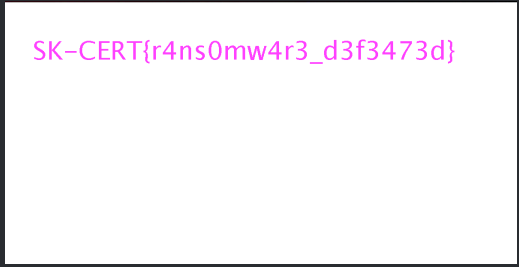
SK-CERT{r4ns0mw4r3_d3f3473d}Why the Official Decryptor Failed
The ransomware encrypted files multiple times with different fraction values. Each encryption pass appended a new metadata block + DEAD0000BEEF marker. The official decryptor reads only the last metadata block (the outermost layer) and decrypts that single layer, then truncates the file. This successfully removes the outer encryption, but the inner encrypted layer remains - leaving the file corrupted.
To fully recover files, all layers must be decrypted in reverse order.
Tools Used
- radare2 / Ghidra - Reverse engineering the decryptor binary
- Python 3 +
cryptographylibrary - RSA decryption of metadata - Python 3 - Custom ChaCha20 decryption implementation
- pdftotext - Extracting text from the recovered PDF
Key Takeaways
- Always check if a “decryptor” is a wrapper around the actual binary
- Ransomware may encrypt files multiple times - the decryptor might not handle all layers
- Custom cipher modifications (constants, shift types, round counts) require careful analysis of the actual assembly, not just pattern-matching against known algorithms
- The use of arithmetic right shift instead of logical right shift was the most subtle and critical difference to identify
Lesser Less
Challenge
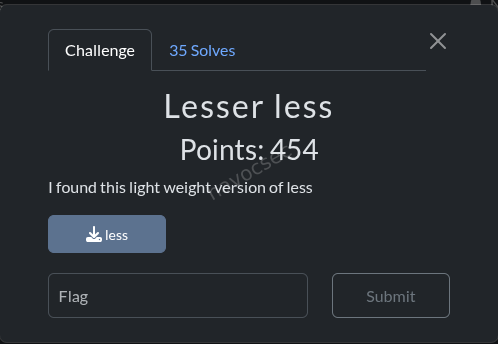
I found this light weight version of less
We are given a single ELF binary called less.
Initial Analysis
$ file less
less: ELF 64-bit LSB pie executable, x86-64, version 1 (SYSV), dynamically linked, not stripped
The binary is not stripped, so symbol names are preserved. Listing the symbols reveals a functional less-style file pager alongside suspicious extras:
execute_phrase_command- a thin wrapper aroundsystem()decode_phrase_from_file- decodes a hidden phrase from a viewed filesha256_transform,sha256_init,sha256_update,sha256_final,sha256_hex- a full SHA-256 implementation- SHA-256 helper primitives:
rotr,ch,maj,ep0,ep1,sig0,sig1
Running strings on the binary dumps 40 hex strings, each 64 characters long (SHA-256 digests), stored in a global array called TARGET_HASHES.
Reverse Engineering
main()
The main function:
- Takes a filename argument and loads it with
file_buffer_load - Calls
decode_phrase_from_file(filename, output_buf, 0x80) - If decoding succeeds (returns 0), passes
output_buftoexecute_phrase_command - Enters the normal pager loop (render page, read key, navigate)
execute_phrase_command()
Trivial function - checks the input pointer is non-null and the first byte is non-zero, then calls system() on it.
decode_phrase_from_file()
This is the core of the challenge. The algorithm:
- Reads the entire file into memory via
read_file_bytes - Iterates through 40 target hashes (indices 0 to 0x27)
- For each target hash, slides a 2-byte window across every position in the file:
- Extracts
file[i]andfile[i+1] - Computes
SHA-256(file[i..i+2])(hash of the 2-byte pair) - Compares the hex digest against
TARGET_HASHES[current_index]
- Extracts
- If a match is found, both bytes are appended to the output buffer
- If any hash has no match in the file, the function returns -1 (failure)
- If all 40 hashes match, the output is null-terminated and returned (80 bytes total)
Solution
Since each target hash is the SHA-256 of just 2 bytes, there are only 65,536 (256 x 256) possible inputs. This is trivially brute-forceable.
Solve Script
import hashlib

target_hashes = [
    "1eb85f4d6a3234ce7acb8c51c75930f12e952517e2e389914a6ca8f89a881a0d",
    "a821c62e8104f8519d639b4c0948aece641b143f6601fa145993bb2e2c7299d4",
    "53eee21f3057e0fc3933f53a171ce2da0e4b4e7ad6553fe03967cf584fdc0dc8",
    "509bcf065e86b5932aa2aaa378974bb1bb987b01f328d47db2e88a0d93b1c4bf",
    "cc7e4412564ba8a761bd32ab4cc6086bac3c2c9e580367e0b0eb32a4316f9154",
    "f3401e2083d1f1d4a098c1091a3a9592d0c197a98d0f352d5f97be8c5ddf63d1",
    "fa51fd49abf67705d6a35d18218c115ff5633aec1f9ebfdc9d5d4956416f57f6",
    "dd8d69f25e9c009f1e8ec0f9febea1ea6d5eff1a52a73cd216b0c74d69eed078",
    "372f7e2fd2d01ce2a1d71dc072acbba4c6fd25a1087cd7f153f4ec0ce37e1ede",
    "f4ba4ba27509eb704c9492c2c5751a1a3e87c1ff39e32188db224889ae982bac",
    "b737ca7ee563ae80e457bb3d1dfe64edd2b4c015a8f88b6f87d5c113b68897fd",
    "2f3fb723b041289c541900b6f2b74aae4b7ffb8f162052959d4f1cbe33299e08",
    "26bf6298ad7005051b39684331a7b1593cd3b346dcb93808c38d451d134c0589",
    "ec4f8e3d1f7cafbdb86e908b6ad83e407ac36a9b3efabd8e24b56d80228be429",
    "593f2d04aab251f60c9e4b8bbc1e05a34e920980ec08351a18459b2bc7dbf2f6",
    "9aaf680776b98fd17fe63376120525cbcdffc01bc66f71df96b6e90b87f39b86",
    "3c247edb35b2ce6c5908166407e643baa9bd99edd0c45b08d900d306ec1ff5b0",
    "d7939186d51d823b7c9c8e8ba5ca31e67ea39b1a1781a94c3364c22efa9c73b2",
    "cb7f854a5192079175cec3a0ba69e9667978d6dd839cbfed07125e26b693dbaa",
    "ed454029deb6faa059964ece2051ca8707e3730a8d40f9d03a6e3dc1c16eb7ed",
    "0608350f54af8a6e7b053e85c3938b455f5246a47d6b3007bd857ccd84ffa1e7",
    "d68956cd067ac773650ef6f94387fd88662528204b65eae20165055281041e0b",
    "3165be96f5833ae07a93e8baa073df6bae2dc719814af10288f844d637d8721a",
    "b3e89a210f5dae7868727fc8330aedb08c5b63e549222ab5c674f54b6dc47ba3",
    "8c1f1046219ddd216a023f792356ddf127fce372a72ec9b4cdac989ee5b0b455",
    "6ab9f1eb8f7d3388f4f9d586f66e99fd54080df2c446f0e58668b09c08a16dd0",
    "2d8e452e1634cae42e17cc9ec974afed94029e20e98fde4444706e3efac1bf77",
    "6bda26c40fcf8754216a72f9cf9398bbaf5ed9aae1bea679b46d13fe406016a4",
    "c1818d580d8c8bc111302f4a5e6903ef2d32b11a5613efba507693de8060fb8c",
    "df047a21e1ac3c06c72c8d0ca57cd25f2056fad002af2630dcc5a12bf8f57420",
    "de3246094525b21a870fc7d2a67490d0132535c6fa5993755c549f1a9d1bd8af",
    "f451a61749c611ba0fa0e16c61831db44f38c611dff25879cf271a24c81a88b6",
    "d0aeeb52df9a031d0b8e374d811f2f8516fd68031c889f266d6afa28c459501e",
    "a4d0ef23161b5b7c6a8d5b287543fd74e16b3bf313d71aa187c24cdd728a7b1e",
    "0be477336d3e1a8d45d820aa54755092e2ec5e0751ccdf93a8fa8fa1e10bd753",
    "7f2253d7e228b22a08bda1f09c516f6fead81df6536eb02fa991a34bb38d9be8",
    "3ad4ee182e21c25db763cda6359ecc441b8ea32ea4d6631c012aac7fa7d362dc",
    "027ca1cbf735e5fa987a1e35ed2d28bc94b91d0b44a5d128f77990b09e885316",
    "4523540f1504cd17100c4835e85b7eefd49911580f8efff0599a8f283be6b9e3",
    "d80a5f6da0d466170689d9dfc58603afca3252c6b54ecc008a6d30caaa6cddde",
]

target_set = set(target_hashes)

# Brute-force SHA-256 of all 65536 two-byte combinations
hash_to_bytes = {}
for i in range(256):
    for j in range(256):
        pair = bytes([i, j])
        h = hashlib.sha256(pair).hexdigest()
        if h in target_set:
            hash_to_bytes[h] = pair

# Reconstruct the hidden command
result = b""
for th in target_hashes:
    result += hash_to_bytes[th]

print(result.decode())
Output
echo 'where is the flag?' > flag.txt # SK-CERT{l99k1n6_f0r_h1dd3n_func710n4l17y}The decoded payload is a shell command. The flag is hidden in a trailing comment after #, meaning system() would silently carry the flag in the command string while only executing the echo portion.
Key Takeaways
- The binary is a functional
lessclone with a backdoor: when opening a file, it silently tries to reconstruct and execute a hidden shell command by matching 2-byte SHA-256 hashes found in the file against a hardcoded table. - SHA-256 of 2-byte inputs is trivially reversible via brute-force (only 65,536 possibilities).
- The hashes can be extracted directly from the
.rodata/.datasections without needing a full decompiler —objdumpandreadelfare sufficient.
Flag
SK-CERT{l99k1n6_f0r_h1dd3n_func710n4l17y}Lock Screen
Summary
 The APK was a fake Android lock-screen/recovery app. Static reversing gave useful context, but the winning path was the remote
 /init endpoint: changing request headers changed the server keystream, and with a long enough h value the full repeating flag string appeared after XOR.
Environment
- OS: Linux
- Target file:
droid.apk - Core tools used:
file,unzip,strings,jadx,curl,python3
Step 1: Recon and decompilation
Commands
ls -la
file droid.apk
unzip -l droid.apk | head -n 80
Key output
droid.apk: Android package (APK), with gradle app-metadata.properties
... classes.dex ... AndroidManifest.xml ...
Decompiled with JADX:
mkdir -p /tmp/jadx_tool /tmp/jadx_out
wget -q -O /tmp/jadx.zip https://github.com/skylot/jadx/releases/download/v1.5.0/jadx-1.5.0.zip
unzip -oq /tmp/jadx.zip -d /tmp/jadx_tool
/tmp/jadx_tool/bin/jadx -d /tmp/jadx_out droid.apk
Important finding from source
MainActivity and RecoveryManager showed the app computes a decryption key from:
- user input (hex)
- server key from
http://exp.cybergame.sk:7090/init?h=... - device identifier
This explained the lock workflow, but did not directly produce the final CTF flag.
Step 2: Follow the hint about headers
Challenge hint said headers matter. I tested /init with different request headers.
OpenAPI discovery
python3 - << 'PY'
import requests
for p in ['/openapi.json','/docs','/redoc']:
    r=requests.get('http://exp.cybergame.sk:7090'+p,timeout=8)
    print(p, r.status_code, r.headers.get('content-type'))
PY
Relevant output
/openapi.json 200 application/json
/docs 200 text/html; charset=utf-8
/redoc 200 text/html; charset=utf-8
/openapi.json confirmed only /init GET/POST with query parameter h, so the trick had to be in request header handling and response encoding.
Step 3: Recover the server keystream behavior
For the same h, the response changes by header profile.
I tested and confirmed this relation:
- response bytes =
h_bytes XOR constant_for_header_profile - so
constant = response XOR h
When using normal headers, the constant decoded to:
You are not a robot :DYou are noWhen using Android-style headers, the constant started with:
SK-CERT{4ndr01d_r4n50mw4r3_w1th_That strongly indicated we were reading a repeated hidden flag stream but only seeing 32 bytes due 64-hex response length.
Step 4: Extend input length to dump more keystream and extract full flag
The endpoint output length tracks input length. So I sent a much longer h and XORed response with input.
Final solve script (complete, reproducible)
import requests
import re

headers = {
    "User-Agent": "Dalvik/2.1.0",
    "Referer": "android-app://com.example.safedroidlockctf",
}

# 512 hex chars = 256 bytes, enough to show repeated full token
h = "ab" * 256

r = requests.get(
    "http://exp.cybergame.sk:7090/init?h=" + h,
    headers=headers,
    timeout=10,
)
r.raise_for_status()

hex_out = r.text.strip().strip('"')
out = bytes.fromhex(hex_out)
hb = bytes.fromhex(h)
const = bytes(a ^ b for a, b in zip(out, hb))
text = ''.join(chr(c) if 32 <= c < 127 else '.' for c in const)

m = re.search(r"SK-CERT\{[^\}]*\}", text)
if not m:
    raise SystemExit("Flag not found")

print(m.group(0))
Input used
- URL:
http://exp.cybergame.sk:7090/init - Query
h:abrepeated 256 times (512 hex chars) - Headers:
User-Agent: Dalvik/2.1.0Referer: android-app://com.example.safedroidlockctf
Output observed
const length 256
SK-CERT{4ndr01d_r4n50mw4r3_w1th_s4f3_ch3ck}SK-CERT{4ndr01d_r4n50mw4r3_w1th_s4f3_ch3ck}...
flag_match SK-CERT{4ndr01d_r4n50mw4r3_w1th_s4f3_ch3ck}
Why this works
- The backend uses a header-dependent XOR stream.
- Short
honly leaks the first 32 bytes of that stream. - Long
hreveals enough bytes to include the fullSK-CERT{...}token and repeat pattern.
Dead ends that were checked
- Direct APK signing cert extraction (
keytool -printcert -jarfile droid.apk) -> unsigned JAR style, not useful. - Looking for static embedded
SK-CERT{...}in APK/DEX strings -> no complete flag. - Brute forcing common API headers without extending
h-> only partial prefix found.
Flag
SK-CERT{4ndr01d_r4n50mw4r3_w1th_s4f3_ch3ck}Flappy
Challenge Information
- Goal: Analyze a Flappy Bird clone built in Rust compiled to WebAssembly, identify the credential exfiltration mechanism, and recover the flag via a known-plaintext XOR attack.
Overview
The challenge presents a Flappy Bird game running in the browser via a Rust/WebAssembly module. The description hints that something is off about the game. The actual vulnerability is a fake “Score Sync” Google login overlay that XOR-encrypts and exfiltrates any credentials entered into it. The XOR key is the flag itself, which can be recovered by a known-plaintext attack once you understand the encryption scheme.
Step 1 - Page Source Reconnaissance
The first thing to do on any web challenge is read the page source.
curl http://exp.cybergame.sk:7010/This immediately reveals a comment in the HTML:
<!-- TODO: remove before production flag{n0t_th3_r34l_fl4g_l0l} -->This is a decoy. Note it for what it is and move on.
The page also contains the following script that loads the WASM module:
<script type="module">
    import init from './pkg/flappy_wasm.js';
    (async()=>{ await init() })();
</script>
There is also a hidden “Score Sync” overlay in the page - a fake Google login form that appears after gameplay, prompting the user for their email and password. This is immediately suspicious.
Step 2 - Downloading and Inspecting the WASM Binary
Download the binary:
curl http://exp.cybergame.sk:7010/pkg/flappy_wasm_bg.wasm -o flappy_wasm_bg.wasm
file flappy_wasm_bg.wasm
Output:
flappy_wasm_bg.wasm: WebAssembly (wasm) binary module version 0x1 (MVP)File size is approximately 158 KB.
String Extraction
Run strings on the binary to get a quick view of embedded data:
strings flappy_wasm_bg.wasmKey strings found:
/assets/app.conf
app
encryption_key
bad key:
oauth
client_id
redirect_uri
grant_type
authorization_code
code
userAgent
POST
/api/v1/oauth/token
Content-Type
application/json
score-sync
style
display:flex
flappy_wasm::do_exfil
btoa
What this tells us immediately:
- The game fetches
/assets/app.confat startup to retrieve anencryption_key - A function named
do_exfilexists - this sends data somewhere - The target endpoint is
/api/v1/oauth/token btoais referenced, meaning data is base64-encoded before being sent- The hidden form reads from fields named
sc-emailandsc-pass
Step 3 - Disassembling the WASM to WAT
Convert the binary to WebAssembly Text format for readable disassembly:
wasm2wat flappy_wasm_bg.wasm -o flappy_wasm_bg.watAnalyzing the init_modal closure in the WAT output confirms the full flow:
- On game start, fetch
/assets/app.conf, parse JSON, extractencryption_key - When the score sync form is submitted, read the email and password from
sc-emailandsc-pass - Concatenate credentials as
email:password - XOR the concatenated string byte-by-byte with the encryption key (cycling through the key)
- Base64-encode the result using
btoa - POST it to
/api/v1/oauth/tokenas thecodefield, along withclient_id,redirect_uri,ua(user agent),res(screen resolution), andts(timestamp)
Step 4 - Dynamic Analysis
Fetching app.conf
Run the following in the browser console while on the challenge page:
fetch('/assets/app.conf').then(r => r.json()).then(console.log)Response:
{
  "oauth": {
    "provider": "google",
    "client_id": "894271536842-k3jhf9x2v7m1n5p4q6r0s8t.apps.googleusercontent.com",
    "client_secret": "GOCSPX-xK9mQ2nRghjkk8jL5dT1wY6uI0",
    "redirect_uri": "http://exp.cybergame.sk:7010/callback"
  },
  "app": {
    "name": "Flappy Bird Score Tracker",
    "encryption_key": "8849790b3c85b6ced19ab38ae4048f84219a73b84da6679ef0aa9b90f43c6facb1b07b420dcd958e9bf0d3"
  }
}
The encryption_key here is a red herring. Analysis of the WASM confirms it is never actually used as the XOR key. It is there to mislead.
Intercepting the POST Request
Play the game until the Score Sync overlay appears, then submit the form with known credentials:
- Email:
root@root.com - Password:
roottoor
Using the browser’s network tab or a proxy (Burp Suite / mitmproxy), capture the POST request to /api/v1/oauth/token.
Captured request body:
{
  "grant_type": "authorization_code",
  "code": "ISRCNwUgOxQNHhYdMlkAXAtHGlgGRg==",
  "client_id": "894271536842-k3jhf9x2v7m1n5p4q6r0s8t.apps.googleusercontent.com",
  "redirect_uri": "http://exp.cybergame.sk:7010/callback",
  "ua": "Mozilla/5.0 ...",
  "res": "2400x1350",
  "ts": 1775286898983
}
The code field contains the base64-encoded XOR-encrypted credentials.
Step 5 - Known-Plaintext XOR Attack
Theory
XOR encryption has a fundamental weakness: if you know both the plaintext and the ciphertext, you can trivially recover the key:
key = ciphertext XOR plaintextWe know exactly what plaintext was fed into the encryption function:
root@root.com:roottoorThe WASM concatenates credentials as email:password, so the plaintext is root@root.com:roottoor (22 bytes).
First Pass - Partial Key Recovery
import base64

code = 'ISRCNwUgOxQNHhYdMlkAXAtHGlgGRg=='
encrypted = base64.b64decode(code)
plaintext = b'root@root.com:roottoor'

key = bytes([encrypted[i] ^ plaintext[i] for i in range(len(plaintext))])
print(key.decode())
Output:
SK-CERT{y0ur_cr3d3n7i4We have 22 bytes of the key. The key is longer than our plaintext, so we can only see as many key bytes as there are ciphertext bytes. The ciphertext length equals the plaintext length, so we need a longer plaintext to expose more of the key.
Second Pass - Extending the Plaintext
Resubmit the form with a longer password to produce a longer ciphertext, exposing more key bytes:
- Email:
root@root.com - Password:
roottoorAAAAAAAAAAAAAAAAAAAAAAAAAA
Captured code value:
ISRCNwUgOxQNHhYdMlkAXAtHGlgGRi0yHnUzch4nLXUxMSgvJh51NnU4PBIKbAIEimport base64
code = 'ISRCNwUgOxQNHhYdMlkAXAtHGlgGRi0yHnUzch4nLXUxMSgvJh51NnU4PBIKbAIE'
encrypted = base64.b64decode(code)
plaintext = b'root@root.com:roottoorAAAAAAAAAAAAAAAAAAAAAAAAAA'
key = bytes([encrypted[i] ^ plaintext[i] for i in range(len(encrypted))])
print(key.decode())Output:
SK-CERT{y0ur_cr3d3n7i4ls_4r3_fl4pping_4w4y}SK-CEThe key repeats - the trailing SK-CE is the start of the flag cycling back to the beginning, which confirms we have recovered the full key. The XOR key cycling back on itself proves the flag is exactly 43 characters long.
Flag
SK-CERT{y0ur_cr3d3n7i4ls_4r3_fl4pping_4w4y}Vulnerability Summary
| Stage | Detail |
|---|---|
| HTML source | Decoy flag in HTML comment to distract |
| WASM strings | do_exfil, /assets/app.conf, btoa, /api/v1/oauth/token identified |
| WAT disassembly | XOR cipher + base64 encode flow confirmed in init_modal |
app.conf | Contains a red herring encryption_key; real key is the flag itself |
| Known-plaintext attack (pass 1) | XOR of ciphertext with known 22-byte credential string recovers partial flag |
| Known-plaintext attack (pass 2) | Longer credential string extends ciphertext, exposing the full flag |
Tools Used
curl- download page source and WASM binarystrings- quick surface-level analysis of binary contentwasm2wat(from the WebAssembly Binary Toolkit) - disassemble WASM to readable WAT format- Browser DevTools / Burp Suite - intercept the POST request and capture the
codefield - Python (stdlib only) - base64 decode and XOR arithmetic
Key Takeaways
The challenge is thematically elegant. The game is literally “flapping your credentials away” - the score sync overlay is a fake phishing form, the flag is the XOR key used to encrypt the stolen credentials, and the known-plaintext attack is the intended path to recovery.
The two deliberate misdirections are worth noting:
- The HTML comment flag (
flag{n0t_th3_r34l_fl4g_l0l}) is placed at exactly the spot a lazy participant would stop looking. - The
encryption_keyinapp.confis a plausible-looking hex string that is never actually used, intended to send reverse engineers down a wrong path.
The real solution requires going one layer deeper: disassemble the WASM, understand the actual cipher used, intercept a live request with known input, and apply basic XOR cryptanalysis.
HAPPY HACKING!

Comments